
- 전체
- Sample DB
- database modeling
- [표준 SQL] Standard SQL
- G-SQL
- 10-Min
- ORACLE
- MS SQLserver
- MySQL
- SQLite
- postgreSQL
- 데이터아키텍처전문가 - 국가공인자격
- 데이터 분석 전문가 [ADP]
- [국가공인] SQL 개발자/전문가
- NoSQL
- hadoop
- hadoop eco system
- big data (빅데이터)
- stat(통계) R 언어
- XML DB & XQuery
- spark
- DataBase Tool
- 데이터분석 & 데이터사이언스
- Engineer Quality Management
- [기계학습] machine learning
- 데이터 수집 및 전처리
- 국가기술자격 빅데이터분석기사
- 암호화폐 (비트코인, cryptocurrency, bitcoin)
NoSQL [몽고디비 mongodb] MongoDB Bulk Insert – MongoDB insertMany
2020.10.09 22:07
[몽고디비 mongodb] MongoDB Bulk Insert – MongoDB insertMany
We will look into MongoDB bulk insert today. Multiple documents can be inserted at a time in MongoDB using bulk insert operation where an array of documents is passed to the insert method as parameter.
MongoDB bulk insert
MongoDB bulk insert performs ordered insert by default. If an error occurs during the insertion at a certain point, the insertion does not happen for the remaining documents.
Lets see an example of how to insert multiple documents using mongodb bulk insert through command line.
MongoDB insert many documents
> db.car.insert(
... [
... { _id:1,name:"Audi",color:"Red",cno:"H101",mfdcountry:"Germany",speed:75 },
... { _id:2,name:"Swift",color:"Black",cno:"H102",mfdcountry:"Italy",speed:60 },

... { _id:3,name:"Maruthi800",color:"Blue",cno:"H103",mfdcountry:"India",speed:70 },
... { _id:4,name:"Polo",color:"White",cno:"H104",mfdcountry:"Japan",speed:65 },
... { _id:5,name:"Volkswagen",color:"JetBlue",cno:"H105",mfdcountry:"Rome",speed:80 }
...  ]
...  )
BulkWriteResult({
	"writeErrors" : [ ],
	"writeConcernErrors" : [ ],
	"nInserted" : 5,
	"nUpserted" : 0,
	"nMatched" : 0,
	"nModified" : 0,
	"nRemoved" : 0,
	"upserted" : [ ]
})
This operation inserted five documents. MongoDB creates an id field automatically if not specified by the user in the query. The “nInserted” column tells the user number of documents that are inserted.
To view the inserted documents perform the following query as shown below.
> db.car.find()
{ "_id" : 1, "name" : "Audi", "color" : "Red", "cno" : "H101", "mfdcountry" : "Germany", "speed" : 75 }
{ "_id" : 2, "name" : "Swift", "color" : "Black", "cno" : "H102", "mfdcountry" : "Italy", "speed" : 60 }
{ "_id" : 3, "name" : "Maruthi800", "color" : "Blue", "cno" : "H103", "mfdcountry" : "India", "speed" : 70 }
{ "_id" : 4, "name" : "Polo", "color" : "White", "cno" : "H104", "mfdcountry" : "Japan", "speed" : 65 }
{ "_id" : 5, "name" : "Volkswagen", "color" : "JetBlue", "cno" : "H105", "mfdcountry" : "Rome", "speed" : 80 }
>
Read more about MongoDB find and MongoDB insert operations.
While inserting it is not mandatory for user to provide all the fields in the query. Now lets see how the insert works when some of the fields are not specified.
MongoDB Bulk Insert documents specifying some of the fields
> db.car.insert(
... [
... { _id:6,name:"HondaCity",color:"Grey",cno:"H106",mfdcountry:"Sweden",speed:45 },
... {name:"Santro",color:"Pale Blue",cno:"H107",mfdcountry:"Denmark",speed:55 },
... { _id:8,name:"Zen",speed:54 }
... ]
... )
BulkWriteResult({
	"writeErrors" : [ ],
	"writeConcernErrors" : [ ],
	"nInserted" : 3,
	"nUpserted" : 0,
	"nMatched" : 0,
	"nModified" : 0,
	"nRemoved" : 0,
	"upserted" : [ ]
})
>
In this example, for the second document, the id field is not specified by the user and for the third document only id, name and speed fields are supplied in the query. The query does a successful insertion even though some fields are missing in the second and third documents. The nInserted column says that three documents were inserted.
Invoke find method and check the inserted documents.
> db.car.find()
{ "_id" : 1, "name" : "Audi", "color" : "Red", "cno" : "H101", "mfdcountry" : "Germany", "speed" : 75 }
{ "_id" : 2, "name" : "Swift", "color" : "Black", "cno" : "H102", "mfdcountry" : "Italy", "speed" : 60 }
{ "_id" : 3, "name" : "Maruthi800", "color" : "Blue", "cno" : "H103", "mfdcountry" : "India", "speed" : 70 }
{ "_id" : 4, "name" : "Polo", "color" : "White", "cno" : "H104", "mfdcountry" : "Japan", "speed" : 65 }
{ "_id" : 5, "name" : "Volkswagen", "color" : "JetBlue", "cno" : "H105", "mfdcountry" : "Rome", "speed" : 80 }
{ "_id" : 6, "name" : "HondaCity", "color" : "Grey", "cno" : "H106", "mfdcountry" : "Sweden", "speed" : 45 }
{ "_id" : ObjectId("54885b8e61307aec89441a0b"), "name" : "Santro", "color" : "Pale Blue", "cno" : "H107", "mfdcountry" : "Denmark", "speed" : 55 }
{ "_id" : 8, "name" : "Zen", "speed" : 54 }
>
Note that the id is automatically generated by MongoDB for the car “Santro”. For id 8 – only name and speed fields are inserted.
Inserting an unordered documents
While performing unordered insertion, if an error occurs at a certain point the mongodb continues to insert the remaining documents in an array.
For example;
> db.car.insert(
... [
... { _id:9,name:"SwiftDezire",color:"Maroon",cno:"H108",mfdcountry:"New York",speed:40 },
... { name:"Punto",color:"Wine Red",cno:"H109",mfdcountry:"Paris",speed:45 },
...  ],
... { ordered: false }
... )
BulkWriteResult({
	"writeErrors" : [ ],
	"writeConcernErrors" : [ ],
	"nInserted" : 2,
	"nUpserted" : 0,
	"nMatched" : 0,
	"nModified" : 0,
	"nRemoved" : 0,
	"upserted" : [ ]
})
>
The ordered false is specified in the insert query indicating that it is an unordered collection.
Execute db.car.find()
{ "_id" : 1, "name" : "Audi", "color" : "Red", "cno" : "H101", "mfdcountry" : "Germany", "speed" : 75 }
{ "_id" : 2, "name" : "Swift", "color" : "Black", "cno" : "H102", "mfdcountry" : "Italy", "speed" : 60 }
{ "_id" : 3, "name" : "Maruthi800", "color" : "Blue", "cno" : "H103", "mfdcountry" : "India", "speed" : 70 }
{ "_id" : 4, "name" : "Polo", "color" : "White", "cno" : "H104", "mfdcountry" : "Japan", "speed" : 65 }
{ "_id" : 5, "name" : "Volkswagen", "color" : "JetBlue", "cno" : "H105", "mfdcountry" : "Rome", "speed" : 80 }
{ "_id" : 6, "name" : "HondaCity", "color" : "Grey", "cno" : "H106", "mfdcountry" : "Sweden", "speed" : 45 }
{ "_id" : ObjectId("54746407d785e3a05a1808a6"), "name" : "Santro", "color" : "Pale Blue", "cno" : "H107", "mfdcountry" : "Denmark", "speed" : 55 }
{ "_id" : 8, "name" : "Zen", "speed" : 54 }
{ "_id" : 9, "name" : "SwiftDezire", "color" : "Maroon", "cno" : "H108", "mfdcountry" : "New York", "speed" : 40 }
{ "_id" : ObjectId("5474642dd785e3a05a1808a7"), "name" : "Punto", "color" : "Wine Red", "cno" : "H109", "mfdcountry" : "Paris", "speed" : 45 }
The documents are inserted and as you can see, it is an unordered insert.
If the insert method encounters an error, the result includes the “WriteResult.writeErrors” field indicating the error message that caused failure.
Inserting duplicate id value
> db.car.insert({_id:6,name:"Innova"})
WriteResult({
	"nInserted" : 0,
	"writeError" : {
		"code" : 11000,
		"errmsg" : "insertDocument :: caused by :: 11000 E11000 duplicate key error index: journaldev.car.$_id_  dup key: { : 6.0 }"
	}
})
>
The error indicates that we are inserting a document for id 6 which already contains a document and hence throws duplicate key error for id of value 6.
MongoDB Bulk.insert() method
This method performs an insert operation in bulk numbers. It is introduced from version 2.6 onwards.
The syntax is Bulk.insert(<document>).
document: specifies the document to be inserted.
Now we shall see the example for bulk insertion.
Bulk Unordered insert
> var carbulk = db.car.initializeUnorderedBulkOp();
> carbulk.insert({ name:"Ritz", color:"Grey",cno:"H109",mfdcountry:"Mexico",speed:62});
> carbulk.insert({ name:"Versa", color:"Magenta",cno:"H110",mfdcountry:"France",speed:68});
> carbulk.insert({ name:"Innova", color:"JetRed",cno:"H111",mfdcountry:"Dubai",speed:72});
> carbulk.execute();
BulkWriteResult({
	"writeErrors" : [ ],
	"writeConcernErrors" : [ ],
	"nInserted" : 3,
	"nUpserted" : 0,
	"nMatched" : 0,
	"nModified" : 0,
	"nRemoved" : 0,
	"upserted" : [ ]
})
>
An unordered list named carbulk is created and insert query is specified with the fields, values to be inserted. Note that it is necessary to call the execute() method following the last insert statement to ensure that the data is actually inserted into the database.
MongoDB Bulk Ordered Insert
This is similar to unordered bulk insert but we use initializeOrderedBulkOp call.


>var car1bulk = db.car.initializeOrderedBulkOp();
>car1bulk.insert({ name:"Ertiga", color:"Red",cno:"H112",mfdcountry:"America",speed:65});
>car1bulk.insert({ name:"Quanta", color:"Maroon",cno:"H113",mfdcountry:"Rome",speed:78});
>car1bulk.execute();
BulkWriteResult({
	"writeErrors" : [ ],
	"writeConcernErrors" : [ ],
	"nInserted" : 2,
	"nUpserted" : 0,
	"nMatched" : 0,
	"nModified" : 0,
	"nRemoved" : 0,
	"upserted" : [ ]
})
First we create an ordered list of car collection named carbulk1 and then insert the documents by invoking the execute() method.
MongoDB Bulk Insert Java Program
Let’s see a java program for different bulk operations, that we have seen using shell commands till now. Below is the java program for bulk insert using MongoDB java driver version 2.x.
package com.journaldev.mongodb;

import com.mongodb.BasicDBObject;
import com.mongodb.BulkWriteOperation;
import com.mongodb.BulkWriteResult;
import com.mongodb.DB;
import com.mongodb.DBCollection;
import com.mongodb.DBCursor;
import com.mongodb.DBObject;
import com.mongodb.MongoClient;
import java.net.UnknownHostException;
import java.util.ArrayList;
import java.util.List;

public class MongoDBBulkInsert {

	//method that inserts all the documents
    public static void insertmultipledocs() throws UnknownHostException{

    //Get a new connection to the db assuming that it is running

     MongoClient mongoClient = new MongoClient("localhost");

     ////use test as a datbase,use your database here
     DB db=mongoClient.getDB("test");

     ////fetch the collection object ,car is used here,use your own
     DBCollection coll = db.getCollection("car");

    //create a new object
    DBObject d1 = new BasicDBObject();

    //data for object d1
    d1.put("_id", 11);
    d1.put("name","WagonR");
    d1.put("color", "MetallicSilver");
    d1.put("cno", "H141");
    d1.put("mfdcountry","Australia");
    d1.put("speed",66);

    DBObject d2 = new BasicDBObject();

    //data for object d2
    d2.put("_id", 12);
    d2.put("name","Xylo");
    d2.put("color", "JetBlue");
    d2.put("cno", "H142");
    d2.put("mfdcountry","Europe");
    d2.put("speed",69);


    DBObject d3 = new BasicDBObject();

    //data for object d3
    d3.put("_id", 13);
    d3.put("name","Alto800");
    d3.put("color", "JetGrey");
    d3.put("cno", "H143");
    d3.put("mfdcountry","Austria");
    d3.put("speed",74);

    //create a new list
    List<DBObject> docs = new ArrayList<>();

    //add d1,d2 and d3 to list docs
    docs.add(d1);
    docs.add(d2);
    docs.add(d3);

    //insert list docs to collection
    coll.insert(docs);


    //stores the result in cursor
    DBCursor carmuldocs = coll.find();


    //print the contents of the cursor
     try {
         while(carmuldocs.hasNext()) {
       System.out.println(carmuldocs.next());
        }
    }        finally {
            carmuldocs.close();//close the cursor
    }


    }

    //method that inserts documents with some fields
    public static void insertsomefieldsformultipledocs() throws UnknownHostException{

    //Get a new connection to the db assuming that it is running

     MongoClient mongoClient = new MongoClient("localhost");

     ////use test as a datbase,use your database here
     DB db=mongoClient.getDB("test");

     ////fetch the collection object ,car is used here,use your own
     DBCollection coll = db.getCollection("car");

    //create object d1
    DBObject d1 = new BasicDBObject();

    //insert data for name,color and speed
    d1.put("name","Indica");
    d1.put("color", "Silver");
    d1.put("cno", "H154");


    DBObject d2 = new BasicDBObject();

    //insert data for id,name and speed
    d2.put("_id", 43);
    d2.put("name","Astar");

    d2.put("speed",79);


    List<DBObject> docs = new ArrayList<>();
    docs.add(d1);
    docs.add(d2);


    coll.insert(docs);

    DBCursor carmuldocs = coll.find();

     System.out.println("-----------------------------------------------");
     try {
         while(carmuldocs.hasNext()) {
       System.out.println(carmuldocs.next());
        }
    }        finally {
            carmuldocs.close();//close the cursor
    }


    }

    //method that checks for duplicate documents
    public static void insertduplicatedocs() throws UnknownHostException{

    //Get a new connection to the db assuming that it is running

     MongoClient mongoClient = new MongoClient("localhost");

     ////use test as a datbase,use your database here
     DB db=mongoClient.getDB("test");

     ////fetch the collection object ,car is used here,use your own
     DBCollection coll = db.getCollection("car");

    DBObject d1 = new BasicDBObject();

    //insert duplicate data of id11
    d1.put("_id", 11);
    d1.put("name","WagonR-Lxi");

    coll.insert(d1);


    DBCursor carmuldocs = coll.find();

     System.out.println("-----------------------------------------------");
     try {
         while(carmuldocs.hasNext()) {
       System.out.println(carmuldocs.next());
        }
    }        finally {
            carmuldocs.close();//close the cursor
    }


    }

    //method to perform bulk unordered list
    public static void insertbulkunordereddocs() throws UnknownHostException{

    //Get a new connection to the db assuming that it is running

     MongoClient mongoClient = new MongoClient("localhost");

     ////use test as a datbase,use your database here
     DB db=mongoClient.getDB("test");

     ////fetch the collection object ,car is used here,use your own
     DBCollection coll = db.getCollection("car");

    DBObject d1 = new BasicDBObject();


    d1.put("name","Suzuki S-4");
    d1.put("color", "Yellow");
    d1.put("cno", "H167");
    d1.put("mfdcountry","Italy");
    d1.put("speed",54);

    DBObject d2 = new BasicDBObject();


    d2.put("name","Santro-Xing");
    d2.put("color", "Cyan");
    d2.put("cno", "H164");
    d2.put("mfdcountry","Holand");
    d2.put("speed",76);

    //intialize and create a unordered bulk
    BulkWriteOperation  b1 = coll.initializeUnorderedBulkOperation();

    //insert d1 and d2 to bulk b1
    b1.insert(d1);
    b1.insert(d2);

    //execute the bulk
    BulkWriteResult  r1 = b1.execute();


    DBCursor carmuldocs = coll.find();

    System.out.println("-----------------------------------------------");
     try {
         while(carmuldocs.hasNext()) {
       System.out.println(carmuldocs.next());
        }
    }        finally {
            carmuldocs.close();//close the cursor
    }


    }

    //method that performs bulk insert for ordered list
       public static void insertbulkordereddocs() throws UnknownHostException{

    //Get a new connection to the db assuming that it is running

     MongoClient mongoClient = new MongoClient("localhost");

     ////use test as a datbase,use your database here
     DB db=mongoClient.getDB("test");

     ////fetch the collection object ,car is used here,use your own
     DBCollection coll = db.getCollection("car");

    DBObject d1 = new BasicDBObject();


    d1.put("name","Palio");
    d1.put("color", "Purple");
    d1.put("cno", "H183");
    d1.put("mfdcountry","Venice");
    d1.put("speed",82);

    DBObject d2 = new BasicDBObject();


    d2.put("name","Micra");
    d2.put("color", "Lime");
    d2.put("cno", "H186");
    d2.put("mfdcountry","Ethopia");
    d2.put("speed",84);

    //initialize and create ordered bulk
    BulkWriteOperation  b1 = coll.initializeOrderedBulkOperation();

    b1.insert(d1);
    b1.insert(d2);

    //invoking execute
    BulkWriteResult  r1 = b1.execute();


    DBCursor carmuldocs = coll.find();

    System.out.println("-----------------------------------");

     try {
         while(carmuldocs.hasNext()) {
       System.out.println(carmuldocs.next());
        }
    }        finally {
            carmuldocs.close();//close the cursor
    }


    }


    public static void main(String[] args) throws UnknownHostException{

       //invoke all the methods to perform insert operation

       insertmultipledocs();
       insertsomefieldsformultipledocs();

        insertbulkunordereddocs();
        insertbulkordereddocs();
        insertduplicatedocs();
    }

}
Below is the output of above program.
{ "_id" : 11 , "name" : "WagonR" , "color" : "MetallicSilver" , "cno" : "H141" , "mfdcountry" : "Australia" , "speed" : 66}
{ "_id" : 12 , "name" : "Xylo" , "color" : "JetBlue" , "cno" : "H142" , "mfdcountry" : "Europe" , "speed" : 69}
{ "_id" : 13 , "name" : "Alto800" , "color" : "JetGrey" , "cno" : "H143" , "mfdcountry" : "Austria" , "speed" : 74}
-----------------------------------------------
{ "_id" : 11 , "name" : "WagonR" , "color" : "MetallicSilver" , "cno" : "H141" , "mfdcountry" : "Australia" , "speed" : 66}
{ "_id" : 12 , "name" : "Xylo" , "color" : "JetBlue" , "cno" : "H142" , "mfdcountry" : "Europe" , "speed" : 69}
{ "_id" : 13 , "name" : "Alto800" , "color" : "JetGrey" , "cno" : "H143" , "mfdcountry" : "Austria" , "speed" : 74}
{ "_id" : { "$oid" : "548860e803649b8efac5a1d7"} , "name" : "Indica" , "color" : "Silver" , "cno" : "H154"}
{ "_id" : 43 , "name" : "Astar" , "speed" : 79}
-----------------------------------------------
{ "_id" : 11 , "name" : "WagonR" , "color" : "MetallicSilver" , "cno" : "H141" , "mfdcountry" : "Australia" , "speed" : 66}
{ "_id" : 12 , "name" : "Xylo" , "color" : "JetBlue" , "cno" : "H142" , "mfdcountry" : "Europe" , "speed" : 69}
{ "_id" : 13 , "name" : "Alto800" , "color" : "JetGrey" , "cno" : "H143" , "mfdcountry" : "Austria" , "speed" : 74}
{ "_id" : { "$oid" : "548860e803649b8efac5a1d7"} , "name" : "Indica" , "color" : "Silver" , "cno" : "H154"}
{ "_id" : 43 , "name" : "Astar" , "speed" : 79}
{ "_id" : { "$oid" : "548860e803649b8efac5a1d8"} , "name" : "Suzuki S-4" , "color" : "Yellow" , "cno" : "H167" , "mfdcountry" : "Italy" , "speed" : 54}
{ "_id" : { "$oid" : "548860e803649b8efac5a1d9"} , "name" : "Santro-Xing" , "color" : "Cyan" , "cno" : "H164" , "mfdcountry" : "Holand" , "speed" : 76}
-----------------------------------
{ "_id" : 11 , "name" : "WagonR" , "color" : "MetallicSilver" , "cno" : "H141" , "mfdcountry" : "Australia" , "speed" : 66}
{ "_id" : 12 , "name" : "Xylo" , "color" : "JetBlue" , "cno" : "H142" , "mfdcountry" : "Europe" , "speed" : 69}
{ "_id" : 13 , "name" : "Alto800" , "color" : "JetGrey" , "cno" : "H143" , "mfdcountry" : "Austria" , "speed" : 74}
{ "_id" : { "$oid" : "548860e803649b8efac5a1d7"} , "name" : "Indica" , "color" : "Silver" , "cno" : "H154"}
{ "_id" : 43 , "name" : "Astar" , "speed" : 79}
{ "_id" : { "$oid" : "548860e803649b8efac5a1d8"} , "name" : "Suzuki S-4" , "color" : "Yellow" , "cno" : "H167" , "mfdcountry" : "Italy" , "speed" : 54}
{ "_id" : { "$oid" : "548860e803649b8efac5a1d9"} , "name" : "Santro-Xing" , "color" : "Cyan" , "cno" : "H164" , "mfdcountry" : "Holand" , "speed" : 76}
{ "_id" : { "$oid" : "548860e803649b8efac5a1da"} , "name" : "Palio" , "color" : "Purple" , "cno" : "H183" , "mfdcountry" : "Venice" , "speed" : 82}
{ "_id" : { "$oid" : "548860e803649b8efac5a1db"} , "name" : "Micra" , "color" : "Lime" , "cno" : "H186" , "mfdcountry" : "Ethopia" , "speed" : 84}
Exception in thread "main" com.mongodb.MongoException$DuplicateKey: { "serverUsed" : "localhost:27017" , "ok" : 1 , "n" : 0 , "err" : "insertDocument :: caused by :: 11000 E11000 duplicate key error index: test.car.$_id_  dup key: { : 11 }" , "code" : 11000}
	at com.mongodb.CommandResult.getWriteException(CommandResult.java:88)
	at com.mongodb.CommandResult.getException(CommandResult.java:79)
	at com.mongodb.DBCollectionImpl.translateBulkWriteException(DBCollectionImpl.java:314)
	at com.mongodb.DBCollectionImpl.insert(DBCollectionImpl.java:189)
	at com.mongodb.DBCollectionImpl.insert(DBCollectionImpl.java:165)
	at com.mongodb.DBCollection.insert(DBCollection.java:93)
	at com.mongodb.DBCollection.insert(DBCollection.java:78)
	at com.mongodb.DBCollection.insert(DBCollection.java:120)
	at com.journaldev.mongodb.MongoDBBulkInsert.insertduplicatedocs(MongoDBBulkInsert.java:163)
	at com.journaldev.mongodb.MongoDBBulkInsert.main(MongoDBBulkInsert.java:304)
If you are using MongoDB java driver 3.x, then use below program.
package com.journaldev.mongodb.main;

import java.net.UnknownHostException;
import java.util.ArrayList;
import java.util.List;

import org.bson.Document;

import com.mongodb.MongoClient;
import com.mongodb.client.FindIterable;
import com.mongodb.client.MongoCollection;
import com.mongodb.client.MongoDatabase;

public class MongoDBBulkInsert {

	public static void main(String[] args) throws UnknownHostException {

		// invoke all the methods to perform insert operation

		insertmultipledocs();
		insertsomefieldsformultipledocs();

		insertduplicatedocs();
	}

	// method that inserts all the documents
	public static void insertmultipledocs() throws UnknownHostException {

		// Get a new connection to the db assuming that it is running

		MongoClient mongoClient = new MongoClient("localhost");

		//// use test as a database,use your database here
		MongoDatabase db = mongoClient.getDatabase("test");

		//// fetch the collection object ,car is used here,use your own
		MongoCollection<Document> coll = db.getCollection("car");

		// create a new object
		Document d1 = new Document();

		// data for object d1
		d1.put("_id", 11);
		d1.put("name", "WagonR");
		d1.put("color", "MetallicSilver");
		d1.put("cno", "H141");
		d1.put("mfdcountry", "Australia");
		d1.put("speed", 66);

		Document d2 = new Document();

		// data for object d2
		d2.put("_id", 12);
		d2.put("name", "Xylo");
		d2.put("color", "JetBlue");
		d2.put("cno", "H142");
		d2.put("mfdcountry", "Europe");
		d2.put("speed", 69);

		Document d3 = new Document();

		// data for object d3
		d3.put("_id", 13);
		d3.put("name", "Alto800");
		d3.put("color", "JetGrey");
		d3.put("cno", "H143");
		d3.put("mfdcountry", "Austria");
		d3.put("speed", 74);

		// create a new list
		List<Document> docs = new ArrayList<>();

		// add d1,d2 and d3 to list docs
		docs.add(d1);
		docs.add(d2);
		docs.add(d3);

		// insert list docs to collection
		coll.insertMany(docs);

		// stores the result in cursor
		FindIterable<Document> carmuldocs = coll.find();

		for (Document d : carmuldocs)
			System.out.println(d);

		mongoClient.close();
	}

	// method that inserts documents with some fields
	public static void insertsomefieldsformultipledocs() throws UnknownHostException {

		// Get a new connection to the db assuming that it is running

		MongoClient mongoClient = new MongoClient("localhost");

		//// use test as a datbase,use your database here
		MongoDatabase db = mongoClient.getDatabase("test");

		//// fetch the collection object ,car is used here,use your own
		MongoCollection<Document> coll = db.getCollection("car");

		// create object d1
		Document d1 = new Document();

		// insert data for name,color and speed
		d1.put("name", "Indica");
		d1.put("color", "Silver");
		d1.put("cno", "H154");

		Document d2 = new Document();

		// insert data for id,name and speed
		d2.put("_id", 43);
		d2.put("name", "Astar");

		d2.put("speed", 79);

		List<Document> docs = new ArrayList<>();
		docs.add(d1);
		docs.add(d2);

		coll.insertMany(docs);

		FindIterable<Document> carmuldocs = coll.find();

		System.out.println("-----------------------------------------------");

		for (Document d : carmuldocs)
			System.out.println(d);

		mongoClient.close();

	}

	// method that checks for duplicate documents
	public static void insertduplicatedocs() throws UnknownHostException {

		// Get a new connection to the db assuming that it is running

		MongoClient mongoClient = new MongoClient("localhost");

		//// use test as a database, use your database here
		MongoDatabase db = mongoClient.getDatabase("test");

		//// fetch the collection object ,car is used here,use your own
		MongoCollection<Document> coll = db.getCollection("car");

		Document d1 = new Document();

		// insert duplicate data of id11
		d1.put("_id", 11);
		d1.put("name", "WagonR-Lxi");

		coll.insertOne(d1);

		FindIterable<Document> carmuldocs = coll.find();

		System.out.println("-----------------------------------------------");

		for (Document d : carmuldocs)
			System.out.println(d);

		mongoClient.close();

	}

}
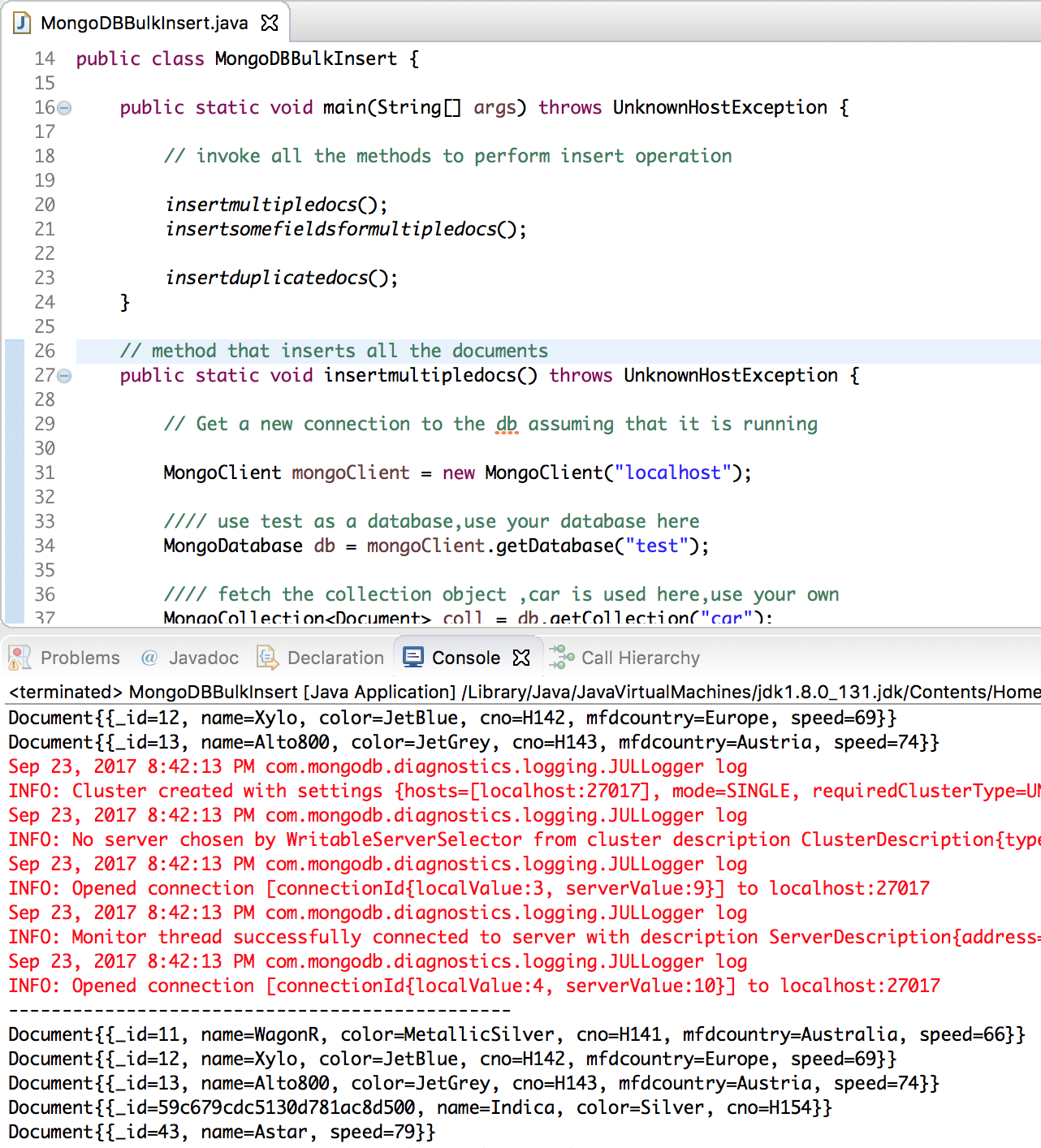
Below image shows sample run of above mongodb bulk insert java program.
That’s all.
[출처] https://www.journaldev.com/6318/mongodb-bulk-insert-insertmany
광고 클릭에서 발생하는 수익금은 모두 웹사이트 서버의 유지 및 관리, 그리고 기술 콘텐츠 향상을 위해 쓰여집니다.
