|
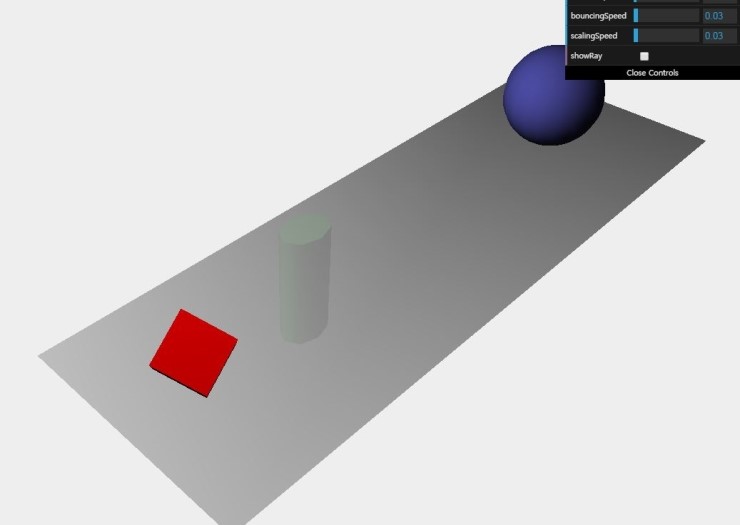
[Three.js] 마우스 커서를 이용한 객체 선택하기 
|
참고 : https://github.com/josdirksen/learning-threejs/blob/master/chapter-09/02-selecting-objects.html
josdirksen/learning-threejs
learning-threejs - Code repository for the examples from the Packt book "Learning Threejs"
github.com

한글로 주석 추가

        function onDocumentMouseDown(event) {
             //클릭된 마우스 커서를 vec3 좌표계로 전환(2차원 화면 좌표계)
            var vector = new THREE.Vector3(( event.clientX / window.innerWidth ) * 2 - 1, -( event.clientY / window.innerHeight ) * 2 + 1, 0.5);
            //vec3 화면 좌표계 형식을 Three.js scene 좌표계로 전환
            vector = vector.unproject(camera);
             //스크린상의 클릭한 점으로 부터 Three.js 3차원 좌표계에 광선을 보내기 위해서 THREE.Raycaster 객체 이용함
            var raycaster = new THREE.Raycaster(camera.position, vector.sub(camera.position).normalize());
             // 상기의 광선이 만나는 Three.js 객체를 선택하기 위해 사용
            var intersects = raycaster.intersectObjects([sphere, cylinder, cube]);
            if (intersects.length > 0) {
                console.log(intersects[0]);
                intersects[0].object.material.transparent = true;
                intersects[0].object.material.opacity = 0.1;
            }
        }


        function onDocumentMouseMove(event) {
            if (controls.showRay) {
                var vector = new THREE.Vector3(( event.clientX / window.innerWidth ) * 2 - 1, -( event.clientY / window.innerHeight ) * 2 + 1, 0.5);
                vector = vector.unproject(camera);
                var raycaster = new THREE.Raycaster(camera.position, vector.sub(camera.position).normalize());
                var intersects = raycaster.intersectObjects([sphere, cylinder, cube]);
                if (intersects.length > 0) {
                    var points = [];
                    //카메라의 위치
    points.push(new THREE.Vector3(-30, 39.8, 30));
                    //ray와 교차점의 위치
    points.push(intersects[0].point);

                    var mat = new THREE.MeshBasicMaterial({color: 0xff0000, transparent: true, opacity: 0.6});
                    var tubeGeometry = new THREE.TubeGeometry(new THREE.SplineCurve3(points), 60, 0.001);  //두개의 포인트를 이용한 스플라인, 세그먼트수, 반경
   //종전에 이미 튜브객체가 있다면 제거
                    if (tube) scene.remove(tube);
   //튜브 메쉬 추가
                    if (controls.showRay) {
                        tube = new THREE.Mesh(tubeGeometry, mat);
                        scene.add(tube);
                    }
                }
            }
        }
[출처] http://blog.naver.com/PostView.nhn?blogId=mankeys&logNo=220386038306
|
본 웹사이트는 광고를 포함하고 있습니다.
광고 클릭에서 발생하는 수익금은 모두 웹사이트 서버의 유지 및 관리, 그리고 기술 콘텐츠 향상을 위해 쓰여집니다.


