
- 전체
- HTML
- Web Design (웹디자인)
- XE 응용 개발
- wordpress plugin dev
- Javascript & JavaScript Application
- MEAN Stack : full stack javascript
- angular js & ionic framework
- bootstrap
- WebGL, Three.js and Babylon.js
- restful api design
- mobile web
- node.js 응용
- Cloud Service 응용
- 웹 어셈블리 개발 [WASM, WebAssembly]
- 마이크로서비스, MSA (microservice architecture)
- WebGL / WebGPU
- next.js 개발
- micro frontend (마이크로프론트앤드)
- 전자상거래/쇼핑몰
- 서버 클라우드 (aws, azure, google)
마이크로서비스, MSA (microservice architecture) Use of microservices in Real time Data Streaming for Spark Streaming or Apache Flink
2021.02.21 15:19
Use of microservices in Real time Data Streaming for Spark Streaming or Apache Flink
Real time data streaming in Event-driven Applications, Streaming Pipelines or Real time Analytics has widespread applications in Big data world.
Microservices provide modular applications much like the traditional modular programming. In this design philosophy individual components are bolted together through loose coupled services. In a microservices architecture, services are fine-grained and the protocols are lightweight. With microservices we move away from the classic monolithic design, towards a design where applications are isolated and can be maintained independently with loose interfaces to other applications.
First few words about Spark Streaming. Spark Streaming does not process one event at a time which is in general I think what one refers to as Streaming. It instead processes groups of events. Each group is a Micro-Batch that gets processed at the same time. Micro-Batch is a collection of input records as collected by Spark Streaming that is later represented as Resilient Distributed Dataset (RDD).
Now Streaming theoretically always has better latency because the event is processed as soon as it arrives. While in Micro-Batching the latency of all the events in the batch can be no better than the last element to arrive. However, Streaming theoretically has worse performance because events cannot be processed in bulk. Having said that as most practitioners concur both throughput and latency are very implementation dependent.
Also back to what is real time. The engineering definition of real time is roughly fast enough to be interactive. However, I put a stronger definition. In real time application or data, there is no such thing as an answer which is supposed to be late and correct. The timeliness is part of the application. If we get the right answer too slowly it becomes useless or wrong
In general there are three parameters that you need to consider with Spark Streaming.
- Batch Window / This is the basic interval at which the system with receive the data in batches from the producer. This is the interval set when creating a Streaming Context. For example, if you set the batch interval as 30 seconds, then any input Discretized Stream (DStream) will generate RDDs of received data at 30 second intervals.
Within streaming you have what is called a window operator which is defined by two parameters :
- WindowDuration / WindowsLength - the length of the window
- - SlideDuration / SlidingInterval - the interval at which the window will slide or move forward
Example
- batch window = 30 seconds
- window length = 10 minutes
- sliding interval = 5 minutes
In that case, you would be creating an output every 5 minutes, aggregating data that you were collecting every 30 seconds over a previous 10 minutes period of time. Generally depending on what you are doing you can tighten the above parameters. For example if you are using Spark Streaming for fraud detection, you may stream data in at 2 seconds batch interval, Keep your windows length at 4 seconds and your sliding interval = 2 seconds which gives you a kind of tight streaming. You are aggregating data that you are collecting over the Batch Window.
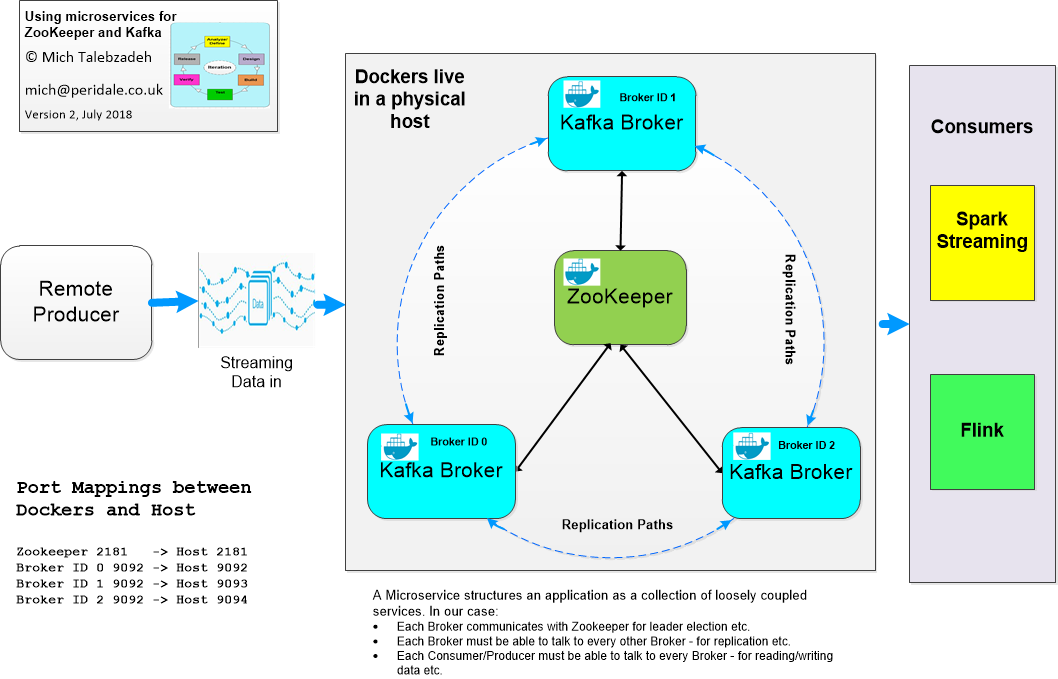
Now going back to the above diagram which is classic streaming, we ought to focus on what simple functions we ought to deploy as Microservice.
|As an outline:
- Develop the needed Microservices first
2. Develop or deploy a microservice container which can provide the necessary interfaces
- For Zookeeper and Kafka these interfaces are well established. Zookeeper is a centralized service for maintaining configuration information, naming, providing distributed synchronization and providing group services. Zookeeper does this by a Master-Slave architecture. Zookeeper listens to the clients on port 2181. Apache Kafka is a publish/subscribe streaming platform that has three key capabilities, namely; publish and subscribe to streams of records, similar to a message queue or enterprise messaging system, store streams of records in a fault-tolerant durable way and process streams of records as they occur. Kafka architecture consists of the following components:
- A stream of messages of a particular type is defined as a topic.
- A Message is defined as a payload of bytes and a Topic is a category or feed name to which messages are published.
- A Producer can be anything that can publish messages to a Topic.
- The published messages are then stored at a set of servers called Brokers or Kafka Cluster.
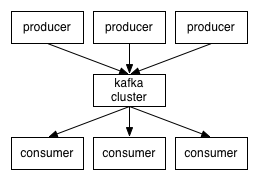
- A Consumer can subscribe to one or more Topics and consume the published Messages by pulling data from the Brokers. Kafka Producer, Consumer and Broker environment is shown below
In our example we have a Kafka cluster comprising of three containers. Of course this design is simplest of all. However, you can create multiple containers on multiple physical hosts for scalability and resiliency. So our challenge is to create our Kafka cluster with 3 members each with one broker. Each Broker has a port the socket server listens on. By default this is 9092
3. Clients of a service need to be able to discover the service. In our case Spark Streaming needs to know the ports that Zookeeper and Kafka microservices will be mapped to the corresponding port on the physical host. Note that in this case the microservice does what it says on the tin. For example ZooKeeper is created to listen on port 2181 for clients. The broker uses port 9092 etc.
4. It is left to the designer to develop a strategy to allow proper port mapping between the container and the physical host. In other words to access Kafka broker 0 in the container in a physical host you need to map the containers port 9092 to a free port in the physical host. These are derscribed in detail in my GitHub but I will provide an outline here.
5. First create a ZooKeeper container based on Ubuntu on the physical host that has docker software
docker run -d --name zookeeper -p 2181:2181 -p 2888:2888 -p 3888:3888 jplock/zookeeper
Note that I have mapped container port of 2181 to the port 2181 on the physical host. Nothing should be running on port 2181 on the physical host
6. Create the three Kafka containers
docker run -d --name kafka_broker0 -p 9092:9092 -e KAFKA_ADVERTISED_HOST_NAME=50.140.197.220 -e ZOOKEEPER_IP=50.140.197.220 -e KAFKA_BROKER_ID=0 -e KAFKA_BROKER_PORT=9092 -e KAFKA_ADVERTISED_PORT=9092 ches/kafka
docker run -d --name kafka_broker1 -p 9093:9092 -e KAFKA_ADVERTISED_HOST_NAME=50.140.197.220 -e ZOOKEEPER_IP=50.140.197.220 -e KAFKA_BROKER_ID=1 -e KAFKA_BROKER_PORT=9092 -e KAFKA_ADVERTISED_PORT=9092 ches/kafka
docker run -d --name kafka_broker2 -p 9094:9092 -e KAFKA_ADVERTISED_HOST_NAME=50.140.197.220 -e ZOOKEEPER_IP=50.140.197.220 -e KAFKA_BROKER_ID=2 -e KAFKA_BROKER_PORT=9092 -e KAFKA_ADVERTISED_PORT=9092 ches/kafka
As you can see, I have mapped port 9092 for these brokers to ports 9092, 9093 and 9094 on the physical host running with IP address of 50.140.197.220 respectively.
7. Once these containers are created you can see their status by running the following command on the physical host
[root@rhes75 ~]# docker ps -a
CONTAINER ID IMAGE COMMAND CREATED STATUS PORTS NAMES
b4ce97519522 ches/kafka "/start.sh" 4 minutes ago Up 4 minutes 7203/tcp, https://www.linkedin.com/redir/invalid-link-page?url=0%2e0%2e0%2e0%3A9094->9092/tcp kafka_broker2


b0360adc77af ches/kafka "/start.sh" 5 minutes ago Up 5 minutes 7203/tcp, https://www.linkedin.com/redir/invalid-link-page?url=0%2e0%2e0%2e0%3A9093->9092/tcp kafka_broker1
8e16ec1fe7b0 ches/kafka "/start.sh" 6 minutes ago Up 6 minutes 7203/tcp, https://www.linkedin.com/redir/invalid-link-page?url=0%2e0%2e0%2e0%3A9092->9092/tcp kafka_broker0
3a286d0a601a jplock/zookeeper "/opt/zookeeper/bin/…" 4 hours ago Up 4 hours (healthy) 0.0.0.0:2181->2181/tcp, https://www.linkedin.com/redir/invalid-link-page?url=0%2e0%2e0%2e0%3A2888->2888/tcp, https://www.linkedin.com/redir/invalid-link-page?url=0%2e0%2e0%2e0%3A3888->3888/tcp zookeeper
BTW, you need to create the Zookeeper container before creating brokers. This will allow brokers to register with Zookeeper
8. [root@rhes75 ~]# netstat -plten|grep 909[2-4]
tcp6 0 0 :::9092 :::* LISTEN 0 6269054 23001/docker-proxy
tcp6 0 0 :::9093 :::* LISTEN 0 6271053 23550/docker-proxy
tcp6 0 0 :::9094 :::* LISTEN 0 6269319 23976/docker-proxy
9 . One can log in to a container (in this case zookeeper) and browse around using the following command:
root@rhes75 ~]# docker exec -it zookeeper bash
10. Now create a topic
${KAFKA_HOME}/bin/kafka-topics.sh --create --zookeeper rhes75:2181 --replication-factor 3 --partitions 3 --topic final
FYI, rhes75 ( 50.140.197.220) is the physical host that hosting the containers. All communications with the containers are done through the physical host and the ports on this host
${KAFKA_HOME}/bin/kafka-topics.sh --describe -zookeeper rhes75:2181 --topic final
Topic:final PartitionCount:3 ReplicationFactor:3 Configs:
Topic: final Partition: 0 Leader: 0 Replicas: 1,2,0 Isr: 0
Topic: final Partition: 1 Leader: 0 Replicas: 2,0,1 Isr: 0
Topic: final Partition: 2 Leader: 0 Replicas: 0,1,2 Isr: 0
11. My deployed software versions are:
- ZooKeeper: 3.4.11
- Kafka: 2.12 -0.10.2.2
- Spark: 2.3.0
- Hadoop: 3.0
- HBase: 1.2.6
12. Now we are set to use the microservices to provide needed services to a Spark Streaming set-up.
My Spark Streaming is part of Speed layer in Lambda Architecture and flushes high value historical prices into an HBase table (it interrogates the RDD in Spark Scala code to find the candidates). This design uses Spark standalone mode with 24G driver-memory, 8G executor-memory and number-executors 4
Unfortunately I don't have the figures from classic Zookeeper and Kafka set-up. However, I see the improvement in performance that looks impressive. For this test I created a Micro-Batch of 100 prices publishing every 2 seconds
13. My observations are based on Spark GUI as shown below
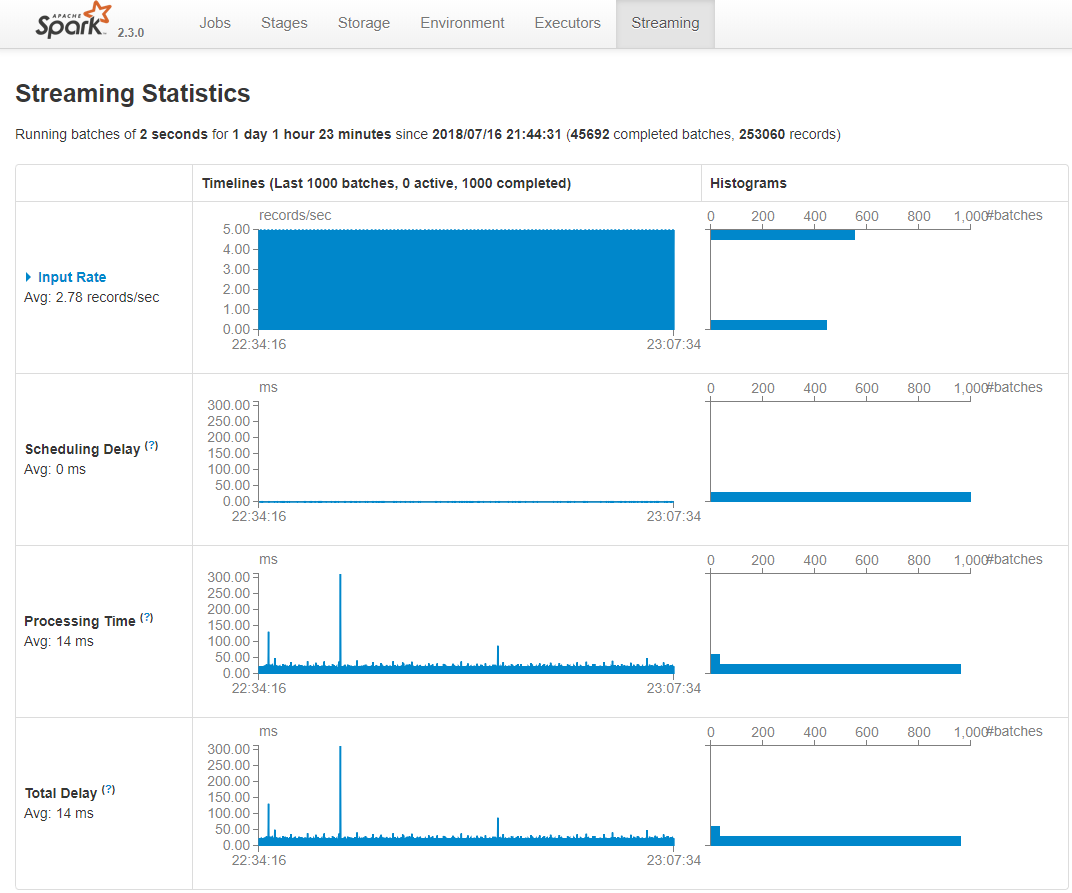
One expects for timely operation, processing time much less that the batch interval. Looking at the graph above I see no delay and an average processing time of 14 ms. I assume the total delay averaged at 14 ms = average processing time. I am not sure how much of this gain is due to the deployment of microservices. However, I assume these services being lightweight, efficient and with loose coupling contribute to a better performance.
Disclaimer: Great care has been taken to make sure that the technical information presented in this article is accurate, but any and all responsibility for any loss, damage or destruction of data or any other property which may arise from relying on its content is explicitly disclaimed. The author will in no case be liable for any monetary damages arising from such loss, damage or destruction.
[출처] https://www.linkedin.com/pulse/use-microservices-real-time-data-streaming-spark-talebzadeh-ph-d-/
광고 클릭에서 발생하는 수익금은 모두 웹사이트 서버의 유지 및 관리, 그리고 기술 콘텐츠 향상을 위해 쓰여집니다.
