
- 전체
- HTML
- Web Design (웹디자인)
- XE 응용 개발
- wordpress plugin dev
- Javascript & JavaScript Application
- MEAN Stack : full stack javascript
- angular js & ionic framework
- bootstrap
- WebGL, Three.js and Babylon.js
- restful api design
- mobile web
- node.js 응용
- Cloud Service 응용
- 웹 어셈블리 개발 [WASM, WebAssembly]
- 마이크로서비스, MSA (microservice architecture)
- WebGL / WebGPU
- next.js 개발
- micro frontend (마이크로프론트앤드)
- 전자상거래/쇼핑몰
- 서버 클라우드 (aws, azure, google)
HTML Javascript 자바스크립트 NaN (숫자)인지 체크
2019.03.19 16:19
Javascript 자바스크립트 NaN (숫자)인지 체크
<html>
<head>
<script type="text/javascript">
var numberCheck = function() {
var temp = document.getElementById('input').value;
if(isNaN(temp) == true) {
alert("입력된 값 : " + temp + " / 문자");
} else {
alert("입력된 값 : " + temp + " / 숫자");
}
};
</script>
</head>
<body>
<input type="text" id="input" />
<input type="button" value="확인" onClick="numberCheck()" />
</body>
</html>
isNaN("문자") ==> true
isNaN(숫자) ==> false
[입력 1]

[출력 1]
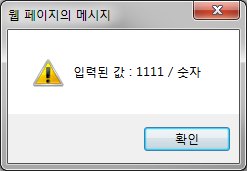
[입력 2]

[출력 2]
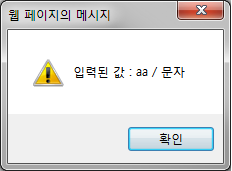
[입력 3]



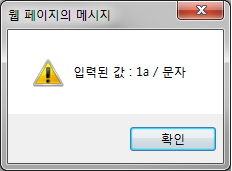
[cnfcj]
<html>
<head>
<script type="text/javascript">
var numberCheck = function() {
var temp = document.getElementById('input').value;
if(isNaN(temp) == true) {
alert("입력된 값 : " + temp + " / 문자");
} else {
alert("입력된 값 : " + temp + " / 숫자");
}
};
</script>
</head>
<body>
<input type="text" id="input" />
<input type="button" value="확인" onClick="numberCheck()" />
</body>
</html>
isNaN("문자") ==> true
isNaN(숫자) ==> false
[입력 1]
[출력 1]
[입력 2]
[출력 2]
[입력 3]
[출력 3]
출처: https://ggoreb.tistory.com/174 [나는 초보다]
본 웹사이트는 광고를 포함하고 있습니다.
광고 클릭에서 발생하는 수익금은 모두 웹사이트 서버의 유지 및 관리, 그리고 기술 콘텐츠 향상을 위해 쓰여집니다.
광고 클릭에서 발생하는 수익금은 모두 웹사이트 서버의 유지 및 관리, 그리고 기술 콘텐츠 향상을 위해 쓰여집니다.
댓글 0
| 번호 | 제목 | 글쓴이 | 날짜 | 조회 수 |
|---|---|---|---|---|
| 4 |
AWS Certified Solutions Architect - Associate 2018 후기
 | 졸리운_곰 | 2018.10.31 | 661 |
| 3 |
AWS 자격증 준비하기
| 졸리운_곰 | 2018.10.31 | 995 |
| 2 |
AWS 자격증 (아키텍트) 준비요령
| 졸리운_곰 | 2018.10.31 | 778 |
| 1 |
AWS Certified Solutions Architect – Associate Exam 시험 후기
| 졸리운_곰 | 2018.10.31 | 820 |