[javascript] How to append HTML code to a div using JavaScript ?

here are two ways to append HTML code to a div through JavaScript

  • Using the innerHTML attribute
  • Using the insertAdjacentHTML() method

Using the innerHTML attribute:
To append using the innerHTML attribute, first select the element (div) where you want to append the code. Then, add the code enclosed as strings using the += operator on innerHTML.

Syntax:

element.innerHTML += "additional HTML code"

or

element.innerHTML = element.innerHTML + "additional HTML code"

Example:


<!DOCTYPE html>
<html>
  
<head>
    <title>How to Append HTML Code to a Div using Javascript</title>
    <style>
        body {
            text-align: center;
              
            padding: 5%;
        }
        h1{
            color:green;
        }
    </style>
</head>
  
<body>
    <div id="add_to_me">
        <h1>GeeksforGeeks</h1>
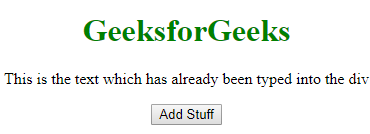
        <p>This is the text which has already been typed into the div</p>
    </div>
  
    <button onclick="addCode()">Add Stuff</button>
    <script>
        function addCode() {
            document.getElementById("add_to_me").innerHTML += 
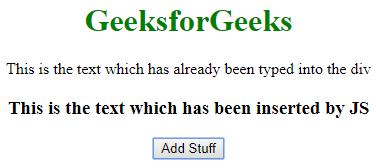
              "<h3>This is the text which has been inserted by JS</h3>";
        }
    </script>
</body>
  
</html>
  • Output:
  • Before Clicking the Button:
  • After Clicking the Button:

    Note: This method basically destroys all the content of the div and recreates it. So, if you have any listeners attached to the child nodes of that div, they will be lost.

    Using the insertAdjacentHTML() method

    경축! 아무것도 안하여 에스천사게임즈가 새로운 모습으로 재오픈 하였습니다.
    어린이용이며, 설치가 필요없는 브라우저 게임입니다.
    https://s1004games.com

    HTML code can be appended to a div using the insertAdjacentHTML() method. However, you need to select an element inside the div to add the code. This method takes two parameters:


    Syntax:

    elementInsideDiv.insertAdjacentHTML('afterend', 'additional HTML code');
    

    Example:

    <!DOCTYPE html>
    <html>
      
    <head>
        <title>How to Append HTML Code to a Div using Javascript</title>
        <style>
            body {
                text-align: center;
                padding: 5%;
            }
          h1{
            color: green
              }
        </style>
    </head>
      
    <body>
        <div id="add_to_me">
            <h1>GeeksforGeeks</h1>
            <p id="add_after_me">
              This is the text which has already been typed into the div</p>
        </div>
      
        <button onclick="addCode()">Add Stuff</button>
        <script>
            function addCode() {
                document.getElementById("add_after_me").insertAdjacentHTML("afterend",
                    "<h3>This is the text which has been inserted by JS</h3>");
            }
        </script>
    </body>
      
    </html>
      1. The position (in the document) where you want to insert the code (‘afterbegin’, ‘beforebegin’, ‘afterend’, ‘beforeend’)
      2. The HTML code you want to insert enclosed in quotes
      • Output:
      • Before Clicking the Button:
      • After Clicking the Button:

        [출처] https://www.geeksforgeeks.org/how-to-append-html-code-to-a-div-using-javascript/


본 웹사이트는 광고를 포함하고 있습니다.
광고 클릭에서 발생하는 수익금은 모두 웹사이트 서버의 유지 및 관리, 그리고 기술 콘텐츠 향상을 위해 쓰여집니다.
번호 제목 글쓴이 날짜 조회 수
13 [웹 어셈블리, WSAM] Persisting data with Emscripten : Emscripten으로 데이터 유지하기 졸리운_곰 2024.04.20 389
12 [웹 어셈블리, WSAM] Porting a Linux Program to Run in Browser using Emscripten : mscripten을 사용하여 브라우저에서 실행되도록 Linux 프로그램 포팅 졸리운_곰 2024.04.20 408
11 [웹 어셈블리, WSAM] An example of emscripten with WebSocket. file 졸리운_곰 2023.12.12 512
10 [웹 어셈블리, WSAM] サーバサイドはWebAssemblyの夢を見るか? – Node.jsでwasmってみた : 서버 측은 WebAssembly의 꿈을 꾸는가? – Node.js에서 wasm 해 보았습니다. file 졸리운_곰 2023.08.27 437
9 [웹 어셈블리 WSAM, webassembly] WebAssembly on the server-side : 서버측 웹어셈블리 file 졸리운_곰 2023.08.27 524
8 [Blazor][WASM] Awesome Blazor file 졸리운_곰 2021.08.15 20106
7 [Blazor][C# .net] Blazor와 C#으로 풀스택 웹 개발하기 file 졸리운_곰 2021.08.15 505
6 [WASM][web assembly] 웹 어셈블리를 보다 쉽게 웹 어플리케이션에 적용하는 방법 file 졸리운_곰 2021.07.19 489
5 Using Blazor, Tensorflow and ML.NET to Identify Images file 졸리운_곰 2021.07.03 619
4 [WASM][WebAssembly] The Top 81 Emscripten Open Source Projects 졸리운_곰 2021.04.19 573
3 [WebAssembly][WSAM] Blazor와 WebAssembly 소개 file 졸리운_곰 2021.03.28 533
2 Webassembly Tutorial using Emscripten file 졸리운_곰 2020.10.24 704
1 [웹어셈블리] Visual Studio 2019와 Emscripten (emcc) 개발 file 졸리운_곰 2020.10.18 2194
대표 김성준 주소 : 경기 용인 분당수지 U타워 등록번호 : 142-07-27414
통신판매업 신고 : 제2012-용인수지-0185호 출판업 신고 : 수지구청 제 123호 개인정보보호최고책임자 : 김성준 sjkim70@stechstar.com
대표전화 : 010-4589-2193 [fax] 02-6280-1294 COPYRIGHT(C) stechstar.com ALL RIGHTS RESERVED