
There are many occasion where you may be limited using your own IP address, i will obviously only refer myself to « rightful » cases where you need to use different IP address in very short lapse of time. Let’s say you want to test your website localization functionality, or just access it using many different IP address and see how the system deals with it.
TOR is a wonderful tool for that. TOR (The Onion Ring to be specific) is a tool that allows you to use several IP addresses as gateways to connect to the Internet and change the path you use dynamically. It’s main goal is to help you « Protect your privacy and defend yourself against network surveillance and traffic analysis. ». I used it a long time ago, when connections were so bad, that using it was mostly a burden and not very practical.
But recently when i had to span HTTP requests through several IP address, i got frustrated by two facts :
- First : i didn’t have enough servers available to do it, and buying them from Amazon EC2 is not a solution as those servers may have the same IP address and all accounts are limited to 5 Elastic IP addresses and i don’t want to buy myself for 400$ worth of servers i may use only 1 hour !
- Second : i need to build a complex distributed environment (like a MapReduce job) and …. well i don’t want to, i don’t need parallel tasks, i just need a varying exit point.
So after a frustrating night of coding, i found myself thinking back of TOR. I installed it back again with Vidalia, and it worked ! Using Vidalia i could change my IP address when i needed and re-execute my tests with a brand new IP address. Of course it wasn’t perfect as i was using sometimes 5 different relay points before reaching my goal but as i was not downloading anything heavy, it went well. But still, i had to change by hand my IP address. So the real point of this article is : » how to change dynamically your IP address using Python and TOR ? »
So first you need TOR installed, you can get it here : https://www.torproject.org/download/download.html.en and activate the remote control here :
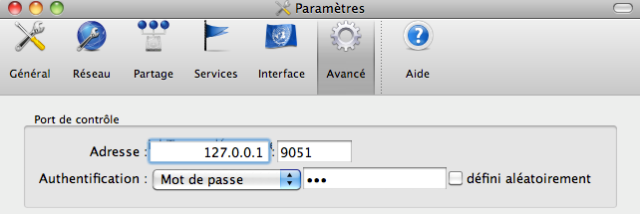
Then i’m going to assume you have Python, Git and Pip installed. To be clear on the principles of all this, TOR offers a relatively complex control system that you can connect to using Telnet, you can see the full command list and a few examples on the TOR website and here : http://thesprawl.org/memdump/?entry=8 . I’m going to refer only to the command i want to use : « re-new my route ».


So to install TorCtl, the library we will want to use to control TOR, we’ll clone the Git repository of the project, and install the library using Pip (it’s pure laziness, i admit, because using python setup.py install works just fine too) :
$ git clone git://github.com/aaronsw/pytorctl.git
Cloning into pytorctl...
remote: Counting objects: 555, done.
remote: Compressing objects: 100% (180/180), done.
remote: Total 555 (delta 376), reused 552 (delta 375)
Receiving objects: 100% (555/555), 145.62 KiB | 213 KiB/s, done.
Resolving deltas: 100% (376/376), done.
$ pip install pytorctl/
Unpacking ./pytorctl
  Running setup.py egg_info for package from [...]
Installing collected packages: torctl
  Running setup.py install for torctl
Successfully installed torctl
Cleaning up...
So now if Tor is running and you try to do this :
$ python
Python 2.6.1 (r261:67515, Jun 24 2010, 21:47:49)
[GCC 4.2.1 (Apple Inc. build 5646)] on darwin
Type "help", "copyright", "credits" or "license" for more information.
>>> from TorCtl import TorCtl
>>> connection = TorCtl.connect(passphrase="lol")
>>> connection.is_live()
True
It’s proof that it works, just use close() on the connection object to disconnect yourself. Now all we need to do is use this connection to send signals to TOR and tell urllib2 to use this precise connection, let’s go :
import urllib2
# using TOR !
proxy_support = urllib2.ProxyHandler({"http" : "127.0.0.1:8118"} )
opener = urllib2.build_opener(proxy_support)
urllib2.install_opener(opener)
# every urlopen connection will then use the TOR proxy like this one :
urllib2.urlopen('http://www.google.fr').read and to renew my route when i need to change the IP :
print "Renewing tor route wait a bit for 5 seconds"
from TorCtl import TorCtl
conn = TorCtl.connect(passphrase="lol")
conn.sendAndRecv('signal newnymrn')
conn.close()
import time
time.sleep(5)
print "renewed"
Now you know everything i know. On the receiving end, i don’t think there’s that much data on how to identify the « source » of the request, if you’ve got any clue about that, tell me in the comments.
