
Sometimes a programming design pattern becomes common enough to warrant its own special syntax. Python’s list comprehensions are a prime example of such a syntactic sugar.
List comprehensions in Python are great, but mastering them can be tricky because they don’t solve a new problem: they just provide a new syntax to solve an existing problem.
Let’s learn what list comprehensions are and how to identify when to use them.
Update: I held a 1 hour video chat about list comprehensions which extends the material in this article. If you want more after reading this post, check out the recording.
What are list comprehensions?
List comprehensions are a tool for transforming one list (any iterable actually) into another list. During this transformation, elements can be conditionally included in the new list and each element can be transformed as needed.
If you’re familiar with functional programming, you can think of list comprehensions as syntactic sugar for a filter followed by a map:
If you’re not familiar with functional programming, don’t worry: I’ll explain using for loops.
From loops to comprehensions
Every list comprehension can be rewritten as a for loop but not every for loop can be rewritten as a list comprehension.
The key to understanding when to use list comprehensions is to practice identifying problems that smell like list comprehensions.
If you can rewrite your code to look just like this for loop, you can also rewrite it as a list comprehension:
You can rewrite the above for loop as a list comprehension like this:
List Comprehensions: The Animated Movie™
That’s great, but how did we do that?


We copy-pasted our way from a for loop to a list comprehension.
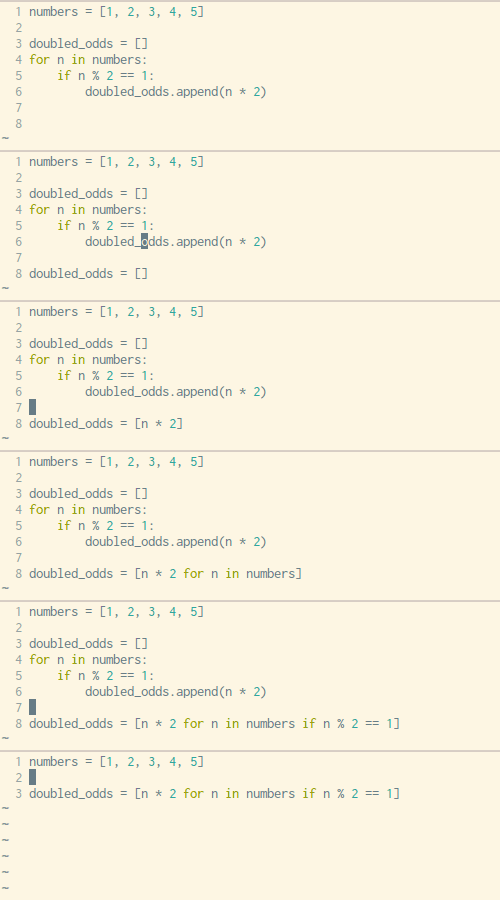
Here’s the order we copy-paste in:
- Copy the variable assignment for our new empty list (line 3)
- Copy the expression that we’ve been
append-ing into this new list (line 6) - Copy the
forloop line, excluding the final:(line 4) - Copy the
ifstatement line, also without the:(line 5)
We’ve now copied our way from this:
To this:
List Comprehensions: Now in Color
Let’s use colors to highlight what’s going on.
doubled_odds = []
for n in numbers:
    if n % 2 == 1:
        doubled_odds.append(n * 2)
doubled_odds = [n * 2 for n in numbers if n % 2 == 1]
We copy-paste from a for loop into a list comprehension by:
- Copying the variable assignment for our new empty list
- Copying the expression that we’ve been
append-ing into this new list - Copying the
forloop line, excluding the final: - Copying the
ifstatement line, also without the:
Unconditional Comprehensions
But what about comprehensions that don’t have a conditional clause (that if SOMETHING part at the end)? These loop-and-append for loops are even simpler than the loop-and-conditionally-append ones we’ve already covered.
A for loop that doesn’t have an if statement:
doubled_numbers = []
for n in numbers:
    doubled_numbers.append(n * 2)
That same code written as a comprehension:
doubled_numbers = [n * 2 for n in numbers]
Here’s the transformation animated:
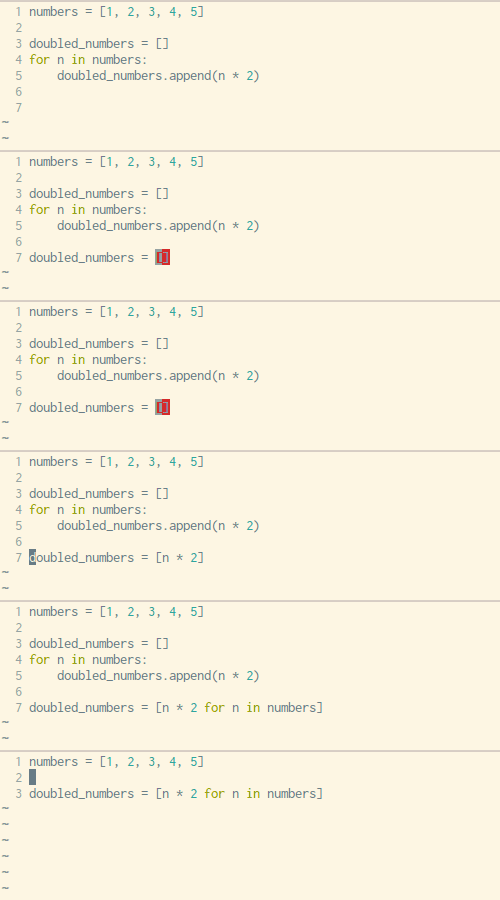
We can copy-paste our way from a simple loop-and-append for loop by:
- Copying the variable assignment for our new empty list (line 3)
- Copying the expression that we’ve been
append-ing into this new list (line 5) - Copying the
forloop line, excluding the final:(line 4)
Nested Loops
What about list comprehensions with nested looping?…
