
- 전체
- Python 일반
- Python 수학
- Python 그래픽
- Python 자료구조
- Python 인공지능
- Python 인터넷
- Python SAGE
- wxPython
- TkInter
- iPython
- wxPython
- pyQT
- Jython
- django
- flask
- blender python scripting
- python for minecraft
- Python 데이터 분석
- Python RPA
- cython
- PyCharm
- pySide
- kivy (python)
How to build a simple neural network in 9 lines of Python code
As part of my quest to learn about AI, I set myself the goal of building a simple neural network in Python. To ensure I truly understand it, I had to build it from scratch without using a neural network library. Thanks to an excellent blog post by Andrew Trask I achieved my goal. Here it is in just 9 lines of code:
In this blog post, I’ll explain how I did it, so you can build your own. I’ll also provide a longer, but more beautiful version of the source code.
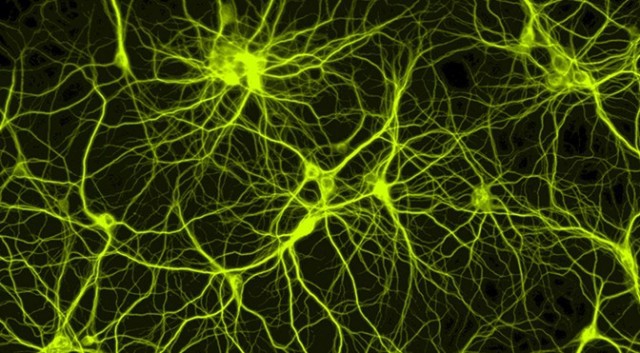
But first, what is a neural network? The human brain consists of 100 billion cells called neurons, connected together by synapses. If sufficient synaptic inputs to a neuron fire, that neuron will also fire. We call this process “thinking”.

We can model this process by creating a neural network on a computer. It’s not necessary to model the biological complexity of the human brain at a molecular level, just its higher level rules. We use a mathematical technique called matrices, which are grids of numbers. To make it really simple, we will just model a single neuron, with three inputs and one output.
We’re going to train the neuron to solve the problem below. The first four examples are called a training set. Can you work out the pattern? Should the ‘?’ be 0 or 1?
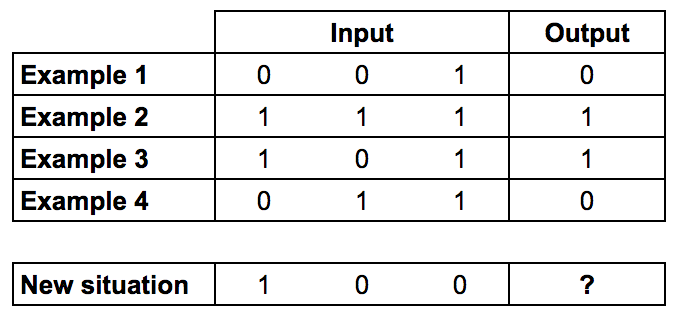
You might have noticed, that the output is always equal to the value of the leftmost input column. Therefore the answer is the ‘?’ should be 1.
Training process
But how do we teach our neuron to answer the question correctly? We will give each input a weight, which can be a positive or negative number. An input with a large positive weight or a large negative weight, will have a strong effect on the neuron’s output. Before we start, we set each weight to a random number. Then we begin the training process:
- Take the inputs from a training set example, adjust them by the weights, and pass them through a special formula to calculate the neuron’s output.
- Calculate the error, which is the difference between the neuron’s output and the desired output in the training set example.
- Depending on the direction of the error, adjust the weights slightly.
- Repeat this process 10, 000 times.
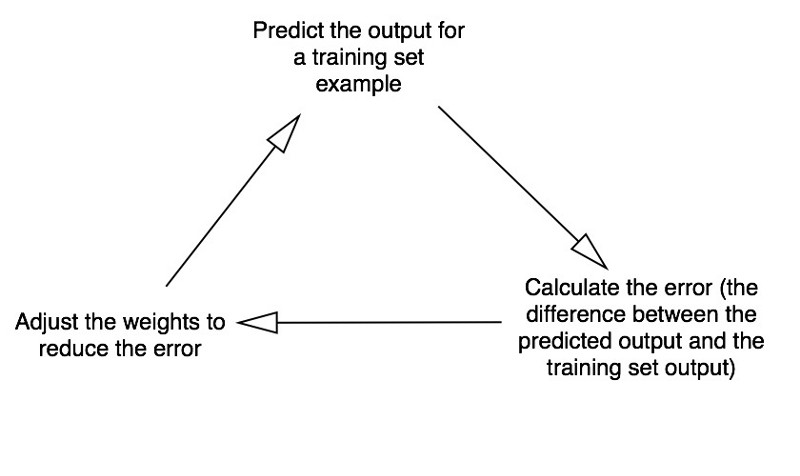
Eventually the weights of the neuron will reach an optimum for the training set. If we allow the neuron to think about a new situation, that follows the same pattern, it should make a good prediction.
This process is called back propagation.
Formula for calculating the neuron’s output
You might be wondering, what is the special formula for calculating the neuron’s output? First we take the weighted sum of the neuron’s inputs, which is:

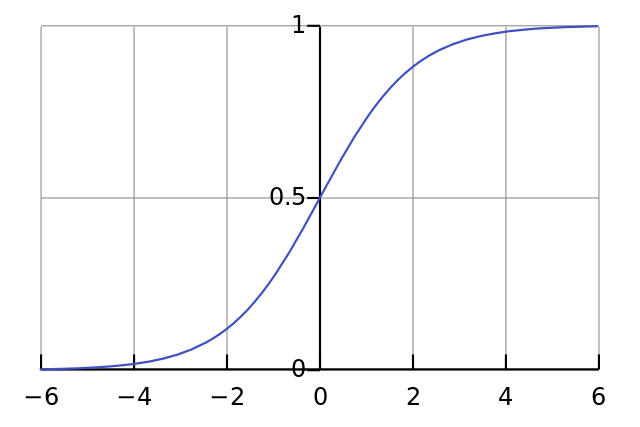
Next we normalise this, so the result is between 0 and 1. For this, we use a mathematically convenient function, called the Sigmoid function:

If plotted on a graph, the Sigmoid function draws an S shaped curve.
So by substituting the first equation into the second, the final formula for the output of the neuron is:

You might have noticed that we’re not using a minimum firing threshold, to keep things simple.
Formula for adjusting the weights
During the training cycle (Diagram 3), we adjust the weights. But how much do we adjust the weights by? We can use the “Error Weighted Derivative” formula:

Why this formula? First we want to make the adjustment proportional to the size of the error. Secondly, we multiply by the input, which is either a 0 or a 1. If the input is 0, the weight isn’t adjusted. Finally, we multiply by the gradient of the Sigmoid curve (Diagram 4). To understand this last one, consider that:
- We used the Sigmoid curve to calculate the output of the neuron.
- If the output is a large positive or negative number, it signifies the neuron was quite confident one way or another.
- From Diagram 4, we can see that at large numbers, the Sigmoid curve has a shallow gradient.
- If the neuron is confident that the existing weight is correct, it doesn’t want to adjust it very much. Multiplying by the Sigmoid curve gradient achieves this.
The gradient of the Sigmoid curve, can be found by taking the derivative:

So by substituting the second equation into the first equation, the final formula for adjusting the weights is:

There are alternative formulae, which would allow the neuron to learn more quickly, but this one has the advantage of being fairly simple.


Constructing the Python code
Although we won’t use a neural network library, we will import four methods from a Python mathematics library called numpy. These are:
- exp — the natural exponential
- array — creates a matrix
- dot — multiplies matrices
- random — gives us random numbers
For example we can use the array() method to represent the training set shown earlier:
The ‘.T’ function, transposes the matrix from horizontal to vertical. So the computer is storing the numbers like this.
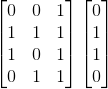
Ok. I think we’re ready for the more beautiful version of the source code. Once I’ve given it to you, I’ll conclude with some final thoughts.
I have added comments to my source code to explain everything, line by line. Note that in each iteration we process the entire training set simultaneously. Therefore our variables are matrices, which are grids of numbers. Here is a complete working example written in Python:
Also available here: https://github.com/miloharper/simple-neural-network
Final thoughts
Try running the neural network using this Terminal command:
python main.py
You should get a result that looks like:
We did it! We built a simple neural network using Python!
First the neural network assigned itself random weights, then trained itself using the training set. Then it considered a new situation [1, 0, 0] and predicted 0.99993704. The correct answer was 1. So very close!
Traditional computer programs normally can’t learn. What’s amazing about neural networks is that they can learn, adapt and respond to new situations. Just like the human mind.
Of course that was just 1 neuron performing a very simple task. But what if we hooked millions of these neurons together? Could we one day create something conscious?
I’ve been inspired by the huge response this article has received. I’m considering creating an online course.
[출처] https://medium.com/technology-invention-and-more/how-to-build-a-simple-neural-network-in-9-lines-of-python-code-cc8f23647ca1
[참고] https://www.youtube.com/watch?v=h3l4qz76JhQ
광고 클릭에서 발생하는 수익금은 모두 웹사이트 서버의 유지 및 관리, 그리고 기술 콘텐츠 향상을 위해 쓰여집니다.
