
- 전체
- 게임 일반 (make game basics)
- 모바일 기획 및 디자인
- GameMaker Studio
- Unity3D
- Cocos2D
- 3D Engine OGRE
- 3D Engine irrlicht
- copperCube
- corona SDK
- Windows Basic Game
- BaaS (Mobile Backend)
- phnegap & cordova
- ionic & anguler
- parse (backend)
- firebase (backend)
- Game Backend Server / Opt
- web assembly
- Smart Makers
- pyGame & Ren'Py
- 머드(MUD) 게임 만들기
- Xamarin(자마린)
- flutter (플루터 앱 개발)
- construct 2 / 3
- pocketbase
- RPG Maker 시리즈
- godot engine
- playmaker(unity)
- react native
머드(MUD) 게임 만들기 [TextMode Game Create] Text based game
2024.08.25 20:59
[TextMode Game Create] Text based game
Today we are going to study about Text based game in C++. It is a simple text based adventure game in C++, where players navigate through rooms, collect items, and face challenges.
Text based adventure games have been a staple in the world of gaming for decades. These games challenge players to navigate through a series of scenarios using only text-based commands and descriptions.
Introduction of C++ Game
Our text based adventure game will be a simple game where the player starts in a dark room with two doors. Behind one door lies treasure, and behind the other door, a fierce monster awaits. As the player progresses through the game, they will encounter locked chests, keys, and a sleeping dragon guarding the treasure.
Game Structure
Rooms and Choices
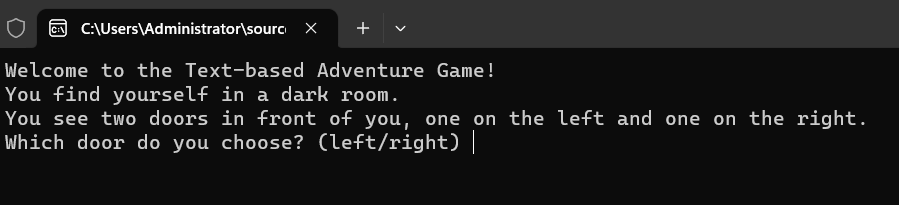
The game begins with the player choosing between two doors: the left door and the right door. Depending on their choice, the player will enter different rooms with unique challenges and outcomes.
Inventory System
We’ve incorporated an inventory system to allow the player to collect and manage items throughout the game. In our game, the player can find a key to unlock a door and progress further.
C++ game with functionality
After completing the game or meeting an unfortunate end, players have the option to play again, resetting the game and their inventory.
GitHub Repository
you can get the source code of text based adventure game through our GitHub Repository by clicking on this button.
Source Code
Before download code please make sure to disable AD-BLOCKER because the ad revenue is used for hosting our Website. The download will automatically starts after 10 seconds of stay on redirected page.
Download CodeImplementing the Game
Main Function
The main() function initializes the game by welcoming the player and prompting them to choose a door.
Rooms in Text based game
Room 1
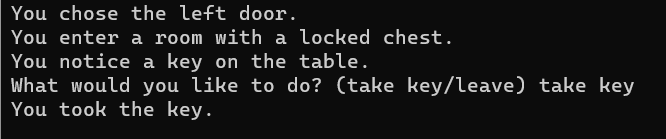
In the first room, the player encounters a locked chest and a key on the table. The player can choose to take the key or leave the room. If the player takes the key, it will be added to their inventory.
Room 2
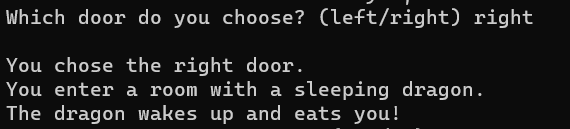
The second room contains a sleeping dragon. If the player has the key in their inventory, they can use it to unlock the door and escape quietly. Otherwise, the dragon wakes up and eats the player.


Room 3
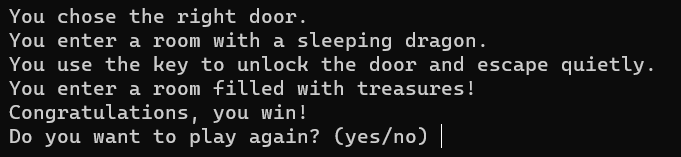
The final room is filled with treasures. If the player successfully navigates through the challenges and reaches this room, they win the game.
Play Again Function
After completing the game or meeting an unfortunate end, players can choose to play again or exit the game.
|
01
02
03
04
05
06
07
08
09
10
11
12
13
14
15
16
17
18
19
20
|
void play_again() { while (true) { string choice; cout << "Do you want to play again? (yes/no) "; cin >> choice; if (choice == "yes") { inventory.clear(); main(); break; } else if (choice == "no") { cout << "Thanks for playing!\n"; break; } else { cout << "Invalid choice. Please enter 'yes' or 'no'.\n"; } }} |
FAQ
How do I win the game?
In our example game, to win, you need to collect the key from room1(), use it to unlock the door in room2(), and then proceed to room3() to claim the treasure. If you successfully navigate through the rooms and make the right choices, you will win the game.
How do I play the text-based adventure game?
To play the text-based adventure game, read the prompts and make choices by typing the corresponding commands. Follow the story, collect items, and navigate through rooms to reach the end goal. In our example game, you start in a dark room with two doors and make choices to progress through rooms with challenges and rewards.
What is a text based adventure game?
A text based adventure game is a type of video game that uses text descriptions to present the game world to the player. Players interact with the game by typing commands and making choices to navigate through the story and solve puzzles.
Conclusion
Creating a text-based adventure game in C++ is a fun and educational project that allows you to practice your programming skills while building an interactive game. Our simple game includes rooms, choices, an inventory system, and play again functionality, providing a foundation for you to expand and enhance the game further.
Whether you’re a beginner learning C++ or an experienced programmer looking for a fun project, creating a text-based adventure game is a rewarding experience that showcases the versatility and creativity of programming. So, grab your keyboard and start coding your own adventure!
Code of text base game in C++
|
001
002
003
004
005
006
007
008
009
010
011
012
013
014
015
016
017
018
019
020
021
022
023
024
025
026
027
028
029
030
031
032
033
034
035
036
037
038
039
040
041
042
043
044
045
046
047
048
049
050
051
052
053
054
055
056
057
058
059
060
061
062
063
064
065
066
067
068
069
070
071
072
073
074
075
076
077
078
079
080
081
082
083
084
085
086
087
088
089
090
091
092
093
094
095
096
097
098
099
100
101
102
103
104
105
106
107
108
109
110
111
112
113
114
115
116
117
|
#include <iostream>#include <string>#include <vector>using namespace std;void room1();void room2();void room3();void left_door();void right_door();void play_again();vector<string> inventory;int main() { cout << "Welcome to the Text-based Adventure Game!\n"; cout << "You find yourself in a dark room.\n"; cout << "You see two doors in front of you, one on the left and one on the right.\n"; while (true) { string choice; cout << "Which door do you choose? (left/right) "; cin >> choice; if (choice == "left") { left_door(); break; } else if (choice == "right") { right_door(); break; } else { cout << "Invalid choice. Please enter 'left' or 'right'.\n"; } } return 0;}void left_door() { cout << "\nYou chose the left door.\n"; room1();}void right_door() { cout << "\nYou chose the right door.\n"; room2();}void room1() { cout << "You enter a room with a locked chest.\n"; cout << "You notice a key on the table.\n"; while (true) { cin.ignore(); cout << "What would you like to do? (take key/leave) "; string choice; getline(cin, choice); if (choice == "take key") { inventory.push_back("key"); cout << "You took the key.\n"; } else if (choice == "leave") { cout << "You leave the room.\n"; right_door(); break; } else { cout << "Invalid choice.\n"; break; } }}void room2() { cout << "You enter a room with a sleeping dragon.\n"; if (std::find(inventory.begin(), inventory.end(), "key") != inventory.end()) { cout << "You use the key to unlock the door and escape quietly.\n"; room3(); } else { cout << "The dragon wakes up and eats you!\n"; play_again(); }}void room3() { cout << "You enter a room filled with treasures!\n"; cout << "Congratulations, you win!\n"; play_again();}void play_again() { while (true) { string choice; cout << "Do you want to play again? (yes/no) "; cin >> choice; if (choice == "yes") { inventory.clear(); main(); break; } else if (choice == "no") { cout << "Thanks for playing!\n"; break; } else { cout << "Invalid choice. Please enter 'yes' or 'no'.\n"; } }} |
[출처] https://guiprojects.com/text-based-game/
광고 클릭에서 발생하는 수익금은 모두 웹사이트 서버의 유지 및 관리, 그리고 기술 콘텐츠 향상을 위해 쓰여집니다.
