
- 전체
- 보안뉴스
- 제로데이취약점
- 해킹프로그래밍
- 웹해킹
- 해킹기법
- 정보보호
- 정보보안기사 - 국가기술자격
- 악성코드분석_리버싱
- 시큐어코딩_개발보안진단원
- CISSP
- CISA
- 모의해킹_penetration-test
- deepweb / tor network
- Kali Linux
deepweb / tor network [deepweb / tor network] How to configure WordPress as a Tor hidden service
2024.01.23 22:28
[deepweb / tor network] How to configure WordPress as a Tor hidden service
How to configure WordPress as a Tor hidden service
I decided I wanted to host my WordPress installation as a hidden service on Tor instead of backporting all my existing content to Hugo. I previously ran Hugo on my onion site and even though I still want to make that move eventually, for now, I’m sticking with what I already know. Besides, putting arguably the worst content management system ever invented on the dark web seemed like a fun venture.
I won’t rely on any third party plugins to manage a “multi-domain” installation, but instead I’ll take advantage of available WordPress filter hooks to modify data at runtime. In short, I will replace all permalinks pointing to blog.paranoidpenguin.net with slackiuxopmaoigo.onion using my existing WordPress installation.
Getting started with hidden services
After installing Tor, getting your hidden service (onion site) up and running is just a matter of adding two lines to your torrc configuration. Have a look at this sample torrc file and review the section documenting hidden services. Yep, it’s that easy.
Virtual host configuration
I’ll be configuring tree separate virtual hosts for serving content from both my onion and clearnet site. These virtual hosts will be owned by the same unix user/group providing a common document root. The vhosts will also share a php-fpm pool owned by the aforementioned user/group. Shown below is an example of what such a configuration might look like (actual paths and ports have been changed to protect the innocent).
# Hidden service configuration (torrc)
HiddenServiceDir /var/lib/tor/secret
HiddenServicePort 7776 127.0.0.1:7776
...

# slackiuxopmaoigo.onion vhost
<VirtualHost 127.0.0.1:7776>
  ServerName slackiuxopmaoigo.onion
  DocumentRoot /home/username/public
</VirtualHost>

# blog.paranoidpenguin.net vhost (HTTP)
<VirtualHost *:80>
  ServerName blog.paranoidpenguin.net
  DocumentRoot /home/username/public
  Redirect permanent / https://blog.paranoidpenguin.net/
</VirtualHost>

# blog.paranoidpenguin.net vhost (HTTPS)
<VirtualHost *:443>
  ServerName blog.paranoidpenguin.net:443
  DocumentRoot /home/username/public
</VirtualHost>
Adding filter hooks to your theme
As previously mentioned, I’ll be using a collection of WordPress filter hooks to modify content referencing my primary domain before it’s rendered in the browser. It’s also advisable to avoid having the theme load static resources like web fonts and scripts from external domains. We don’t want any traffic seeping out to the clearnet from our safe onion haven.
In the end the job didn’t require much effort. I only had to spend some time identifying the applicable filters by reviewing the comprehensive WordPress Plugin API/Filter Reference. Your needs may differ though depending on theme functionality and installed plugins. For my frugal pureRegression theme, all that was needed was to add the following hooks to my theme’s functions.php:


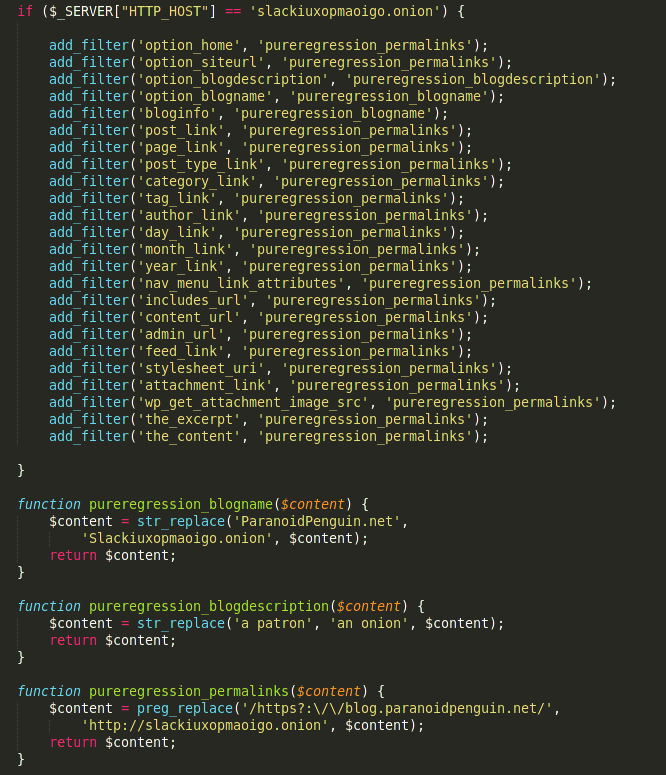
These hooks are executed whenever a visitor loads my onion site and effectively removes all references to blog.paranoidpenguin.net.
The above-mentioned code is available from github.com.
[출처] https://blog.paranoidpenguin.net/2017/09/how-to-configure-wordpress-as-a-tor-hidden-service/
광고 클릭에서 발생하는 수익금은 모두 웹사이트 서버의 유지 및 관리, 그리고 기술 콘텐츠 향상을 위해 쓰여집니다.
댓글 0
| 번호 | 제목 | 글쓴이 | 날짜 | 조회 수 |
|---|---|---|---|---|
| 공지 | 침투테스트(취약점검점검, 모의해킹) 문의 / 답변 | 졸리운_곰 | 2017.12.10 | 28361 |
| 9 |
[deepweb / tor network] How to install Tor and create Tor hidden service on Windows
 | 졸리운_곰 | 2024.03.26 | 200 |
| 8 | [deepweb / tor network] How to get a custom onion address | 졸리운_곰 | 2024.02.05 | 280 |
| » | [deepweb / tor network] How to configure WordPress as a Tor hidden service | 졸리운_곰 | 2024.01.23 | 213 |
| 6 | [deepweb / tor network] OnionShare - Tor 네트워크로 익명으로 파일 공유 | 졸리운_곰 | 2024.01.22 | 173 |
| 5 | [deepweb / tor network] 다크 웹의 TOP 21 .onion 사이트 | 졸리운_곰 | 2024.01.21 | 582 |
| 4 | [deepweb / tor network] 딥웹 .onion 익명 사이트 호스팅하기 (Tor를 사용한 .onion 주소 할당 방법) | 졸리운_곰 | 2024.01.21 | 200 |
| 3 |
[deepweb / tor network] 딥웹 .onion 익명 사이트 개설(호스팅)하기 (Tor를 사용한 .onion 주소 할당 방법)
| 졸리운_곰 | 2024.01.21 | 166 |
| 2 |
[deepweb / tor network] 노드로 만드는 간단한 토르 웹 서버!!
| 졸리운_곰 | 2024.01.21 | 180 |
| 1 | [deepweb / tor network] Tor 네트워크를 사용해 익명 웹서버 구동하기 | 졸리운_곰 | 2024.01.21 | 156 |