
- 전체
- HTML
- Web Design (웹디자인)
- XE 응용 개발
- wordpress plugin dev
- Javascript & JavaScript Application
- MEAN Stack : full stack javascript
- angular js & ionic framework
- bootstrap
- WebGL, Three.js and Babylon.js
- restful api design
- mobile web
- node.js 응용
- Cloud Service 응용
- 웹 어셈블리 개발 [WASM, WebAssembly]
- 마이크로서비스, MSA (microservice architecture)
- WebGL / WebGPU
- next.js 개발
- micro frontend (마이크로프론트앤드)
- 전자상거래/쇼핑몰
- 서버 클라우드 (aws, azure, google)
Javascript & JavaScript Application angularjs 에서 php 서비스 콜하고 json으로 리턴 받기
2016.07.19 17:29
angularjs 에서 php 서비스 콜하고 json으로 리턴 받기
php 5.3, angular.js
결과를 리턴받고 표시할 INDEX.HTML
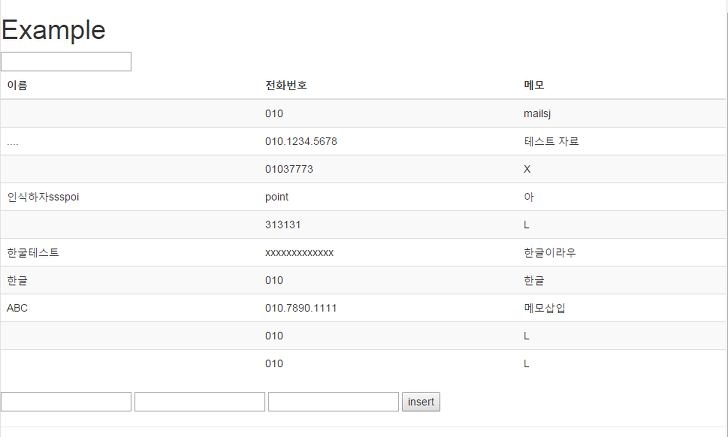
화면에 리스트, 입력폼, 버튼을 하나 만들고 화면이 실행되면 데이터를 조회해서 리스트에 표시.
각각 칸에 데이터 입력후에 버튼을 누르면 데이터를 입력.
서버쪽 php는 일반적인 POST방식 처리를 수행하면 된다.


결과를 리턴할때만 json_encoder를 수행하면 된다.
|
1
2
3
4
5
6
7
8
9
10
11
12
13
14
15
16
17
18
19
20
21
22
23
24
25
26
27
28
29
30
31
32
33
34
35
36
37
38
39
40
41
42
43
44
45
46
47
48
49
|
<!doctype html><head> <title>연습파일</title> <meta charset="utf-8"> <meta http-equiv="X-UA-COMPATIBLE" content="IE=edge,chrome=1"> <meta name="viewport" content="width=device-width, user-scalable=no"> <script src="angular.js"></script> <script src="myService.js"></script> <link rel="stylesheet" href="angul.css"></head> <div class="mainContainer" data-ng-app="myApp"> <h1>Example</h1> <div data-ng-controller="search_ctrl"> <input type="text" data-ng-model="val1"> <table class="table table-striped"> <thead> <tr> <th>이름</th> <th>전화번호</th> <th>메모</th> </tr> </thead> <tbody> <tr data-ng-repeat="row in rows | filter:val1 | orderBy:'DEV_NAME' | limitTo: 10"> <td>{{row.DEV_NAME}}</td> <td>{{row.DEV_TEL}}</td> <td>{{row.DEV_MEMO}}</td> </tr> </tbody> </table> </div> <div data-ng-controller="insert_ctrl"> <input type="text" data-ng-model="key_name"> <input type="text" data-ng-model="key_tel"> <input type="text" data-ng-model="key_memo"> <hidden type="text" data-ng-model="message"> <button data-ng-click="insertValue()">insert</button> <hr> {{message}} </div> </div> |
myService.js
|
1
2
3
4
5
6
7
8
9
10
11
12
13
14
15
16
17
18
19
20
21
22
23
24
25
26
27
28
29
30
31
32
|
/* use strict */var app = angular.module("myApp", []);app.controller("search_ctrl", function ($scope, $http){ var request = $http({ method: "post", headers: { 'Content-Type': 'application/x-www-form-urlencoded' } }); /* Check whether the HTTP Request is successful or not. */ request.success(function (data) { $scope.rows = data; });})app.controller("insert_ctrl", function ($scope, $http){ $scope.insertValue = function () { var request = $http({ method: "post", headers: { 'Content-Type': 'application/x-www-form-urlencoded' } }); /* Check whether the HTTP Request is successful or not. */ request.success(function (data) { $scope.message = data; }); }}) |
동작화면
본 웹사이트는 광고를 포함하고 있습니다.
광고 클릭에서 발생하는 수익금은 모두 웹사이트 서버의 유지 및 관리, 그리고 기술 콘텐츠 향상을 위해 쓰여집니다.
광고 클릭에서 발생하는 수익금은 모두 웹사이트 서버의 유지 및 관리, 그리고 기술 콘텐츠 향상을 위해 쓰여집니다.
댓글 0
| 번호 | 제목 | 글쓴이 | 날짜 | 조회 수 |
|---|---|---|---|---|
| 13 | [Next.js 개발] pm2 로 Next.js 실행하기 | 졸리운_곰 | 2025.07.01 | 480 |
| 12 | [Next.js 개발] NextAuth.js 를 이용한 자체 로그인 구현 | 졸리운_곰 | 2024.03.09 | 560 |
| 11 |
[Next.js 개발] Using Next.js Version 13
 | 졸리운_곰 | 2024.03.09 | 409 |
| 10 |
[Next.js 개발] Common Errors in Next.js and How to Resolve Them
| 졸리운_곰 | 2024.03.09 | 468 |
| 9 | [Next.js 개발] [Javascript] 현재 날짜, 시간 구하기 | 졸리운_곰 | 2024.03.09 | 431 |
| 8 |
[Next.js 개발] Using Next.js Version 13 : Next.js 버전 13 사용
| 졸리운_곰 | 2024.03.07 | 499 |
| 7 |
[Next.js 개발] [React] useEffect에서 async/await
| 졸리운_곰 | 2024.03.06 | 362 |
| 6 |
[next.js 개발] How to use fetch API in Next.js?
| 졸리운_곰 | 2024.03.05 | 368 |
| 5 | [next.js 개발] Next.js14에 Mysql연결하기 | 졸리운_곰 | 2024.03.05 | 457 |
| 4 |
[next.js 개발] How To Connect MySQL And Auth To A Next.js App
| 졸리운_곰 | 2024.03.05 | 323 |
| 3 |
[next.js 개발] Next.js 소개와 14 버전 변경사항 – React 인기 라이브러리
| 졸리운_곰 | 2024.03.05 | 523 |
| 2 | [next.js 개발] next.js API 호출시 - 수신부따로 호출하고 await 붙일것 | 졸리운_곰 | 2024.03.05 | 555 |
| 1 | [next.js 개발] [Next.js] Fetch POST body에 json 형태로 데이터 주고받기 (json형 / object형 차이) | 졸리운_곰 | 2024.03.05 | 457 |