

window.open()을 이용하면 팝업창을 띄울 수 있다. 이때 팝업창은 자식창, 팝업을 띄우는 창은 부모창이 된다. 자식창과 부모창간에는 서로 값을 주고받을 수 있다.
부모창에서 자식창에 접근하려면 팝업창을 특정 변수에 담아서 그 변수를 통해 접근하면 된다. 반대로 자식창에서 부모창에 접근하려면 opener를 이용해서 접근을 하면 된다.
부모창에서 자식창으로 값 전달하기
■ Parent.html
|
1
2
3
4
5
6
7
8
9
10
11
12
13
14
15
16
17
18
19
20
21
22
23
24
25
26
27
28
29
30
31
32
33
34
35
|
<!DOCTYPE html>
<html>
<head>
<meta charset="EUC-KR">
<title>Parent</title>
<script type="text/javascript">
var openWin;
function openChild()
{
// window.name = "부모창 이름";
window.name = "parentForm";
// window.open("open할 window", "자식창 이름", "팝업창 옵션");
openWin = window.open("Child.html",
"childForm", "width=570, height=350, resizable = no, scrollbars = no");
}
function setChildText(){
openWin.document.getElementById("cInput").value = document.getElementById("pInput").value;
}
</script>
</head>
<body>
<br>
<b><font size="5" color="gray">부모창</font></b>
<br><br>
<input type="button" value="자식창 열기" onclick="openChild()"><br>
전달할 값 : <input type="text" id="pInput"> <input type="button" value="전달" onclick="setChildText()">
</body>
</html>
|
cs |
자식창 열기를 클릭하면 openChild( ) 함수가 실행되며 자식창이 열린다. 그리고 전달을 클릭하면 setChildText( )가 실행되며 자식창으로 값이 전달된다.
-
16줄 : open된 자식창을 openWin이라는 변수에 담는다.
-
21줄 : 자식창에 접근하기 위해 openWin(자식창)을 사용한다. openWin.document.getElementById("cInput").value 이런 식으로 openWin부터 시작하여 자식창에 있는 특정 element에 접근할 수 있다.
■ Child.html
|
1
2
3
4
5
6
7
8
9
10
11
12
13
14
15
16
|
<!DOCTYPE html>
<html>
<head>
<meta charset="EUC-KR">
<title>Child</title>
</head>
<body>
<br>
<b><font size="5" color="gray">자식창</font></b>
<br><br>
<input type="text" id="cInput"><br><br>
<input type="button" value="창닫기" onclick="window.close()">
</body>
</html>
|
cs |
■ 실행결과
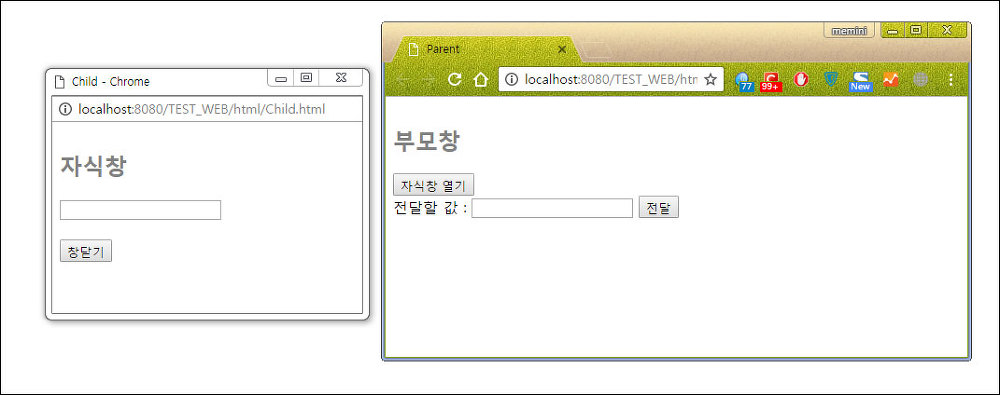
먼저 부모창에서 자식창열기 버튼을 클릭한다.
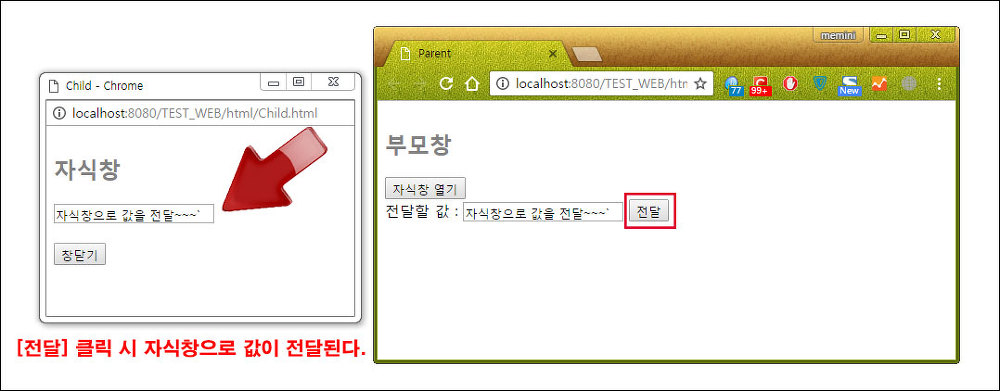


자식창이 열리면 부모창에서 전달할 값을 입력 후 전달 버튼을 클릭한다. 그러면 입력한 값이 자식창으로 전달된다.
자식창에서 부모창의 값 가져오기
이번에는 자식창에서 부모창에 입력된 값을 가져와보자.
■ Parent.html
|
1
2
3
4
5
6
7
8
9
10
11
12
13
14
15
16
17
18
19
20
21
22
23
24
25
26
27
28
29
30
31
|
<!DOCTYPE html>
<html>
<head>
<meta charset="EUC-KR">
<title>Parent</title>
<script type="text/javascript">
function openChild()
{
// window.name = "부모창 이름";
window.name = "parentForm";
// window.open("open할 window", "자식창 이름", "팝업창 옵션");
window.open("Child.html",
"childForm", "width=570, height=350, resizable = no, scrollbars = no");
}
</script>
</head>
<body>
<br>
<b><font size="5" color="gray">부모창</font></b>
<br><br>
<input type="button" value="자식창 열기" onclick="openChild()"><br>
전달할 값 : <input type="text" id="pInput">
</body>
</html>
|
cs |
■ Child.html
|
1
2
3
4
5
6
7
8
9
10
11
12
13
14
15
16
17
18
19
20
21
22
23
|
<!DOCTYPE html>
<html>
<head>
<meta charset="EUC-KR">
<title>Child</title>
<script type="text/javascript">
function getParentText(){
document.getElementById("cInput").value = opener.document.getElementById("pInput").value;
}
</script>
</head>
<body>
<br>
<b><font size="5" color="gray">자식창</font></b>
<br><br>
<input type="text" id="cInput"> <input type="button" value="가져오기" onclick="getParentText()">
<br><br>
<input type="button" value="창닫기" onclick="window.close()">
</body>
</html>
|
cs |
자식창에서 부모창에 접근하기 위해서는 opener를 사용해야 한다. 9줄 처럼 opener를 이용하면 부모창에 있는 특정 element에 접근하여 값을 가져올 수 있다.
자식창에서 부모창으로 값 전달하기
■ Parent.html
|
1
2
3
4
5
6
7
8
9
10
11
12
13
14
15
16
17
18
19
20
21
22
23
24
25
26
27
28
29
30
31
|
<!DOCTYPE html>
<html>
<head>
<meta charset="EUC-KR">
<title>Parent</title>
<script type="text/javascript">
var openWin;
function openChild()
{
// window.name = "부모창 이름";
window.name = "parentForm";
// window.open("open할 window", "자식창 이름", "팝업창 옵션");
openWin = window.open("Child.html",
"childForm", "width=570, height=350, resizable = no, scrollbars = no");
}
</script>
</head>
<body>
<br>
<b><font size="5" color="gray">부모창</font></b>
<br><br>
<input type="button" value="자식창 열기" onclick="openChild()"><br>
전달할 값 : <input type="text" id="pInput">
</body>
</html>
|
cs |
■ Child.html
|
1
2
3
4
5
6
7
8
9
10
11
12
13
14
15
16
17
18
19
20
21
22
23
|
<!DOCTYPE html>
<html>
<head>
<meta charset="EUC-KR">
<title>Child</title>
<script type="text/javascript">
function setParentText(){
opener.document.getElementById("pInput").value = document.getElementById("cInput").value
}
</script>
</head>
<body>
<br>
<b><font size="5" color="gray">자식창</font></b>
<br><br>
<input type="text" id="cInput"> <input type="button" value="전달하기" onclick="setParentText()">
<br><br>
<input type="button" value="창닫기" onclick="window.close()">
</body>
</html>
|
cs |
자식창에서 부모창으로 값을 전달하는 것은 부모창의 값을 가져오는 것과 반대로 처리하면 된다. 자식창에 입력된 값을 가져온 다음 opener를 이용해 부모창에 있는 특정 element에 값을 담으면 된다.
