
[인공지능 기술] 효과적인 에이전트 구축 : Building effective agents
2025.01.01 15:54
[인공지능 기술] 효과적인 에이전트 구축 : Building effective agents
효과적인 에이전트 구축
지난 1년 동안, 우리는 산업 전반에 걸쳐 대규모 언어 모델(LLM) 에이전트를 구축하는 수십 개의 팀과 협력했습니다. 일관되게, 가장 성공적인 구현은 복잡한 프레임워크나 전문 라이브러리를 사용하지 않았습니다. 대신, 그들은 간단하고 구성 가능한 패턴으로 구축했습니다.
이 게시물에서는 고객과 협력하고 직접 에이전트를 구축하면서 얻은 교훈을 공유하고, 개발자에게 효과적인 에이전트를 구축하기 위한 실질적인 조언을 제공합니다.
에이전트란 무엇인가요?
"에이전트"는 여러 가지 방법으로 정의할 수 있습니다. 일부 고객은 에이전트를 다양한 도구를 사용하여 복잡한 작업을 수행하는 장기간 독립적으로 작동하는 완전 자율 시스템으로 정의합니다. 다른 고객은 이 용어를 사용하여 미리 정의된 워크플로를 따르는 보다 규범적인 구현을 설명합니다. Anthropic에서는 이러한 모든 변형을 에이전트 시스템 으로 분류하지만 워크플로 와 에이전트 간에 중요한 구조적 구분을 그립니다 .
- 워크플로 는 LLM과 도구가 미리 정의된 코드 경로를 통해 조정되는 시스템입니다.
- 반면, 에이전트 는 LLM이 자신의 프로세스와 도구 사용을 동적으로 지시하고 작업을 완료하는 방법에 대한 제어를 유지하는 시스템입니다.
아래에서 우리는 두 가지 유형의 에이전트 시스템을 자세히 살펴볼 것입니다. 부록 1("실무에서의 에이전트")에서 우리는 고객이 이러한 종류의 시스템을 사용하는 데 특별한 가치를 발견한 두 가지 도메인을 설명합니다.
에이전트를 사용할 때(그리고 사용하지 않을 때)
LLM으로 애플리케이션을 빌드할 때는 가능한 가장 간단한 솔루션을 찾고 필요할 때만 복잡성을 높이는 것이 좋습니다. 이는 에이전트 시스템을 전혀 빌드하지 않는다는 것을 의미할 수 있습니다. 에이전트 시스템은 종종 더 나은 작업 성능을 위해 지연 시간과 비용을 거래하며, 이러한 트레이드오프가 합리적인 경우를 고려해야 합니다.
더 많은 복잡성이 필요할 때 워크플로는 잘 정의된 작업에 대한 예측 가능성과 일관성을 제공하는 반면, 에이전트는 유연성과 모델 기반 의사 결정이 규모에 맞게 필요할 때 더 나은 옵션입니다. 그러나 많은 애플리케이션의 경우 검색 및 컨텍스트 내 예제로 단일 LLM 호출을 최적화하는 것으로 일반적으로 충분합니다.
프레임워크를 사용하는 시기와 방법
다음을 포함하여 에이전트 시스템을 보다 쉽게 구현할 수 있는 프레임워크가 많이 있습니다.
- LangChain의 LangGraph ;
- Amazon Bedrock의 AI 에이전트 프레임 워크
- 드래그 앤 드롭 GUI LLM 워크플로 빌더 인 Rivet ;
- Vellum은 복잡한 작업 흐름을 구축하고 테스트하기 위한 또 다른 GUI 도구입니다.
이러한 프레임워크는 LLM 호출, 도구 정의 및 구문 분석, 호출 체인과 같은 표준 저수준 작업을 간소화하여 시작하기 쉽게 해줍니다. 그러나 종종 기본 프롬프트와 응답을 가릴 수 있는 추가 추상화 계층을 만들어 디버깅하기 어렵게 만듭니다. 또한 더 간단한 설정으로 충분할 때 복잡성을 추가하려는 유혹을 줄 수도 있습니다.
개발자는 LLM API를 직접 사용하는 것으로 시작하는 것이 좋습니다. 많은 패턴을 몇 줄의 코드로 구현할 수 있습니다. 프레임워크를 사용하는 경우 기본 코드를 이해해야 합니다. 후드 아래에 무엇이 있는지에 대한 잘못된 가정은 고객 오류의 일반적인 원인입니다.
일부 샘플 구현 내용은 요리책을 참조하세요 .
빌딩 블록, 워크플로 및 에이전트
이 섹션에서는 프로덕션에서 본 에이전트 시스템의 일반적인 패턴을 살펴보겠습니다. 기본 빌딩 블록인 증강 LLM부터 시작하여 간단한 구성 워크플로에서 자율 에이전트까지 점진적으로 복잡성을 증가시킵니다.
빌딩 블록: 증강된 LLM
에이전트 시스템의 기본 구성 요소는 검색, 도구, 메모리와 같은 증강으로 강화된 LLM입니다. 현재 모델은 이러한 기능을 적극적으로 사용할 수 있습니다. 즉, 자체 검색 쿼리를 생성하고, 적절한 도구를 선택하고, 어떤 정보를 보관할지 결정합니다.
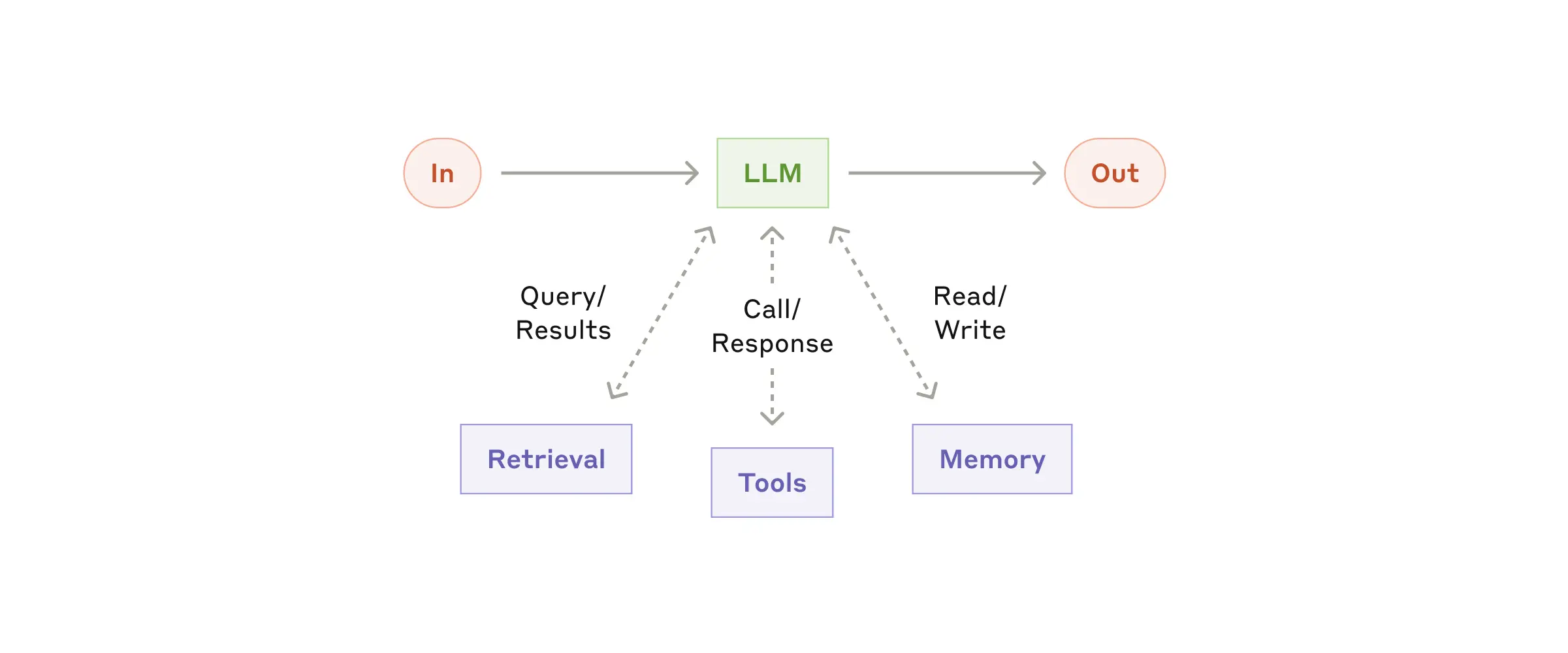
구현의 두 가지 핵심 측면에 집중하는 것이 좋습니다. 이러한 기능을 특정 사용 사례에 맞게 조정하고 LLM에 대한 쉽고 잘 문서화된 인터페이스를 제공하는지 확인하는 것입니다. 이러한 증강을 구현하는 방법은 여러 가지가 있지만, 한 가지 접근 방식은 최근 출시된 Model Context Protocol을 통한 것입니다. 이를 통해 개발자는 간단한 클라이언트 구현을 통해 성장하는 타사 도구 생태계와 통합할 수 있습니다 .
이 게시물의 나머지 부분에서는 각 LLM 호출이 이러한 증강된 기능에 액세스할 수 있다고 가정합니다.
워크플로: 프롬프트 체이닝
프롬프트 체이닝은 작업을 일련의 단계로 분해하는데, 각 LLM 호출은 이전 호출의 출력을 처리합니다. 중간 단계에 프로그램적 체크(아래 다이어그램의 "게이트" 참조)를 추가하여 프로세스가 여전히 제대로 진행되고 있는지 확인할 수 있습니다.
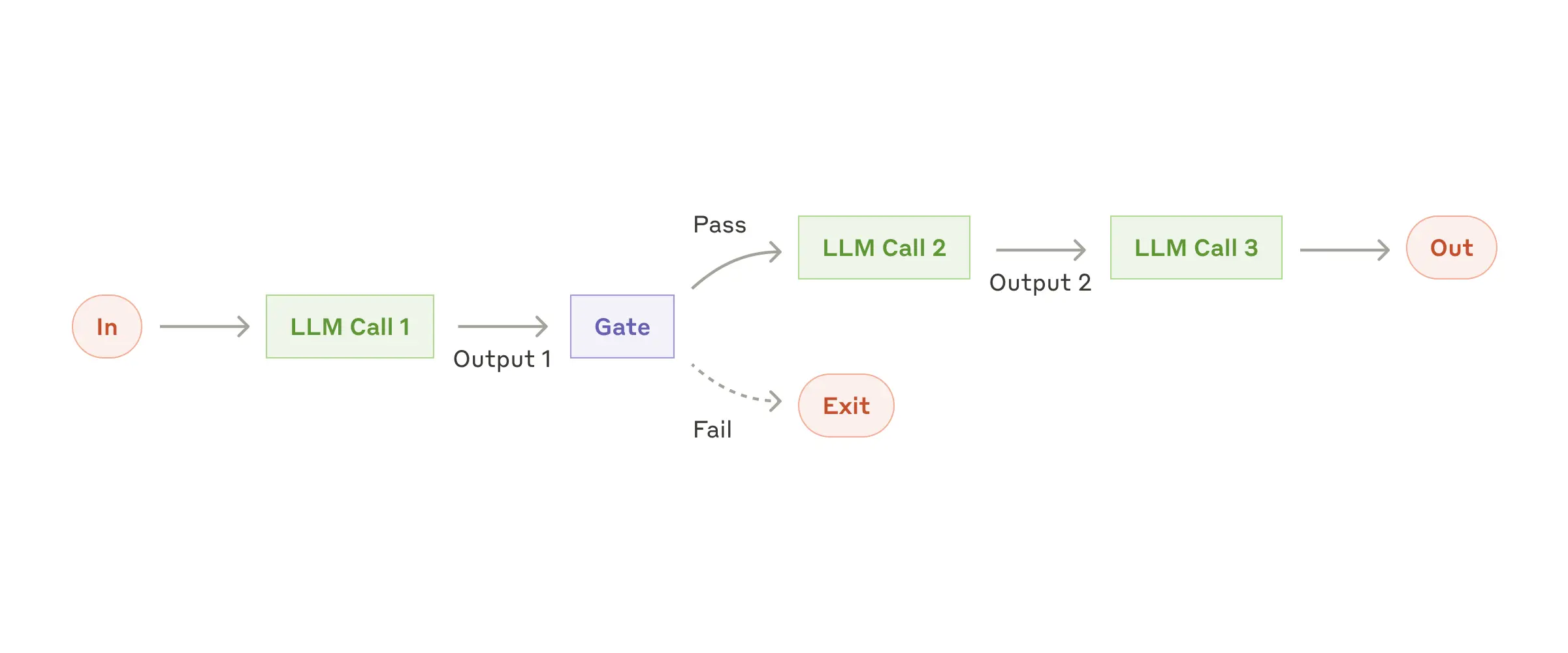
이 워크플로를 사용하는 경우: 이 워크플로는 작업을 쉽고 깔끔하게 고정된 하위 작업으로 분해할 수 있는 상황에 이상적입니다. 주요 목표는 각 LLM 호출을 더 쉬운 작업으로 만들어 지연 시간을 더 높은 정확도로 트레이드 오프하는 것입니다.
프롬프트 체이닝이 유용한 예:
- 마케팅 카피를 작성한 후 다른 언어로 번역합니다.
- 문서의 개요를 작성하고, 개요가 특정 기준을 충족하는지 확인한 후, 개요에 따라 문서를 작성합니다.
워크플로: 라우팅
라우팅은 입력을 분류하여 전문화된 후속 작업으로 보냅니다. 이 워크플로는 우려 사항을 분리하고 보다 전문화된 프롬프트를 구축할 수 있도록 합니다. 이 워크플로가 없으면 한 종류의 입력을 최적화하면 다른 입력의 성능이 저하될 수 있습니다.
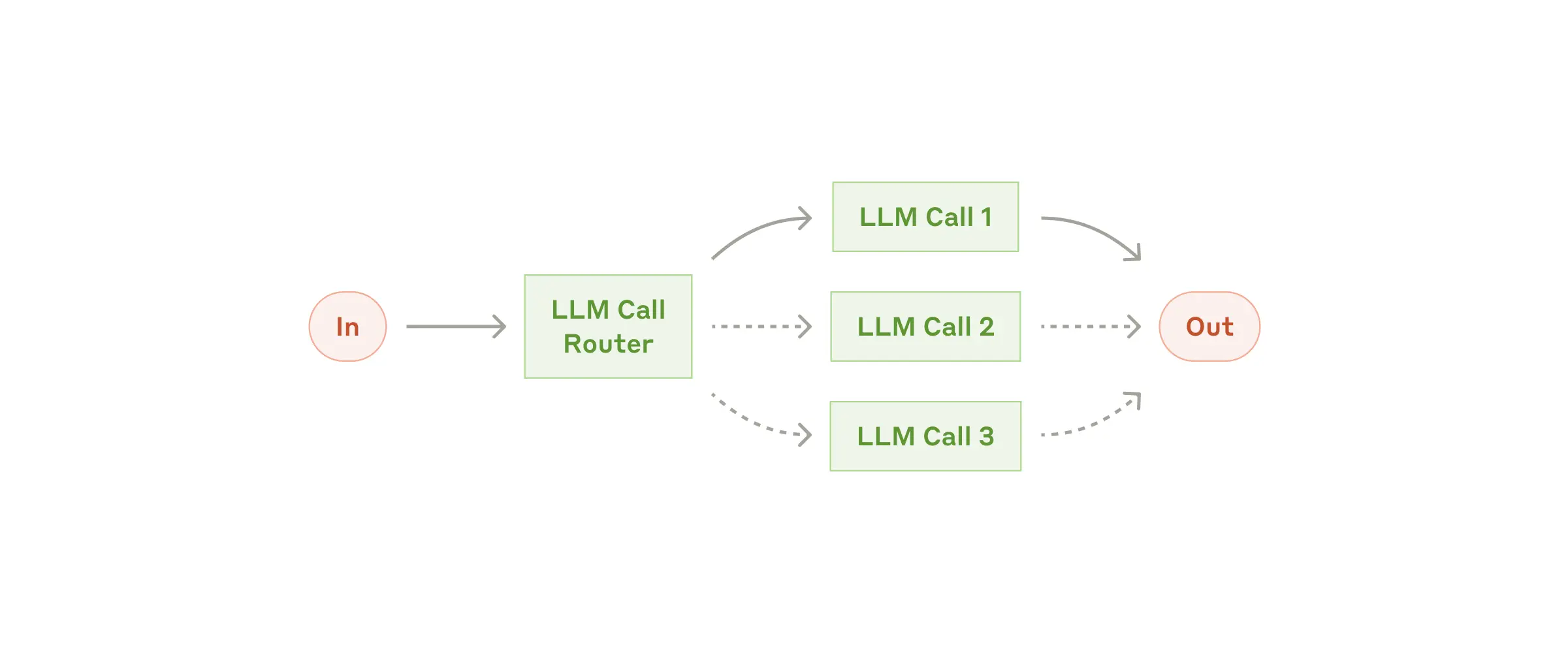
이 워크플로를 사용하는 경우: 라우팅은 여러 범주가 있고 별도로 처리하는 것이 더 나은 복잡한 작업에 적합하며, LLM이나 보다 전통적인 분류 모델/알고리즘을 통해 분류를 정확하게 처리할 수 있습니다.
라우팅이 유용한 예:
- 다양한 유형의 고객 서비스 질의(일반적인 질문, 환불 요청, 기술 지원)를 다양한 다운스트림 프로세스, 프롬프트, 도구로 전달합니다.
- Claude 3.5 Haiku와 같은 소규모 모델에 쉽고 일반적인 질문을 라우팅하고, Claude 3.5 Sonnet과 같은 보다 성능이 좋은 모델에 어렵고 특이한 질문을 라우팅하여 비용과 속도를 최적화합니다.
워크플로: 병렬화
LLM은 때때로 작업을 동시에 수행하고 출력을 프로그래밍 방식으로 집계할 수 있습니다. 이 워크플로, 병렬화는 두 가지 주요 변형으로 나타납니다.
- 섹션화 : 작업을 병렬로 실행되는 독립적인 하위 작업으로 나눕니다.
- 투표: 다양한 결과를 얻기 위해 동일한 작업을 여러 번 실행합니다.
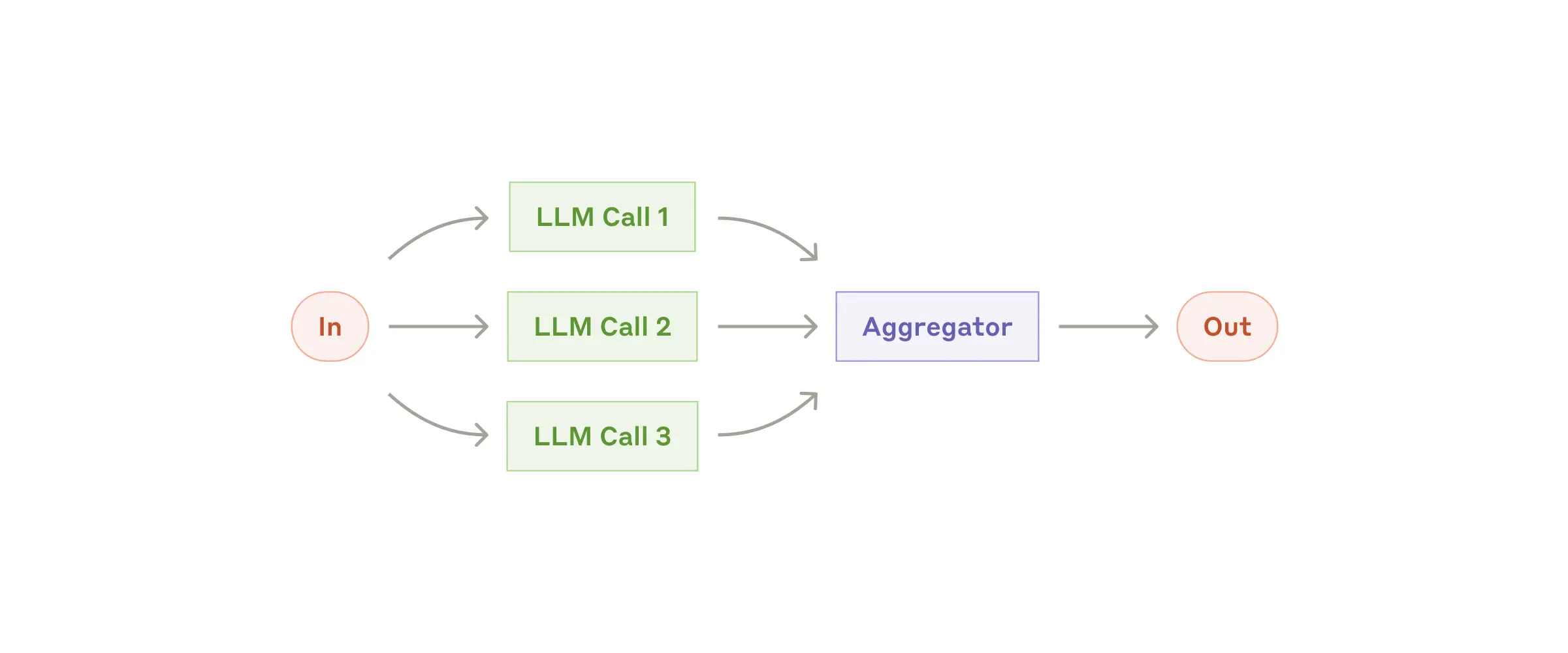
이 워크플로를 사용하는 경우: 병렬화는 분할된 하위 작업을 속도를 위해 병렬화할 수 있거나 더 높은 신뢰도 결과를 위해 여러 관점이나 시도가 필요한 경우에 효과적입니다. 여러 고려 사항이 있는 복잡한 작업의 경우 LLM은 일반적으로 각 고려 사항을 별도의 LLM 호출로 처리하여 각 특정 측면에 집중할 수 있을 때 더 나은 성과를 보입니다.
병렬화가 유용한 예:
- 섹션화 :
- 한 모델 인스턴스가 사용자 쿼리를 처리하는 동안 다른 모델 인스턴스가 부적절한 콘텐츠나 요청을 걸러내는 가드레일을 구현합니다. 이는 동일한 LLM 호출이 가드레일과 핵심 응답을 모두 처리하는 것보다 성능이 더 좋습니다.
- LLM 성능을 평가하기 위한 자동화된 평가. 각 LLM 호출은 주어진 프롬프트에서 모델 성능의 다양한 측면을 평가합니다.
- 투표 :
- 취약점이 있는 코드를 검토합니다. 여러 가지 다른 프롬프트가 코드를 검토하고 문제가 발견되면 플래그를 지정합니다.
- 주어진 콘텐츠가 부적절한지 여부를 평가하는데, 여러 프롬프트를 통해 다양한 측면을 평가하거나, 양성 및 음성 오류의 균형을 맞추기 위해 서로 다른 투표 임계값을 요구합니다.
워크플로: 오케스트레이터-워커
오케스트레이터-워커 워크플로에서 중앙 LLM은 작업을 동적으로 분할하여 워커 LLM에 위임하고 결과를 종합합니다.
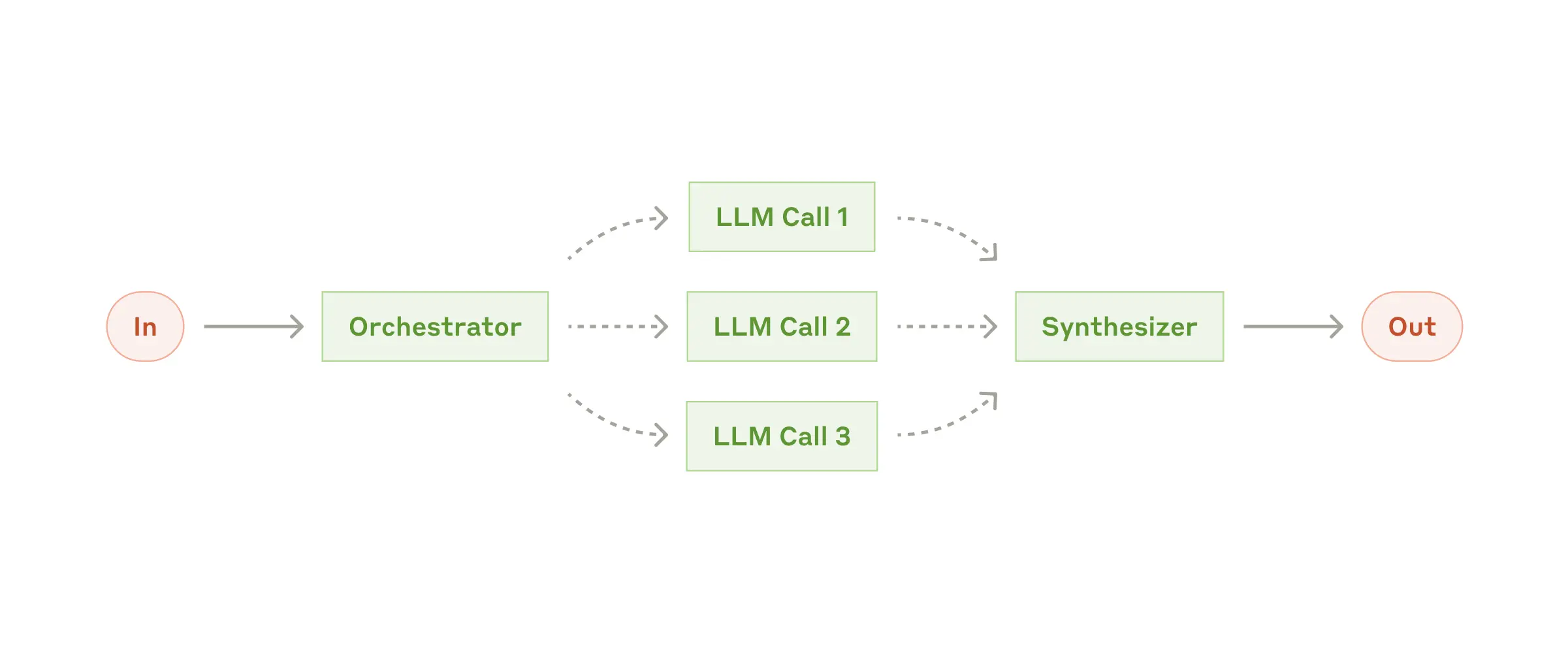
이 워크플로를 사용하는 경우: 이 워크플로는 필요한 하위 작업을 예측할 수 없는 복잡한 작업에 적합합니다(예를 들어, 코딩에서 변경해야 하는 파일 수와 각 파일의 변경 특성은 작업에 따라 달라질 수 있음). 지형적으로 유사하지만 병렬화와의 주요 차이점은 유연성입니다. 하위 작업은 미리 정의되지 않고 오케스트레이터가 특정 입력을 기반으로 결정합니다.
orchestrator-workers가 유용한 예:
- 매번 여러 파일에 복잡한 변경 사항을 적용하는 제품을 코딩합니다.
- 여러 출처에서 정보를 수집하고 분석하여 관련성이 높은 정보를 찾는 작업을 검색합니다.
워크플로: 평가자-최적화자
평가자-최적화 워크플로에서 한 LLM 호출은 응답을 생성하고 다른 호출은 루프 방식으로 평가 및 피드백을 제공합니다.
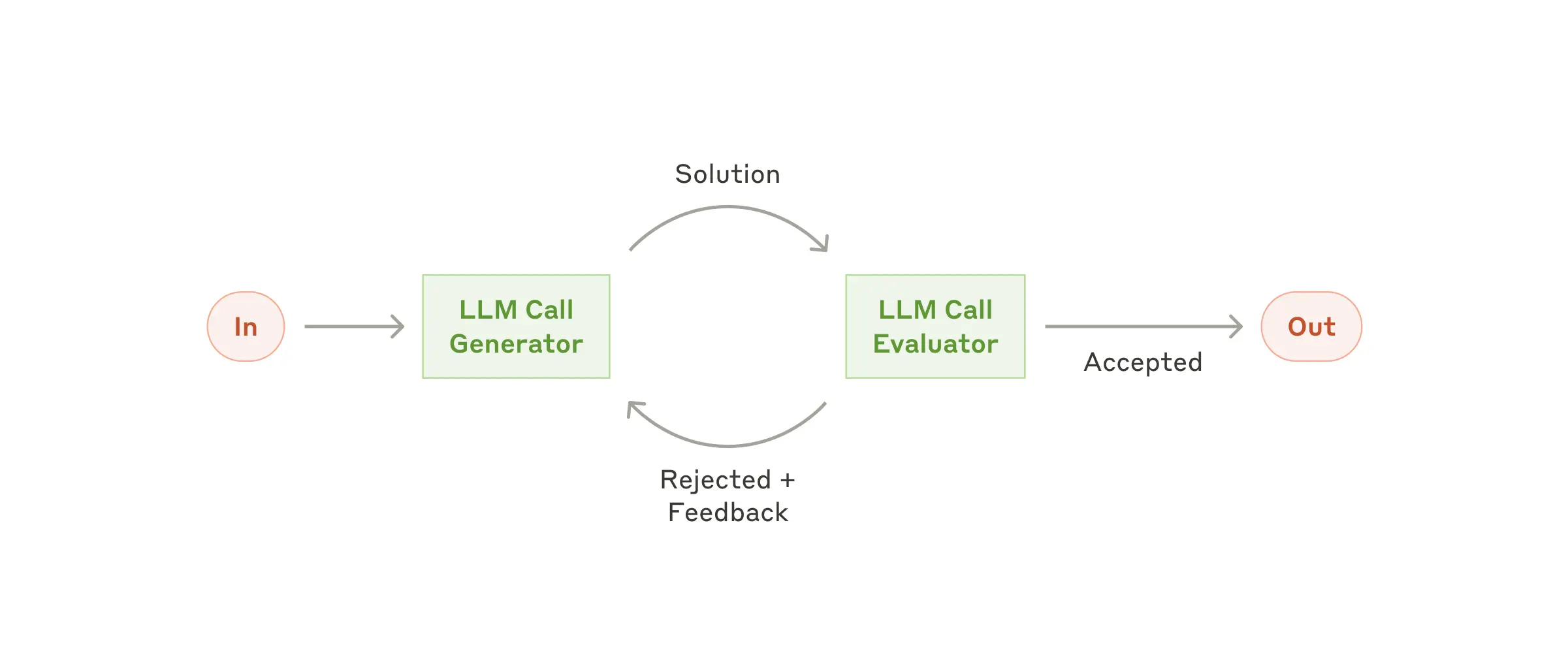
이 워크플로를 사용하는 경우: 이 워크플로는 명확한 평가 기준이 있고 반복적 개선이 측정 가능한 가치를 제공할 때 특히 효과적입니다. 적합성이 좋은 두 가지 징후는 첫째, 인간이 피드백을 표현할 때 LLM 응답이 입증 가능하게 개선될 수 있다는 것과 둘째, LLM이 그러한 피드백을 제공할 수 있다는 것입니다. 이는 인간 작가가 세련된 문서를 작성할 때 거치는 반복적 쓰기 프로세스와 유사합니다.
평가자-최적화 도구가 유용한 예:
- 번역가 LLM이 처음에는 포착하기 어려울 수 있는 뉘앙스가 있는 문학 번역이지만, 평가자 LLM이 유용한 비평을 제공할 수 있는 문학 번역입니다.
- 종합적인 정보를 수집하기 위해 여러 차례의 검색과 분석을 거쳐야 하는 복잡한 검색 작업으로, 평가자가 추가 검색이 필요한지 여부를 결정합니다.
자치령 대표
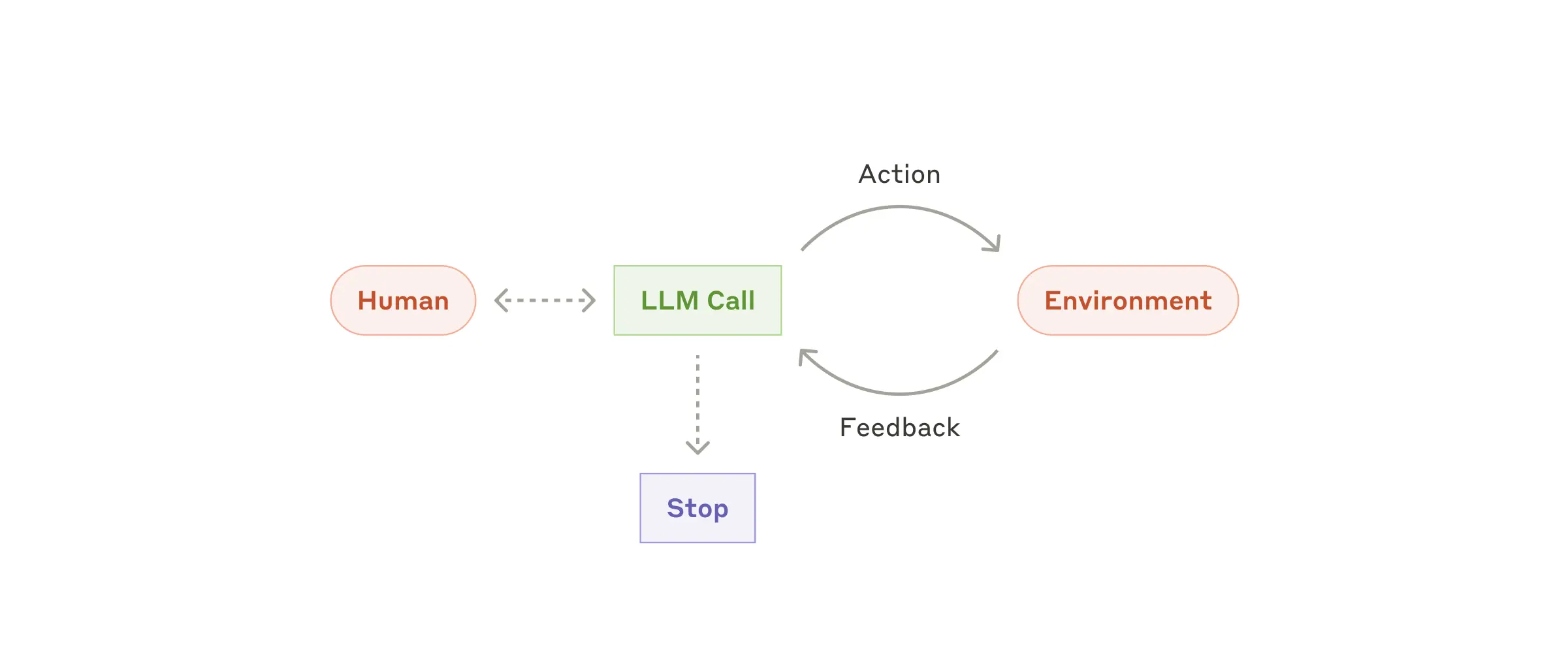
LLM이 복잡한 입력 이해, 추론 및 계획 수행, 도구의 신뢰성 있는 사용, 오류 복구 등 핵심 역량에서 성숙함에 따라 프로덕션에서 에이전트가 등장하고 있습니다. 에이전트는 인간 사용자로부터 명령을 받거나 인간 사용자와 대화형 토론을 통해 작업을 시작합니다. 작업이 명확해지면 에이전트는 독립적으로 계획하고 작동하며, 추가 정보나 판단을 위해 인간에게 돌아갈 가능성이 있습니다. 실행하는 동안 에이전트가 각 단계에서 환경으로부터 "기본 진실"(예: 도구 호출 결과 또는 코드 실행)을 얻어 진행 상황을 평가하는 것이 중요합니다. 그런 다음 에이전트는 체크포인트에서 또는 차단 요소에 부딪혔을 때 인간의 피드백을 위해 일시 중지할 수 있습니다. 작업은 종종 완료 시 종료되지만 제어를 유지하기 위해 중지 조건(예: 최대 반복 횟수)을 포함하는 것도 일반적입니다.
에이전트는 정교한 작업을 처리할 수 있지만, 구현은 종종 간단합니다. 이들은 일반적으로 루프에서 환경 피드백을 기반으로 하는 도구를 사용하는 LLM일 뿐입니다. 따라서 도구 세트와 해당 문서를 명확하고 사려 깊게 설계하는 것이 중요합니다. 부록 2("도구의 신속한 엔지니어링")에서 도구 개발 모범 사례에 대해 자세히 설명합니다.
에이전트를 사용하는 경우: 에이전트는 필요한 단계 수를 예측하기 어렵거나 불가능한 개방형 문제에 사용할 수 있으며, 고정 경로를 하드코딩할 수 없습니다. LLM은 잠재적으로 여러 차례 작동하며 의사 결정에 대한 어느 정도의 신뢰가 있어야 합니다. 에이전트의 자율성 덕분에 신뢰할 수 있는 환경에서 작업을 확장하는 데 이상적입니다.
에이전트의 자율적 특성은 더 높은 비용과 복합 오류의 가능성을 의미합니다. 적절한 가드레일과 함께 샌드박스 환경에서 광범위한 테스트를 권장합니다.
에이전트가 유용한 예:
다음은 우리가 직접 구현한 사례입니다.
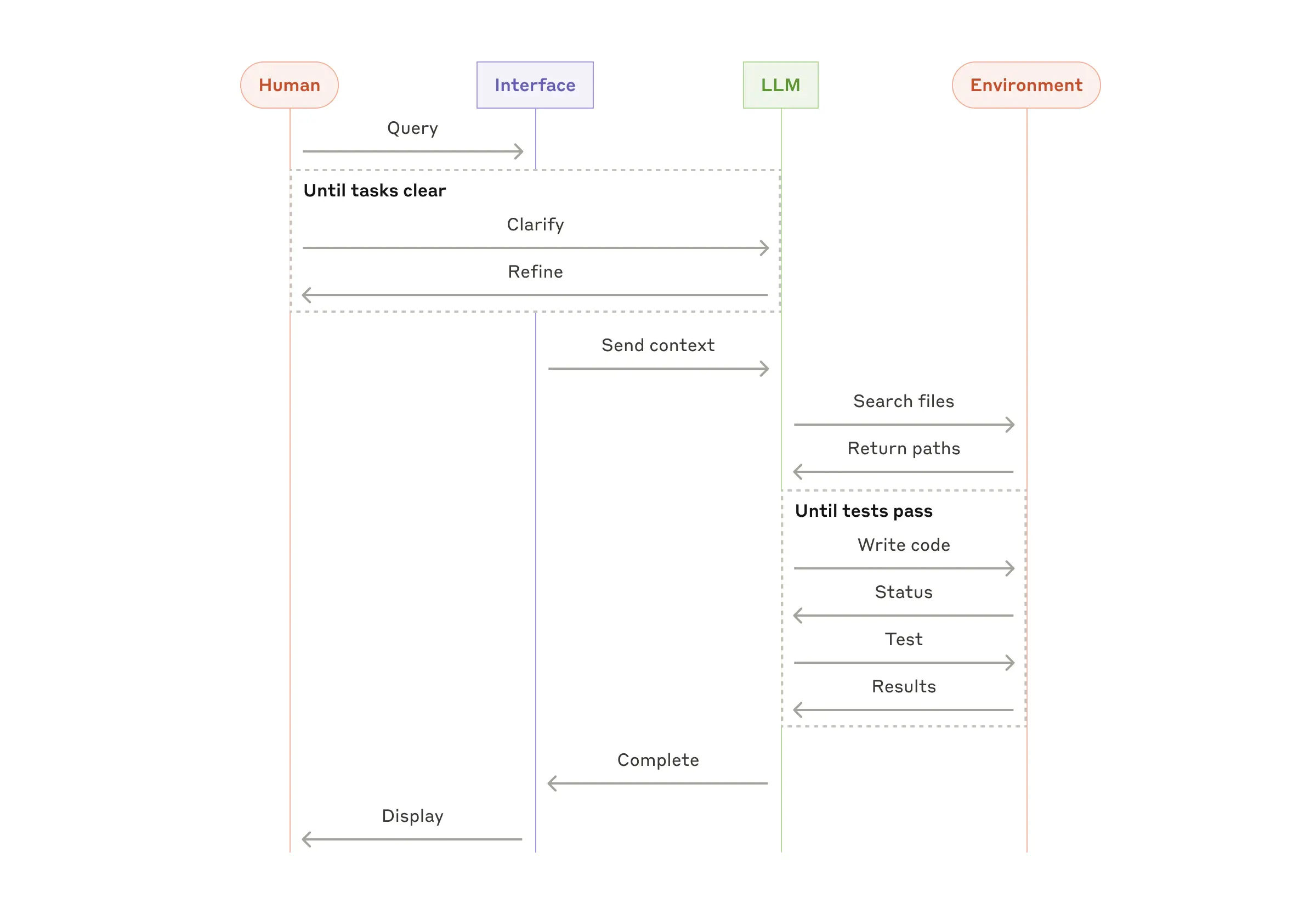
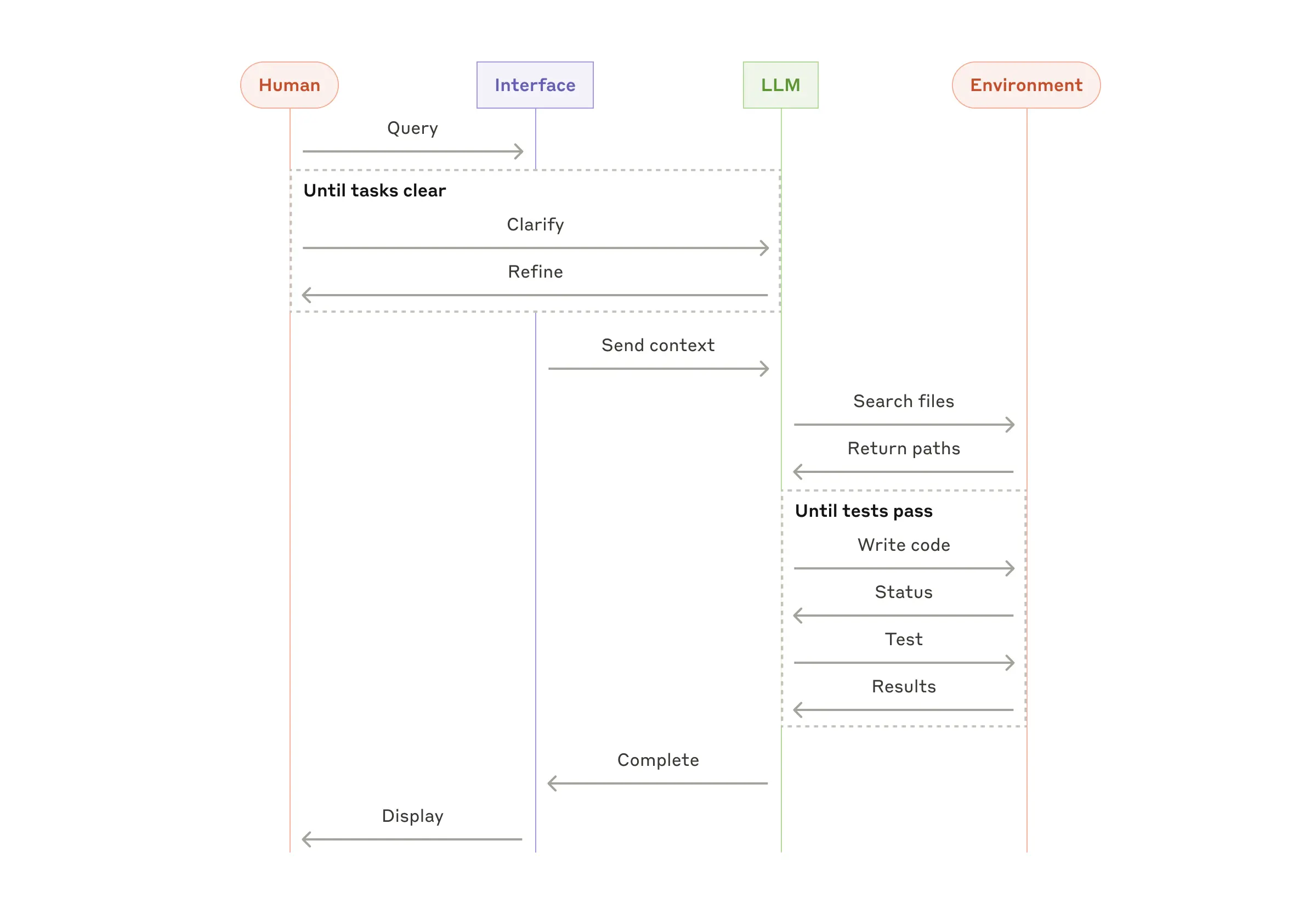
- SWE-벤치 작업을 해결하기 위한 코딩 에이전트. 작업 설명에 따라 많은 파일을 편집해야 합니다.
- 클로드가 컴퓨터를 사용하여 작업을 완료하는 "컴퓨터 사용" 참조 구현입니다 .
이러한 패턴을 결합하고 사용자 정의
이러한 빌딩 블록은 규범적이지 않습니다. 개발자가 다양한 사용 사례에 맞게 형성하고 결합할 수 있는 일반적인 패턴입니다. 모든 LLM 기능과 마찬가지로 성공의 열쇠는 성능을 측정하고 구현을 반복하는 것입니다. 반복하자면, 복잡성은 결과가 명백하게 개선될 때만 추가하는 것을 고려해야 합니다 .
요약
LLM 분야에서 성공하는 것은 가장 정교한 시스템을 구축하는 것이 아닙니다. 귀하의 필요에 맞는 올바른 시스템을 구축하는 것입니다. 간단한 프롬프트로 시작하여 포괄적인 평가로 최적화하고, 더 간단한 솔루션이 부족할 때만 다단계 에이전트 시스템을 추가하세요.
에이전트를 구현할 때 우리는 세 가지 핵심 원칙을 따르려고 노력합니다.
- 에이전트 디자인은 단순함을 유지하세요 .
- 에이전트의 계획 단계를 명확하게 보여줌으로써 투명성을 우선시합니다 .
- 철저한 도구 문서화와 테스트를 통해 에이전트-컴퓨터 인터페이스(ACI)를 신중하게 만들어보세요 .
프레임워크는 빠르게 시작하는 데 도움이 될 수 있지만, 프로덕션으로 옮길 때 추상화 계층을 줄이고 기본 구성 요소로 빌드하는 것을 주저하지 마십시오. 이러한 원칙을 따르면 강력할 뿐만 아니라 신뢰할 수 있고 유지 관리가 가능하며 사용자에게 신뢰받는 에이전트를 만들 수 있습니다.
감사의 말
Erik Schluntz와 Barry Zhang이 작성했습니다. 이 작업은 Anthropic에서 에이전트를 구축한 경험과 고객이 공유한 귀중한 통찰력을 바탕으로 작성되었으며, 이에 대해 깊이 감사드립니다.
부록 1: 실무에서의 에이전트
고객과의 협력을 통해 AI 에이전트에 대한 두 가지 특히 유망한 애플리케이션이 발견되었는데, 이는 위에서 논의한 패턴의 실질적인 가치를 보여줍니다. 두 애플리케이션 모두 에이전트가 대화와 행동이 모두 필요한 작업에 가장 큰 가치를 더하고, 명확한 성공 기준을 가지고, 피드백 루프를 가능하게 하고, 의미 있는 인간의 감독을 통합하는 방법을 보여줍니다.
A. 고객 지원
고객 지원은 익숙한 챗봇 인터페이스와 도구 통합을 통한 향상된 기능을 결합합니다. 이는 다음과 같은 이유로 더 개방적인 에이전트에게 자연스럽게 적합합니다.
- 지원 상호작용은 외부 정보 및 작업에 대한 액세스가 필요하면서도 대화 흐름을 자연스럽게 따릅니다.
- 고객 데이터, 주문 내역, 지식 기반 문서를 가져오기 위해 도구를 통합할 수 있습니다.
- 환불 발행이나 티켓 업데이트와 같은 작업은 프로그래밍 방식으로 처리할 수 있습니다.
- 성공은 사용자가 정의한 해결책을 통해 명확하게 측정할 수 있습니다.
여러 회사에서는 성공적인 문제 해결에만 요금을 청구하는 사용 기반 가격 책정 모델을 통해 이러한 접근 방식의 실현 가능성을 입증했으며, 이를 통해 상담원의 효율성에 대한 자신감을 보였습니다.
B. 코딩 에이전트
소프트웨어 개발 분야는 LLM 기능에 대한 놀라운 잠재력을 보여주었으며, 기능은 코드 완성에서 자율적인 문제 해결로 진화했습니다. 에이전트는 다음과 같은 이유로 특히 효과적입니다.
- 코드 솔루션은 자동화된 테스트를 통해 검증할 수 있습니다.
- 에이전트는 테스트 결과를 피드백으로 사용하여 솔루션을 반복할 수 있습니다.
- 문제 공간은 잘 정의되고 구조화되어 있습니다.
- 출력 품질은 객관적으로 측정할 수 있습니다.
우리의 구현에서 에이전트는 이제 풀 리퀘스트 설명만으로 SWE-bench Verified 벤치마크에서 실제 GitHub 문제를 해결할 수 있습니다. 그러나 자동화된 테스트가 기능을 검증하는 데 도움이 되는 반면, 솔루션이 더 광범위한 시스템 요구 사항과 일치하는지 확인하는 데는 여전히 인적 검토가 중요합니다.
부록 2: 도구의 신속한 엔지니어링
어떤 에이전트 시스템을 구축하든 도구는 에이전트의 중요한 부분이 될 가능성이 큽니다. 도구를 사용 하면 클로드가 API에서 정확한 구조와 정의를 지정하여 외부 서비스 및 API와 상호 작용할 수 있습니다. 클로드가 응답하면 도구를 호출할 계획이라면 API 응답에 도구 사용 블록을 포함합니다 . 도구 정의와 사양은 전체 프롬프트와 마찬가지로 신속한 엔지니어링 주의를 기울여야 합니다. 이 간단한 부록에서는 도구를 프롬프트 엔지니어링하는 방법을 설명합니다.
동일한 작업을 지정하는 방법은 종종 여러 가지가 있습니다. 예를 들어, diff를 작성하거나 전체 파일을 다시 작성하여 파일 편집을 지정할 수 있습니다. 구조화된 출력의 경우 마크다운이나 JSON 내부에서 코드를 반환할 수 있습니다. 소프트웨어 엔지니어링에서 이러한 차이점은 미용적인 것이며 손실 없이 한 쪽에서 다른 쪽으로 변환할 수 있습니다. 그러나 일부 형식은 LLM이 다른 형식보다 작성하기 훨씬 어렵습니다. diff를 작성하려면 새 코드를 작성하기 전에 청크 헤더에서 변경되는 줄 수를 알아야 합니다. JSON 내부에서 코드를 작성하려면(마크다운과 비교) 줄바꿈과 따옴표를 추가로 이스케이프해야 합니다.
도구 형식을 결정하기 위한 제안은 다음과 같습니다.
- 모델이 궁지에 몰리기 전에 "생각"할 수 있을 만큼 충분한 토큰을 제공하세요.
- 형식은 모델이 인터넷의 텍스트에서 자연스럽게 나타나는 것과 비슷하게 유지하세요.
- 수천 줄의 코드를 정확하게 계산해야 하거나 작성하는 모든 코드에 문자열을 이스케이프해야 하는 등의 포맷팅 "오버헤드"가 없는지 확인하세요.
경험에 따르면, HCI(인간-컴퓨터 인터페이스)에 얼마나 많은 노력을 기울이는지 생각하고, 좋은 에이전트 -컴퓨터 인터페이스(ACI)를 만드는 데도 같은 노력을 투자할 계획을 세우는 것이 좋습니다 . 이를 위한 몇 가지 생각은 다음과 같습니다.
- 모델의 입장에서 생각해보세요. 설명과 매개변수를 기준으로 이 도구를 사용하는 방법이 명확합니까? 아니면 신중하게 생각해야 합니까? 그렇다면 모델에도 해당할 가능성이 큽니다. 좋은 도구 정의에는 종종 사용 예, 예외 사례, 입력 형식 요구 사항, 다른 도구와의 명확한 경계가 포함됩니다.
- 매개변수 이름이나 설명을 변경하여 사물을 더 명확하게 만들 수 있는 방법은 무엇입니까? 이것을 팀의 주니어 개발자를 위한 훌륭한 docstring을 작성하는 것으로 생각하세요. 이것은 특히 많은 유사한 도구를 사용할 때 중요합니다.
- 모델이 도구를 어떻게 사용하는지 테스트하세요. 워크벤치 에서 많은 예제 입력을 실행하여 모델이 어떤 실수를 하는지 확인하고 반복하세요.
- 도구를 포카요케하세요 . 실수를 하기 어렵게 주장을 바꾸세요.
SWE-bench 용 에이전트를 빌드하는 동안 , 우리는 실제로 전체 프롬프트보다 도구 최적화에 더 많은 시간을 보냈습니다. 예를 들어, 에이전트가 루트 디렉토리에서 이동한 후 상대 파일 경로를 사용하는 도구에서 모델이 실수를 한다는 것을 발견했습니다. 이를 수정하기 위해 도구를 항상 절대 파일 경로를 요구하도록 변경했고, 모델이 이 방법을 완벽하게 사용한다는 것을 발견했습니다.
[출처] https://www.anthropic.com/research/building-effective-agents
Building effective agents
Over the past year, we've worked with dozens of teams building large language model (LLM) agents across industries. Consistently, the most successful implementations weren't using complex frameworks or specialized libraries. Instead, they were building with simple, composable patterns.


In this post, we share what we’ve learned from working with our customers and building agents ourselves, and give practical advice for developers on building effective agents.
What are agents?
"Agent" can be defined in several ways. Some customers define agents as fully autonomous systems that operate independently over extended periods, using various tools to accomplish complex tasks. Others use the term to describe more prescriptive implementations that follow predefined workflows. At Anthropic, we categorize all these variations as agentic systems, but draw an important architectural distinction between workflows and agents:
- Workflows are systems where LLMs and tools are orchestrated through predefined code paths.
- Agents, on the other hand, are systems where LLMs dynamically direct their own processes and tool usage, maintaining control over how they accomplish tasks.
Below, we will explore both types of agentic systems in detail. In Appendix 1 (“Agents in Practice”), we describe two domains where customers have found particular value in using these kinds of systems.
When (and when not) to use agents
When building applications with LLMs, we recommend finding the simplest solution possible, and only increasing complexity when needed. This might mean not building agentic systems at all. Agentic systems often trade latency and cost for better task performance, and you should consider when this tradeoff makes sense.
When more complexity is warranted, workflows offer predictability and consistency for well-defined tasks, whereas agents are the better option when flexibility and model-driven decision-making are needed at scale. For many applications, however, optimizing single LLM calls with retrieval and in-context examples is usually enough.
When and how to use frameworks
There are many frameworks that make agentic systems easier to implement, including:
- LangGraph from LangChain;
- Amazon Bedrock's AI Agent framework;
- Rivet, a drag and drop GUI LLM workflow builder; and
- Vellum, another GUI tool for building and testing complex workflows.
These frameworks make it easy to get started by simplifying standard low-level tasks like calling LLMs, defining and parsing tools, and chaining calls together. However, they often create extra layers of abstraction that can obscure the underlying prompts and responses, making them harder to debug. They can also make it tempting to add complexity when a simpler setup would suffice.
We suggest that developers start by using LLM APIs directly: many patterns can be implemented in a few lines of code. If you do use a framework, ensure you understand the underlying code. Incorrect assumptions about what's under the hood are a common source of customer error.
See our cookbook for some sample implementations.
Building blocks, workflows, and agents
In this section, we’ll explore the common patterns for agentic systems we’ve seen in production. We'll start with our foundational building block—the augmented LLM—and progressively increase complexity, from simple compositional workflows to autonomous agents.
Building block: The augmented LLM
The basic building block of agentic systems is an LLM enhanced with augmentations such as retrieval, tools, and memory. Our current models can actively use these capabilities—generating their own search queries, selecting appropriate tools, and determining what information to retain.
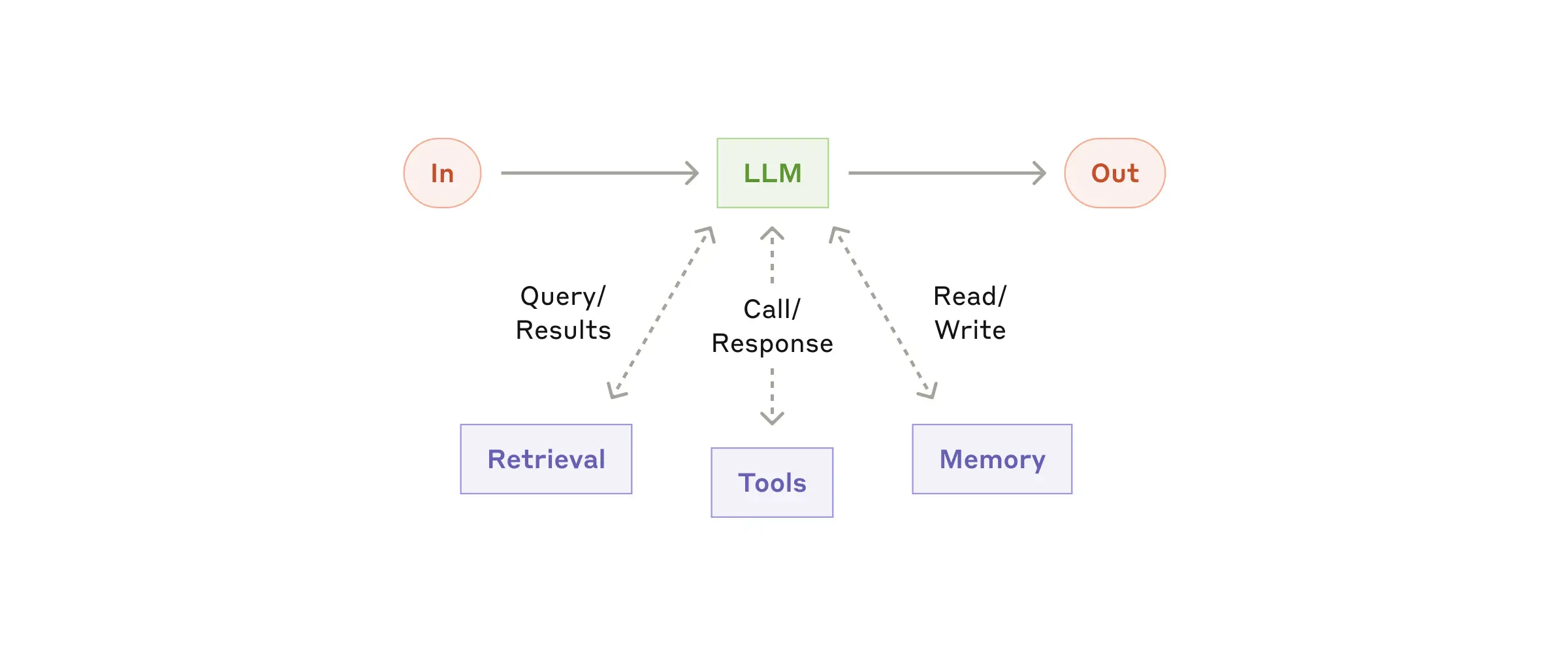
We recommend focusing on two key aspects of the implementation: tailoring these capabilities to your specific use case and ensuring they provide an easy, well-documented interface for your LLM. While there are many ways to implement these augmentations, one approach is through our recently released Model Context Protocol, which allows developers to integrate with a growing ecosystem of third-party tools with a simple client implementation.
For the remainder of this post, we'll assume each LLM call has access to these augmented capabilities.
Workflow: Prompt chaining
Prompt chaining decomposes a task into a sequence of steps, where each LLM call processes the output of the previous one. You can add programmatic checks (see "gate” in the diagram below) on any intermediate steps to ensure that the process is still on track.
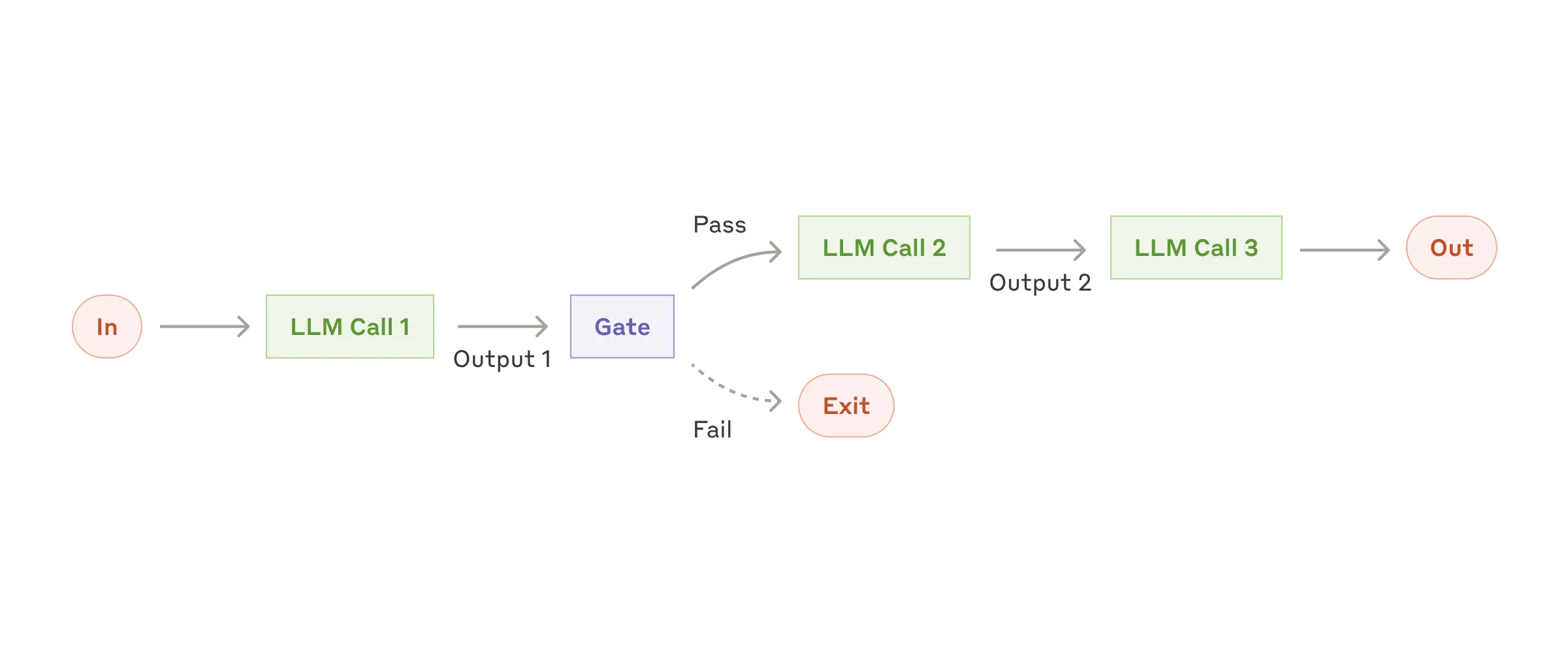
When to use this workflow: This workflow is ideal for situations where the task can be easily and cleanly decomposed into fixed subtasks. The main goal is to trade off latency for higher accuracy, by making each LLM call an easier task.
Examples where prompt chaining is useful:
- Generating Marketing copy, then translating it into a different language.
- Writing an outline of a document, checking that the outline meets certain criteria, then writing the document based on the outline.
Workflow: Routing
Routing classifies an input and directs it to a specialized followup task. This workflow allows for separation of concerns, and building more specialized prompts. Without this workflow, optimizing for one kind of input can hurt performance on other inputs.
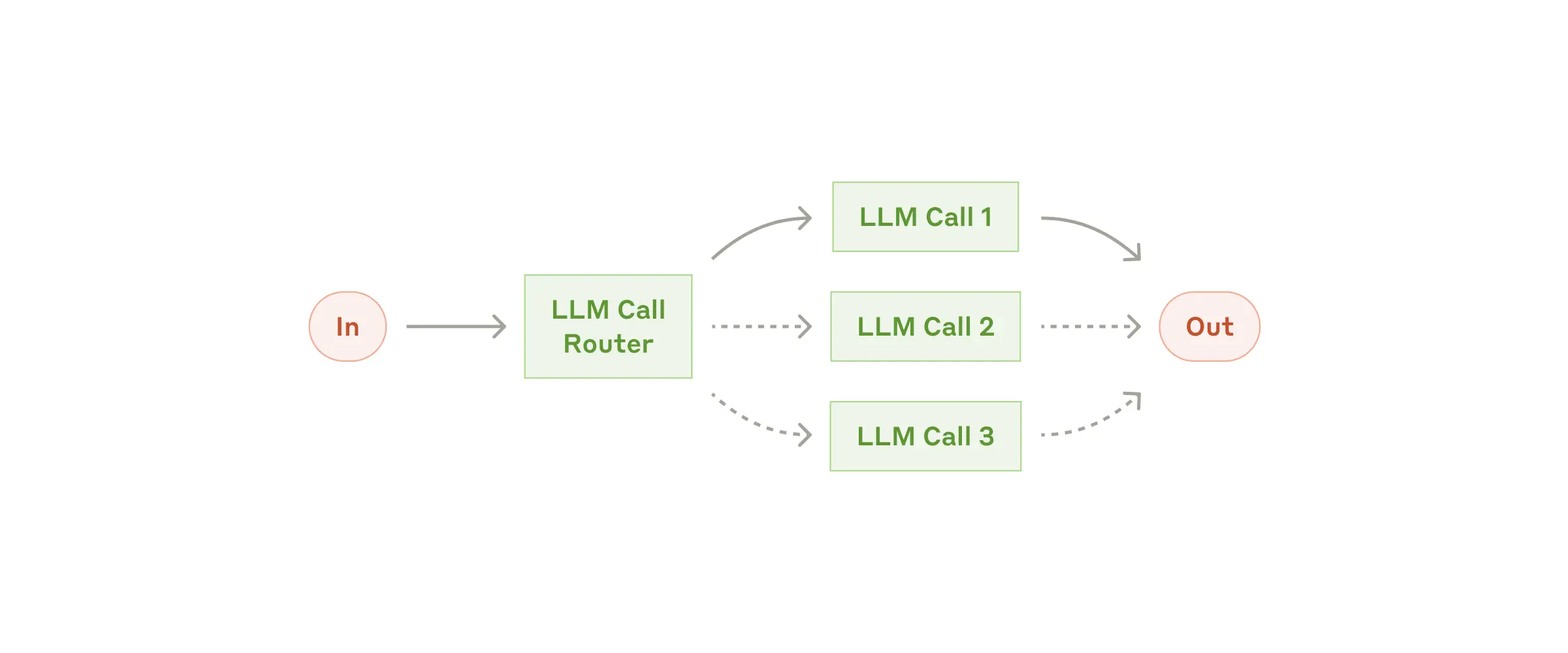
When to use this workflow: Routing works well for complex tasks where there are distinct categories that are better handled separately, and where classification can be handled accurately, either by an LLM or a more traditional classification model/algorithm.
Examples where routing is useful:
- Directing different types of customer service queries (general questions, refund requests, technical support) into different downstream processes, prompts, and tools.
- Routing easy/common questions to smaller models like Claude 3.5 Haiku and hard/unusual questions to more capable models like Claude 3.5 Sonnet to optimize cost and speed.
Workflow: Parallelization
LLMs can sometimes work simultaneously on a task and have their outputs aggregated programmatically. This workflow, parallelization, manifests in two key variations:
- Sectioning: Breaking a task into independent subtasks run in parallel.
- Voting: Running the same task multiple times to get diverse outputs.
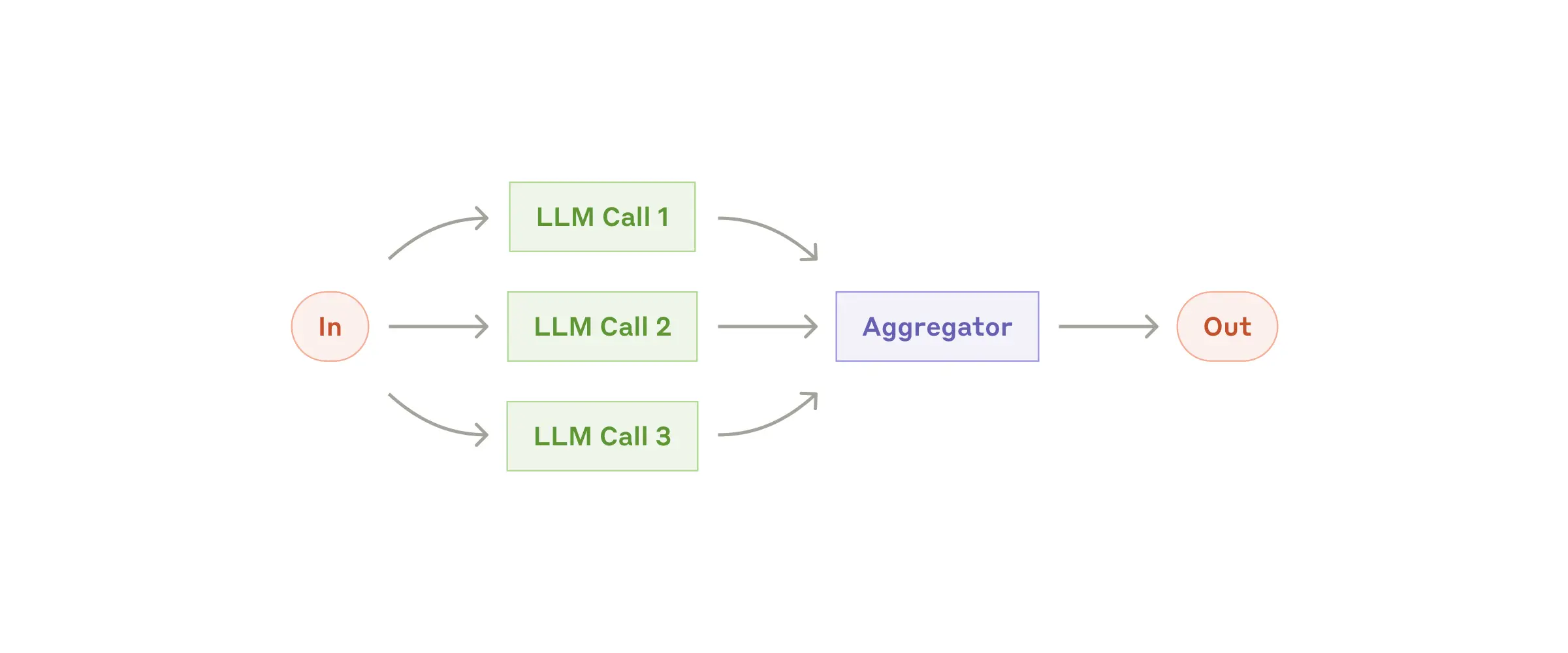
When to use this workflow: Parallelization is effective when the divided subtasks can be parallelized for speed, or when multiple perspectives or attempts are needed for higher confidence results. For complex tasks with multiple considerations, LLMs generally perform better when each consideration is handled by a separate LLM call, allowing focused attention on each specific aspect.
Examples where parallelization is useful:
- Sectioning:
- Implementing guardrails where one model instance processes user queries while another screens them for inappropriate content or requests. This tends to perform better than having the same LLM call handle both guardrails and the core response.
- Automating evals for evaluating LLM performance, where each LLM call evaluates a different aspect of the model’s performance on a given prompt.
- Voting:
- Reviewing a piece of code for vulnerabilities, where several different prompts review and flag the code if they find a problem.
- Evaluating whether a given piece of content is inappropriate, with multiple prompts evaluating different aspects or requiring different vote thresholds to balance false positives and negatives.
Workflow: Orchestrator-workers
In the orchestrator-workers workflow, a central LLM dynamically breaks down tasks, delegates them to worker LLMs, and synthesizes their results.
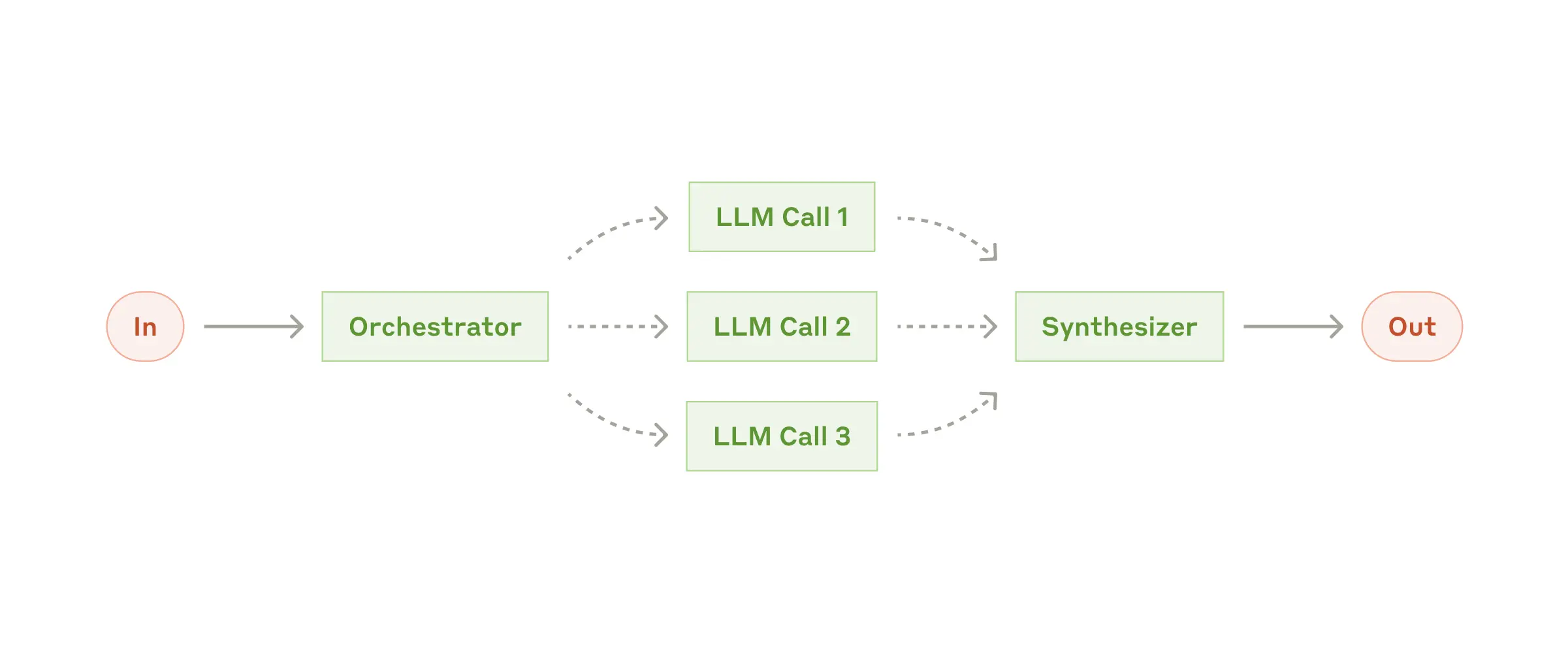
When to use this workflow: This workflow is well-suited for complex tasks where you can’t predict the subtasks needed (in coding, for example, the number of files that need to be changed and the nature of the change in each file likely depend on the task). Whereas it’s topographically similar, the key difference from parallelization is its flexibility—subtasks aren't pre-defined, but determined by the orchestrator based on the specific input.
Example where orchestrator-workers is useful:
- Coding products that make complex changes to multiple files each time.
- Search tasks that involve gathering and analyzing information from multiple sources for possible relevant information.
Workflow: Evaluator-optimizer
In the evaluator-optimizer workflow, one LLM call generates a response while another provides evaluation and feedback in a loop.
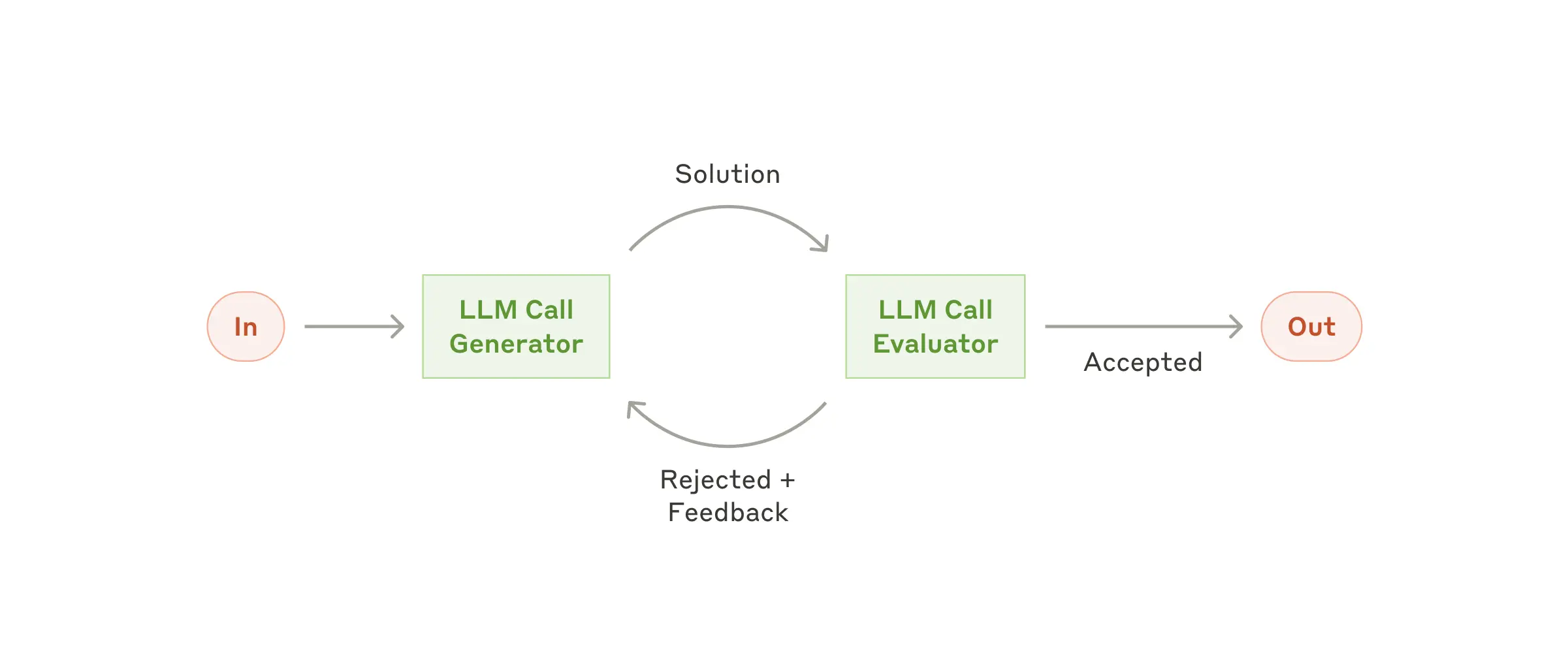
When to use this workflow: This workflow is particularly effective when we have clear evaluation criteria, and when iterative refinement provides measurable value. The two signs of good fit are, first, that LLM responses can be demonstrably improved when a human articulates their feedback; and second, that the LLM can provide such feedback. This is analogous to the iterative writing process a human writer might go through when producing a polished document.
Examples where evaluator-optimizer is useful:
- Literary translation where there are nuances that the translator LLM might not capture initially, but where an evaluator LLM can provide useful critiques.
- Complex search tasks that require multiple rounds of searching and analysis to gather comprehensive information, where the evaluator decides whether further searches are warranted.
Agents
Agents are emerging in production as LLMs mature in key capabilities—understanding complex inputs, engaging in reasoning and planning, using tools reliably, and recovering from errors. Agents begin their work with either a command from, or interactive discussion with, the human user. Once the task is clear, agents plan and operate independently, potentially returning to the human for further information or judgement. During execution, it's crucial for the agents to gain “ground truth” from the environment at each step (such as tool call results or code execution) to assess its progress. Agents can then pause for human feedback at checkpoints or when encountering blockers. The task often terminates upon completion, but it’s also common to include stopping conditions (such as a maximum number of iterations) to maintain control.
Agents can handle sophisticated tasks, but their implementation is often straightforward. They are typically just LLMs using tools based on environmental feedback in a loop. It is therefore crucial to design toolsets and their documentation clearly and thoughtfully. We expand on best practices for tool development in Appendix 2 ("Prompt Engineering your Tools").
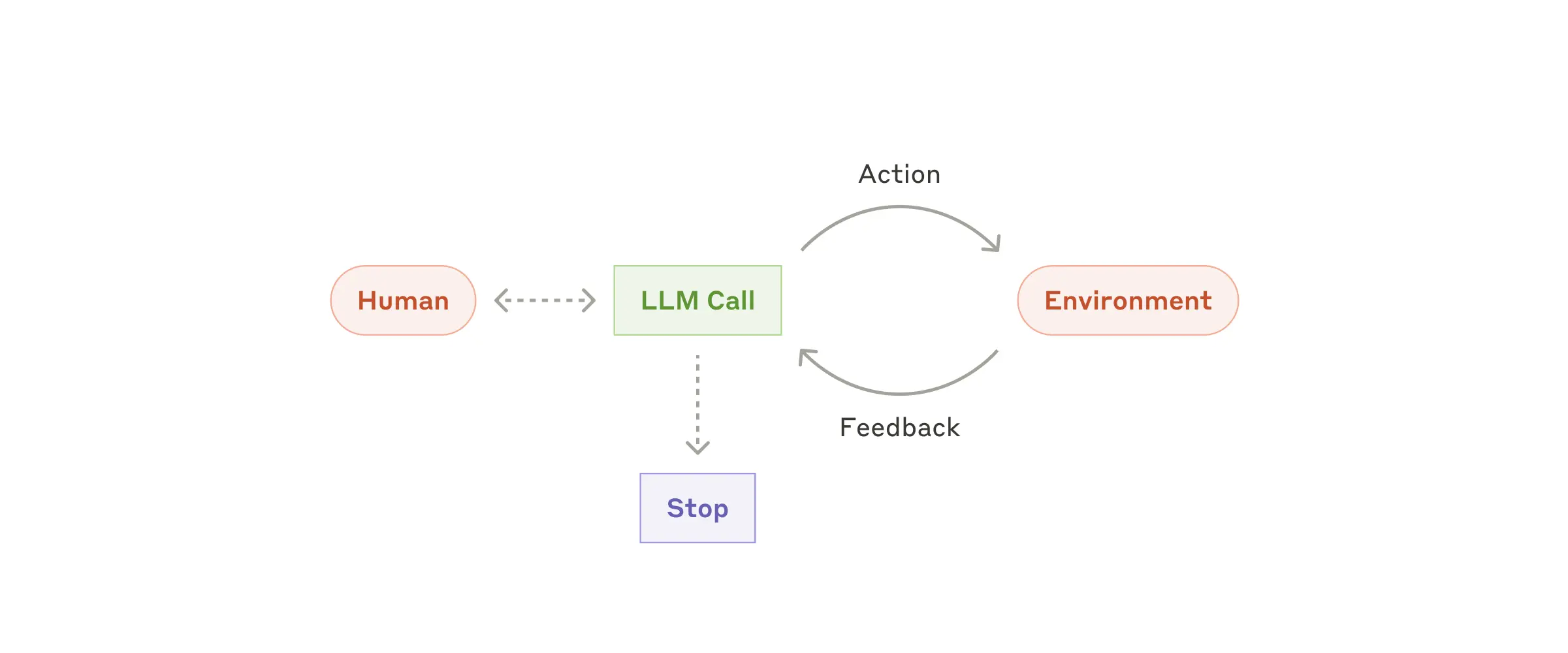
When to use agents: Agents can be used for open-ended problems where it’s difficult or impossible to predict the required number of steps, and where you can’t hardcode a fixed path. The LLM will potentially operate for many turns, and you must have some level of trust in its decision-making. Agents' autonomy makes them ideal for scaling tasks in trusted environments.
The autonomous nature of agents means higher costs, and the potential for compounding errors. We recommend extensive testing in sandboxed environments, along with the appropriate guardrails.
Examples where agents are useful:
The following examples are from our own implementations:
- A coding Agent to resolve SWE-bench tasks, which involve edits to many files based on a task description;
- Our “computer use” reference implementation, where Claude uses a computer to accomplish tasks.
Combining and customizing these patterns
These building blocks aren't prescriptive. They're common patterns that developers can shape and combine to fit different use cases. The key to success, as with any LLM features, is measuring performance and iterating on implementations. To repeat: you should consider adding complexity only when it demonstrably improves outcomes.
Summary
Success in the LLM space isn't about building the most sophisticated system. It's about building the right system for your needs. Start with simple prompts, optimize them with comprehensive evaluation, and add multi-step agentic systems only when simpler solutions fall short.
When implementing agents, we try to follow three core principles:
- Maintain simplicity in your agent's design.
- Prioritize transparency by explicitly showing the agent’s planning steps.
- Carefully craft your agent-computer interface (ACI) through thorough tool documentation and testing.
Frameworks can help you get started quickly, but don't hesitate to reduce abstraction layers and build with basic components as you move to production. By following these principles, you can create agents that are not only powerful but also reliable, maintainable, and trusted by their users.
Acknowledgements
Written by Erik Schluntz and Barry Zhang. This work draws upon our experiences building agents at Anthropic and the valuable insights shared by our customers, for which we're deeply grateful.
Appendix 1: Agents in practice
Our work with customers has revealed two particularly promising applications for AI agents that demonstrate the practical value of the patterns discussed above. Both applications illustrate how agents add the most value for tasks that require both conversation and action, have clear success criteria, enable feedback loops, and integrate meaningful human oversight.
A. Customer support
Customer support combines familiar chatbot interfaces with enhanced capabilities through tool integration. This is a natural fit for more open-ended agents because:
- Support interactions naturally follow a conversation flow while requiring access to external information and actions;
- Tools can be integrated to pull customer data, order history, and knowledge base articles;
- Actions such as issuing refunds or updating tickets can be handled programmatically; and
- Success can be clearly measured through user-defined resolutions.
Several companies have demonstrated the viability of this approach through usage-based pricing models that charge only for successful resolutions, showing confidence in their agents' effectiveness.
B. Coding agents
The software development space has shown remarkable potential for LLM features, with capabilities evolving from code completion to autonomous problem-solving. Agents are particularly effective because:
- Code solutions are verifiable through automated tests;
- Agents can iterate on solutions using test results as feedback;
- The problem space is well-defined and structured; and
- Output quality can be measured objectively.
In our own implementation, agents can now solve real GitHub issues in the SWE-bench Verified benchmark based on the pull request description alone. However, whereas automated testing helps verify functionality, human review remains crucial for ensuring solutions align with broader system requirements.
Appendix 2: Prompt engineering your tools
No matter which agentic system you're building, tools will likely be an important part of your agent. Tools enable Claude to interact with external services and APIs by specifying their exact structure and definition in our API. When Claude responds, it will include a tool use block in the API response if it plans to invoke a tool. Tool definitions and specifications should be given just as much prompt engineering attention as your overall prompts. In this brief appendix, we describe how to prompt engineer your tools.
There are often several ways to specify the same action. For instance, you can specify a file edit by writing a diff, or by rewriting the entire file. For structured output, you can return code inside markdown or inside JSON. In software engineering, differences like these are cosmetic and can be converted losslessly from one to the other. However, some formats are much more difficult for an LLM to write than others. Writing a diff requires knowing how many lines are changing in the chunk header before the new code is written. Writing code inside JSON (compared to markdown) requires extra escaping of newlines and quotes.
Our suggestions for deciding on tool formats are the following:
- Give the model enough tokens to "think" before it writes itself into a corner.
- Keep the format close to what the model has seen naturally occurring in text on the internet.
- Make sure there's no formatting "overhead" such as having to keep an accurate count of thousands of lines of code, or string-escaping any code it writes.
One rule of thumb is to think about how much effort goes into human-computer interfaces (HCI), and plan to invest just as much effort in creating good agent-computer interfaces (ACI). Here are some thoughts on how to do so:
- Put yourself in the model's shoes. Is it obvious how to use this tool, based on the description and parameters, or would you need to think carefully about it? If so, then it’s probably also true for the model. A good tool definition often includes example usage, edge cases, input format requirements, and clear boundaries from other tools.
- How can you change parameter names or descriptions to make things more obvious? Think of this as writing a great docstring for a junior developer on your team. This is especially important when using many similar tools.
- Test how the model uses your tools: Run many example inputs in our workbench to see what mistakes the model makes, and iterate.
- Poka-yoke your tools. Change the arguments so that it is harder to make mistakes.
While building our agent for SWE-bench, we actually spent more time optimizing our tools than the overall prompt. For example, we found that the model would make mistakes with tools using relative filepaths after the agent had moved out of the root directory. To fix this, we changed the tool to always require absolute filepaths—and we found that the model used this method flawlessly.
[출처] https://www.anthropic.com/research/building-effective-agents
광고 클릭에서 발생하는 수익금은 모두 웹사이트 서버의 유지 및 관리, 그리고 기술 콘텐츠 향상을 위해 쓰여집니다.
