
- 전체
- 안드로이드 플랫폼
- 아두이노
- 라즈베리 파이
- 안드로이드 ADK
- Embedded HardWare
- Embedded FirmWare
- Embedded Platform
- Embedded SoftWare
- 임베디드 리눅스
- Hobby Electronics
- 임베디드기사 - 국가기술자격
- VHDL 디지털설계
- M2M_IoT_사물지능통신
- 아마추어 로봇
- EDA - Electronic CAD
- 로봇공학
- 국가기술자격 로봇 제작 개발 자격증
- IoT (임베디드 인터넷)
아두이노 아두이노 부트로더 굽기 2
2015.07.04 17:50
Burn a bootloader to a blank atmega328/atmega328p with an Arduino UNO
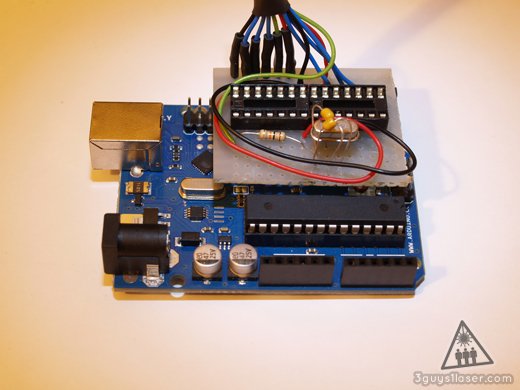
Build your own optiLoader shield!
You cant use your Arduino UNO as programmer unless you modify it, but i didnt want to do that!
Some people had luck using a Resistor and Capacitor to disable the auto reset feature but it did not work for me (Using an Arduino UNO R2)
So i tried using a parallel port programmer but never got it to work. It seems easy, so if your interested go ahead and try it yourself, but be warned, could lead to frustration :)
Fortunately Bill Westfield wrote optiLoader!
The readme file doesent tell you how to connect the blank chip so i asumed that you need an oscillator and a pull up resistor and... well... it worked! (for me)
A nice thing about optiLoader is that is supports multiple chips, even atmega328 (non p) - the cheaper version whithout "pico power" features.
That way you dont have to edit your avrdude's config file, after bootloading a atmega328 the bootloader lies to avrdude telling that he is a atmega328p, keeping em quiet :)
You need:
- Working Arduino (with µC and Bootloader) - optiLoader will run on that one
- 16MHz oscillator
- 2 x 22pF ceramic capacitor
- 10KΩ resistor
Update:
If your chip comes straight out of the factory it 'should' be fused to work without an external clock - meaning that you don't need the clock and the two capacitors.
But if you allready burnt a bootloader (even if it was aborted) or your supplier modifed the fuses for some reason - you need them.


Breadboard setup looks like this:
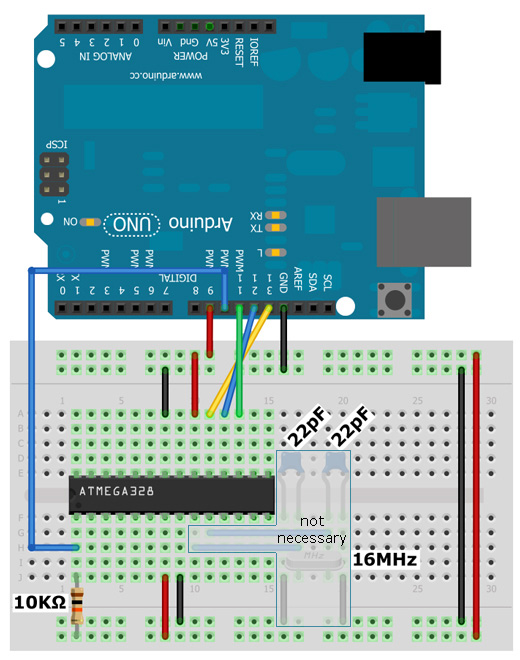
Powering the circuit over pin 9 is questionable, but seems to work well with this setup (look at optiLoader source files for more info on this).
After downloading optiLoader go to the directory where your sketches reside and create a new directory named 'optiLoader' and put the files inside it.
Structure should look like this:
optiLoader/optiLoader.pde
optiLoader/optiLoader.h
If you use Arduino SDK 1.0 it will ask you if it should rename it to .ino -> Allow that.
Now upload optiLoader to your arduino and connect the serial monitor (with 19200 Baud) to see what is going on.
You dont even need the serial monitor, but thats the only way to get feedback on the process.
If you plan to make a shield out of this circuit you could learn from my mistakes:
Look at the main image on top of this page, i forgot to leave room to get to the reset button :)
[출처] http://3g1l.com/blog-burn-bootloader-blank-atmega328atmega328p-arduino-uno
광고 클릭에서 발생하는 수익금은 모두 웹사이트 서버의 유지 및 관리, 그리고 기술 콘텐츠 향상을 위해 쓰여집니다.
