
ESXi 5.x Installation on Intel NUC fails with “No Network Adapters”
2016.05.14 20:23
ESXi 5.x Installation on Intel NUC fails with “No Network Adapters”
When you try to install ESXi 5.x on an Intel Next Unit of Computing (NUC) system, the installation fails with the following error message:
No Network Adapters
No network adapters were detected. Either no network adapters are physically connected to the system, or a suitable driver could not be located. A third party driver may be required.
Ensure that there is at least one network adapter physically connected to the system before attempting installation. If the problem persists, consult the VMware Knowledge Base.
3rd Generation Intel NUC Models:
- Intel NUC DC53427HYE
- Intel NUC DC3217IYE
- Intel NUC DC3217BY
4th Generation Intel NUC Models:
- Intel NUC D54250WYK
- Intel NUC D34010WYK
- Intel NUC D54250WYKH
- Intel NUC D34010WYKH
5th Generation Intel NUC Models:
- Intel NUC5i7RYH
- Intel NUC5i5RYH
- Intel NUC5i5MYHE
- Intel NUC5i5RYK
- Intel NUC5i3RYH
- Intel NUC5i3MYHE
- Intel NUC5i3RYK
This message is caused by missing Gigabit Ethernet Controller drivers that are not included in the ESXi Base Image. To fix that, you have to create an customized ESXi Image and add the proper drivers.
Tested with:


- VMware ESXi 5.0
- VMware ESXi 5.1
- VMware ESXi 5.5
Create Customized ISO with PowerCLI (4th, 5th Gen NUC)
You can use PowerCLI to create a customized ISO. (Check this post if you are new to PowerCLI)
- Download and install vSphere PowerCLI 5.8 to use the Image Builder. This requires an account at vmware.com. If you are not entitled to download PowerCLI, register for an evaluation.
- Open VMware vSphere PowerCLI
- Use the following commands to create a customized NUC ESXi Image. This will download all required files (about 300MB) and create a bootable ISO file. If you want to use another ESXi version than ESXi 5.5 February Patch 2015, select another Image Profile. A list of all Image Profiles is available here.
-
Add-EsxSoftwareDepot https://hostupdate.vmware.com/software/VUM/PRODUCTION/main/vmw-depot-index.xml
Add-EsxSoftwareDepot http://vibsdepot.v-front.de
New-EsxImageProfile -CloneProfile "ESXi-5.5.0-20150204001-standard" -name "ESXi-5.5.0-20150204001-NUC" -Vendor "virten.net" -AcceptanceLevel "CommunitySupported"
Add-EsxSoftwarePackage -ImageProfile "ESXi-5.5.0-20150204001-NUC" -SoftwarePackage "net-e1000e"
Add-EsxSoftwarePackage -ImageProfile "ESXi-5.5.0-20150204001-NUC" -SoftwarePackage "sata-xahci"
Export-ESXImageProfile -ImageProfile "ESXi-5.5.0-20150204001-NUC" -ExportToISO -filepath ESXi-5.5.0-20150204001-NUC.iso
Credit for the sata-xahci map file goes to Andreas Peetz at VMware Front Experience.
- Burn ESXi-5.5.0-20150204001-NUC.iso to a cd or create a usb flash drive
- Install ESXi
Create Customized ISO with ESXi-Customizer by v-front.de
ESXi-Customizer is a user-friendly program thats can be used to customize the original ESXi installation media with drivers that are not originally included. The script runs entirely on Windows. The required drivers are dependent on your Intel NUC Generation.
- Download required Files (To download .vib files: Right click -> Save target as)
– ESXi 5.1 U1 ISO image (VMware-VMvisor-Installer-5.1.0.update01-1065491.x86_64.iso)
– ESXi 5.5 U2 ISO image (VMware-ESXi-5.5U2-RollupISO2.iso)
– ESXi-Customizer (ESXi-Customizer-v2.7.1.exe)
– Intel Driver (net-e1001e-1.0.0.x86_64.vib) (3rd Gen NUC)
– Intel Driver (net-e1000e-2.3.2.x86_64.vib) (4th Gen NUC)
– Intel Driver (e1000e-3.1.0.2-glr.vib) (5th Gen NUC) from GLRoman
– SATA Controller (sata-xahci-1.27-1.x86_64.vib) (4th Gen NUC) from v-front.de - Run ESXi-Customizer-v2.7.1.exe to extract the required files
- Run ESXi-Customizer.cmd
- Select the ESXi Image and VIB File
- Make sure to tick “Create (U)EFI-bootable ISO”
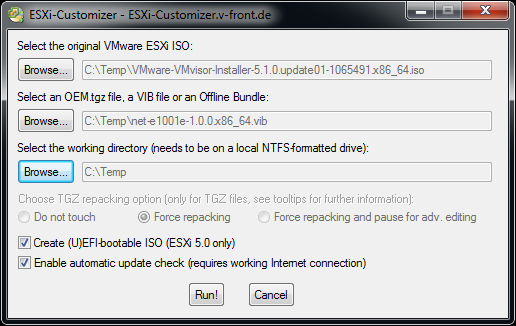
- Press Run!
- Repeat Step 2-6 to add all required drivers
- Burn the new created ISO file and use it in your Intel NUC
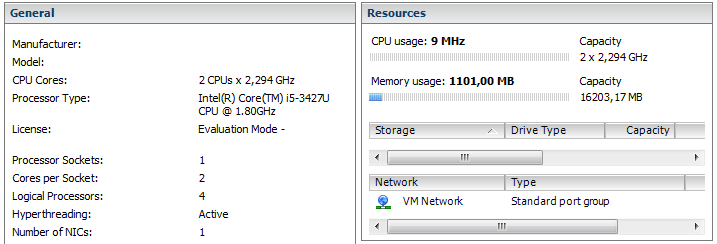
[Update: Added 4th gen Models]
[Update: Added 5th gen Models]
[출처] http://www.virten.net/2013/09/esxi-5-x-installation-on-intel-nuc-fails-with-no-network-adapters/
광고 클릭에서 발생하는 수익금은 모두 웹사이트 서버의 유지 및 관리, 그리고 기술 콘텐츠 향상을 위해 쓰여집니다.
