
Find and List all Files and Folders in a Directory
2016.12.04 10:09
Find and List all Files and Folders in a Directory
In this article I will explain how you can find and create a list of all the files and folder in a directory:
Jump To:
- Get List of All Files Using, FileSystemObject
- Get List of All Folders Using, FileSystemObject
- Dir()
- Get List of All Files in a Directory Using Dir()
- Get List of All Folders and Files in a Directory Using Dir()
Get List of All Files Using, FileSystemObject:
In this example I will assume that I have the following files in the directory “D:StuffFreelancesWebsiteBlogArraysPics”:
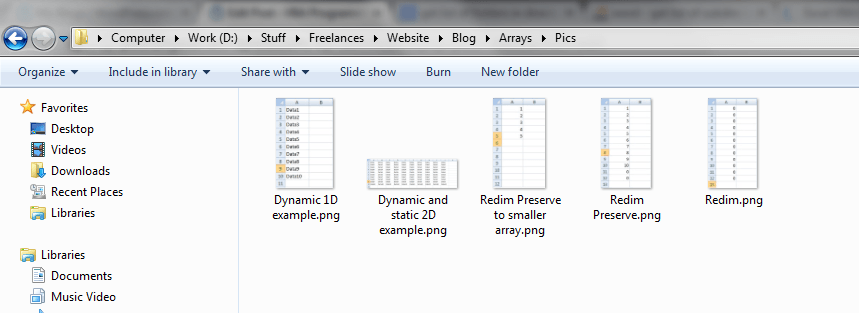
The code below retrieves the file in this directory and creates a list of their names and paths:
Sub  Example1()

Dim  objFSO As  Object

Dim  objFolder As  Object

Dim  objFile As  Object

Dim  i As  Integer


'Create an instance of the FileSystemObject

Set  objFSO = CreateObject("Scripting.FileSystemObject")

'Get the folder object

Set  objFolder = objFSO.GetFolder("D:StuffFreelancesWebsiteBlogArraysPics")

i = 1

'loops through each file in the directory and prints their names and path

For  Each objFile In objFolder.Files

    'print file name

    Cells(i + 1, 1) = objFile.Name

    'print file path

    Cells(i + 1, 2) = objFile.Path

    i = i + 1

Next  objFile

End  Sub
Result:

Get List of All Folders Using, FileSystemObject:
In this example I will use the directory “D:StuffFreelancesWebsiteBlog”. The following folders can be found in that directory:

Using the code below, the names of the folders and their associated paths are listed on column A and B:
Sub  Example2()

Dim  objFSO As  Object

Dim  objFolder As  Object

Dim  objSubFolder As  Object

Dim  i As  Integer


'Create an instance of the FileSystemObject

Set  objFSO = CreateObject("Scripting.FileSystemObject")

'Get the folder object

Set  objFolder = objFSO.GetFolder("D:StuffFreelancesWebsiteBlog")

i = 1

'loops through each file in the directory and prints their names and path

For  Each objSubFolder In objFolder.subfolders

    'print folder name

    Cells(i + 1, 1) = objSubFolder.Name

    'print folder path

    Cells(i + 1, 2) = objSubFolder.Path

    i = i + 1

Next  objSubFolder

End  Sub
Result:

Dir():
Using the Dir() function you can get the list of files and folders in a specific path. The Dir() function takes 2 input parameters, the directory path and the type of file we are looking for:
strFileOrFolder = Dir(strPath, FileAttribute)


strPath is the path of the directory which the files and folder are in. The FileAttribute specifies what type of file or folder we are after. For more information about the FileAttribute parameter click here.
Get List of All Files in a Directory Using Dir():
In this example I will assume that I have the following files in the directory “D:StuffFreelancesWebsiteBlogArraysPics”:
The code below retrieves the name and path of the files in that directory using the DIR() function and lists them in column A and B:
Sub  Example3()


Dim  varDirectory As  Variant

Dim  flag As  Boolean

Dim  i As  Integer

Dim  strDirectory As  String


strDirectory = "D:StuffFreelancesWebsiteBlogArraysPics"

i = 1

flag = True

varDirectory = Dir(strDirectory, vbNormal)


While  flag = True

    If  varDirectory = "" Then

        flag = False

    Else

        Cells(i + 1, 1) = varDirectory

        Cells(i + 1, 2) = strDirectory + varDirectory

        'returns the next file or directory in the path

        varDirectory = Dir

        i = i + 1

    End If

Wend
Result:
Get List of All Folders and Files in a Directory Using Dir():
In this example I will assume that I have the following files and folders in the directory “D:StuffFreelancesWebsiteBlog”:
The code below retrieves the name and path of the folders and files in that directory using the DIR() function and lists them in column A and B:
Sub  Example4()


Dim  varDirectory As  Variant

Dim  flag As  Boolean

Dim  i As  Integer

Dim  strDirectory As  String


strDirectory = "D:StuffFreelancesWebsiteBlog"

i = 1

flag = True

varDirectory = Dir(strDirectory, vbDirectory)


While  flag = True

    If  varDirectory = "" Then

        flag = False

    Else

        Cells(i + 1, 1) = varDirectory

        Cells(i + 1, 2) = strDirectory + varDirectory

        'returns the next file or directory in the path

        varDirectory = Dir

        i = i + 1

    End If

Wend
Result:

[출처] http://software-solutions-online.com/list-files-and-folders-in-a-directory/
광고 클릭에서 발생하는 수익금은 모두 웹사이트 서버의 유지 및 관리, 그리고 기술 콘텐츠 향상을 위해 쓰여집니다.
