
Welcome to Part 4 for Spring 3.0 MVC Series. In previous article we saw how to create a form using Spring 3 MVC and display it in JSP. Also we learn about annotation @ModelAttribute.
In this part we will discuss about Tiles Framework and its Integration with Spring 3.0 MVC. We will add Tiles support to our HelloWorld Spring application that we created in previous parts. I strongly recommend you to go through previous articles and download the source code of our sample application.
Spring 3.0 MVC Series
- Part 1: Introduction to Spring 3.0 MVC framework
- Part 2: Create Hello World Application in Spring 3.0 MVC
- Part 3: Handling Forms in Spring 3.0 MVC
- Part 4: Spring 3 MVC Tiles Plugin Tutorial with Example in Eclipse
- Part 5: Spring 3 MVC Internationalization & Localization Tutorial with Example in Eclipse
- Part 6: Spring 3 MVC Themes in Spring-Tutorial with Example
- Part 7: Create Spring 3 MVC Hibernate 3 Example using Maven in Eclipse
- Spring 3 MVC Interceptor tutorial
- Spring MVC: Save / Retrieve BLOB object with Hibernate
- How to change spring-servlet.xml filename
- Spring MVC: Multiple Row Form Submit using List of Beans
- Spring 3 MVC – Autocomplete with JQuery & JSON example
- Spring MVC + FreeMarker (FTL) Integration example
- Spring MVC HashMap Form Integration example
- Spring MVC Multiple File Upload example
Introduction to Tiles 2
Nowadays, website are generally divided into pieces of reusable template that are being rendered among different web pages. For example a site containing header, footer, menu etc. This items remains same through out the website and give it a common look and feel. It is very difficult to hard code this in each and every webpage and if later a change is needed than all the pages needs to be modified. Hence we use templatization mechanism. We create a common Header, Footer, Menu page and include this in each page.
Tiles Plugin allow both templating and componentization. In fact, both mechanisms are similar: you
define parts of page (a “Tile”) that you assemble to build another part or a full page. A part can
take parameters, allowing dynamic content, and can be seen as a method in JAVA language. Tiles is a templating system used to maintain a consistent look and feel across all the web pages of a web application. It increase the reusability of template and reduce code duplication.
A common layout of website is defined in a central configuration file and this layout can be extended across all the webpages of the web application.
Our Application Layout
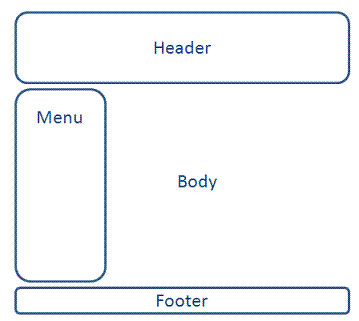
Our goal is to add Header, Footer and Menu to our Spring 3 HelloWorld application. Following will be the layout of the same.
Required JAR files
In order to add Tiles support to our Spring3 application, we will need few jar files. Following is the list of JARs in our example. Add these JARs in WEB-INF/lib folder.
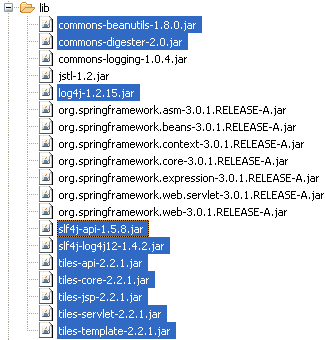
The highlighted jar files in above list are the new jars to be added in project for Tiles integration.
Configuring Tiles framework in Spring MVC
To configure Tiles, an entry for bean TilesConfigure has to be made in spring-servlet.xml. Open the spring-servlet.xml from WEB-INF folder and add following code between <beans> </beans> tag.
File: /WebContent/WEB-INF/spring-servlet.xml
<bean id="viewResolver"
		class="org.springframework.web.servlet.view.UrlBasedViewResolver">
		<property name="viewClass">
			<value>
				org.springframework.web.servlet.view.tiles2.TilesView
			</value>
		</property>
	</bean>
	<bean id="tilesConfigurer"
		class="org.springframework.web.servlet.view.tiles2.TilesConfigurer">
		<property name="definitions">
			<list>
				<value>/WEB-INF/tiles.xml</value>
			</list>
		</property>
	</bean>
An input configuration file /WEB-INF/tiles.xml is passed as argument in above bean definition. This file contains the Tiles definition for our web application.


Create a file tiles.xml in WEB-INF folder and copy following code into it.
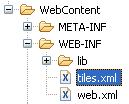
File: WebContent/WEB-INF/tiles.xml
<?xml version="1.0" encoding="UTF-8" ?>
<!DOCTYPE tiles-definitions PUBLIC
       "-//Apache Software Foundation//DTD Tiles Configuration 2.0//EN"
       "http://tiles.apache.org/dtds/tiles-config_2_0.dtd">
<tiles-definitions>
	<definition name="base.definition"
		template="/WEB-INF/jsp/layout.jsp">
		<put-attribute name="title" value="" />
		<put-attribute name="header" value="/WEB-INF/jsp/header.jsp" />
		<put-attribute name="menu" value="/WEB-INF/jsp/menu.jsp" />
		<put-attribute name="body" value="" />
		<put-attribute name="footer" value="/WEB-INF/jsp/footer.jsp" />
	</definition>

	<definition name="contact" extends="base.definition">
		<put-attribute name="title" value="Contact Manager" />
		<put-attribute name="body" value="/WEB-INF/jsp/contact.jsp" />
	</definition>

</tiles-definitions>
Here in tiles.xml we have define a template base.definition. This layout contains attributes such as Header, Title, Body, Menu and Footer. The layout is then extended and new definitions for Contact page. We have override the default layout and changed the content for Body and Title.
Creating View – The JSPs
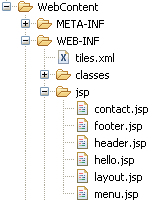
We will define the template for our webapplication in a JSP file called layout.jsp. This template will contain different segments of web page (Header, Footer, Menu etc). Create four new JSP files layout.jsp, header.jsp, menu.jsp and footer.jsp and copy following content in each of them.
File: WebContent/WEB-INF/jsp/layout.jsp
<%@ taglib uri="http://tiles.apache.org/tags-tiles" prefix="tiles"%>
<!DOCTYPE HTML PUBLIC "-//W3C//DTD HTML 4.01 Transitional//EN"
"http://www.w3.org/TR/html4/loose.dtd">
<html>
<head>
<meta http-equiv="Content-Type" content="text/html; charset=UTF-8">
<title><tiles:insertAttribute name="title" ignore="true" /></title>
</head>
<body>
<table border="1" cellpadding="2" cellspacing="2" align="center">
	<tr>
		<td height="30" colspan="2"><tiles:insertAttribute name="header" />
		</td>
	</tr>
	<tr>
		<td height="250"><tiles:insertAttribute name="menu" /></td>
		<td width="350"><tiles:insertAttribute name="body" /></td>
	</tr>
	<tr>
		<td height="30" colspan="2"><tiles:insertAttribute name="footer" />
		</td>
	</tr>
</table>
</body>
</html>
File: WebContent/WEB-INF/jsp/header.jsp
<h1>Header</h1>
File: WebContent/WEB-INF/jsp/menu.jsp
<p>Menu</p>
File: WebContent/WEB-INF/jsp/footer.jsp
<p>Copyright © ViralPatel.net</p>
That’s All Folks
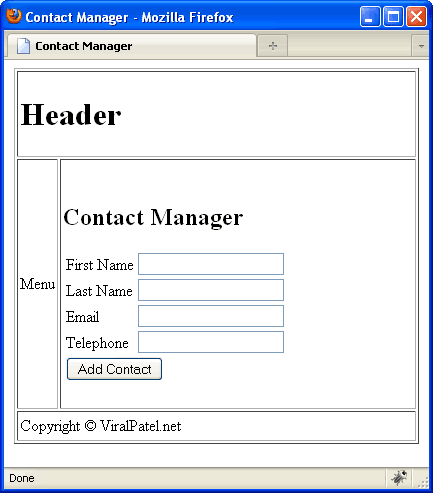
Compile and Execute the application in Eclipse and see that the header, menu and footer are properly applied.
Download Source Code
Click here to download Source Code Spring3MVC-part3.zip
Moving On
Today we saw how we can configure Tiles framework with Spring 3 MVC application. We used org.springframework.web.servlet.view.tiles2.TilesConfigurer class in bean definition to define the tiles configuration file. In next part we will discuss about Internationalization/Localization and adding its support in Spring 3 MVC. I hope you liked this article. Feel free to post your queries and comments in comment section.
