
[bootstrap] spring 프로젝트에 bootstrap 적용
2017.01.29 22:24
[bootstrap] spring 프로젝트에 bootstrap 적용
ColumnConverter 개발을 시작하고 화면을 어떻게 구성할까 고민하다가 bootstrap으로 하기로 결정했다. 실무에서 front를 개발해 본적은 없지만 어떤식으로 써야되는지는 대충 알고 있었고 이 기회에 경험이라고 생각하고 해보기로 했다. 사용하면서 느낀점은 정말 간편하고 이쁘고 빠르게 사용하고 개발 할 수 있어서 정말 좋았다. 아마 개인 프로젝트를 진행할 때는 모두 bootstrap을 사용하지 않을까 싶다.
1. 다운로드
다운로드 : http://getbootstrap.com/getting-started/#download
여기서 다운을 받을 수 있고 사실 공식 사이트만 참고해도 쉽게 다운받고 적용 할 수 있다.
Github : https://github.com/twbs/bootstrap
2. 적용
1) 파일 복사
다운받은 파일 압축을 풀고 bootstrap 폴더를
webapp/resources/
경로에 파일을 복사한다.
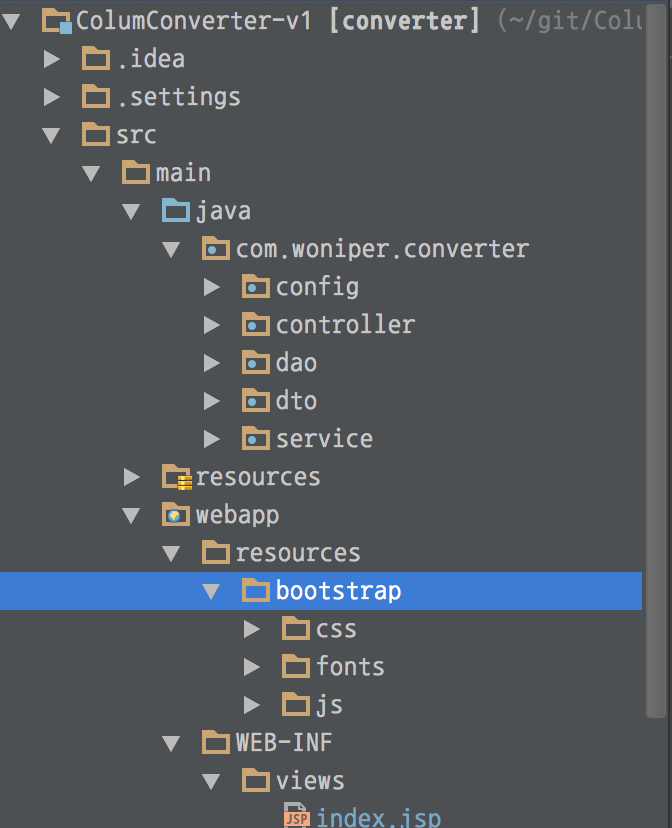
위 이미지는 프로젝트 구성 이미지이다.
2) ResourceHandler 설정
spring 기반 프로젝트 이므로 resources의 하위 폴더는 ResourceHandler 추가를 해야한다.
|
1
2
3
4
5
6
7
8
9
10
11
12
13
14
15
16
17
18
19
20
21
22
23
24
25
26
27
28
29
30
31
32
33
34
35
|
package com.woniper.converter.config;import org.springframework.context.annotation.Bean;import org.springframework.context.annotation.ComponentScan;import org.springframework.context.annotation.Configuration;import org.springframework.web.servlet.ViewResolver;import org.springframework.web.servlet.config.annotation.DefaultServletHandlerConfigurer;import org.springframework.web.servlet.config.annotation.EnableWebMvc;import org.springframework.web.servlet.config.annotation.ResourceHandlerRegistry;import org.springframework.web.servlet.config.annotation.WebMvcConfigurerAdapter;import org.springframework.web.servlet.view.InternalResourceViewResolver;@Configuration@EnableWebMvc@ComponentScan(basePackages = {"com.wonier.converter"}, excludeFilters=@ComponentScan.Filter(Configuration.class))public class WebAppConfiguration extends WebMvcConfigurerAdapter { @Override public void addResourceHandlers(ResourceHandlerRegistry registry) { registry.addResourceHandler("/resources/").addResourceLocations("/resources/**"); } @Override public void configureDefaultServletHandling(DefaultServletHandlerConfigurer configurer) { configurer.enable(); } @Bean public ViewResolver viewResolver() { InternalResourceViewResolver resolver = new InternalResourceViewResolver(); resolver.setPrefix("/WEB-INF/views/"); resolver.setSuffix(".jsp"); return resolver; } } |
현재 프로젝트는 javaConfig 기반으로 spring설정이 되어있기 때문에 위 소스는 이해가 안될 수 있지만 자세한 설명은 생략하고 Github 전체 프로젝트 소스를 참고하면 이해가 잘될 것이다.


3) jsp에 bootstrap적용
|
1
2
3
4
5
6
7
8
9
10
11
12
13
14
15
16
17
|
<%@ page contentType="text/html;charset=UTF-8" language="java" %><%@ taglib uri="http://java.sun.com/jsp/jstl/core" prefix="c" %><% String cp = request.getContextPath(); %> <%--ContextPath 선언 --%><html><head> <meta charset="utf-8"> <meta http-equiv="X-UA-Compatible" content="IE=edge"> <meta name="viewport" content="width=device-width, initial-scale=1"> <link href="<%=cp%>/resources/bootstrap/css/bootstrap.min.css" rel="stylesheet"> <title>TEST</title></head><body> <script src="<%=cp%>/resources/bootstrap/js/bootstrap.min.js"></script></body></html> |
3line : 프로젝트 ContextPath를 cp 변수로 선언
9line, 14line : bootstrap 추가
13line : jQuery 추가
bootstrap 경로는 위에 프로젝트 구성 이미지에 나온 경로대로 설정한 것이다. bootstrap을 추가하고 적용이 안된다면 경로를 확인해볼 필요가 있다.
3. 예제
아직 많이 사용해 보지 못해서 공식 사이트에서 예제를 보면서 하나씩 구현했다.
참고 : http://getbootstrap.com/components/
여기를 참고해서 예제를 만들어보면 도움이 많이 된다. 쉽게 설명되어 있고 영어지만 소스를 보면 다 이해될 정도로 쉽다.
4. 마무리
사실 이 포스팅을 보는 것보다는 Github에서 프로젝트 전체를 참고하는게 더 빠를 것이다. 포스팅을 안해도 될 정도로 쉽지만 자잘한 spring설정이나 경로 설정을 기록하기 위해서 포스팅했다.
[출처] http://blog.woniper.net/207
광고 클릭에서 발생하는 수익금은 모두 웹사이트 서버의 유지 및 관리, 그리고 기술 콘텐츠 향상을 위해 쓰여집니다.
