
- 전체
- Native Apps
- WinJS App
- C# Apps
- XAML
- VB.net
- VisualC.net
- C++
- MFC
- visual studio mobile app dev
- Azure ms cloud service
- Asp.net
- 인공지능 (AI)
- wpf
- UWP
- MAUI
- asp.net
C# Apps C# c샾 c sharp 에서 SQLITE sqlite 사용
2017.03.18 18:36
C# c샾 c sharp 에서 SQLITE sqlite 사용
SQLite 소개
SQLite는 DB 엔진을 별도로 설치하지 않고 윈도우, Mac, 리눅스, 모바일폰 등의 다양한 Platform에서 간단하게 사용할 수 있는 Lightweight 데이타베이스이다. C#에서 SQLite을 사용하기 위해서는 http://system.data.sqlite.org 에서 해당 .NET 버젼에 맞는 바이너리를 다운 받아 설치하면 된다. (예를 들어, 32비트 .NET 4.0인 경우 sqlite-netFx40-setup-bundle-x86-2010-1.0.84.0.exe 을 다운 받아 설치한다) SQLite을 설치한 후에 C# 프로젝트에서 System.Data.SQLite.dll를 참조한 후 using System.Data.SQLite; 네임스페이스를 참조하면, SQLite의 .NET 클래스들 (예: SQLiteConnection, SQLiteCommand, SQLiteDataReader 등)을 사용할 수 있다.


SQLite3 커멘트 라인 툴
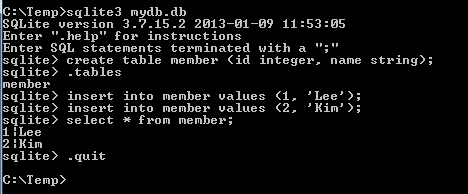
SQLite는 위의 System.Data.SQLite를 설치하면 DB 생성, 테이블 생성, 데이타 입출력등 모든 기능을 프로그래밍으로 처리할 수 있다. 하지만, 간단한 Command line 툴을 이용하면 경우에 따라 보다 편리할 수 있는데, 많이 사용되는 툴로서 SQLite3 를 들 수 있다. 이 툴을 다운 받아 sqlite3.exe를 실행한 후, 아래와 같이 (mydb.db 라는) DB 파일을 생성하고 (파일 없으면 생성/있으면 오픈), (member 라는) 테이블을 생성할 수 있다. 데이타 입력은 일반 SQL문을 그대로 사용하는데, 아래는 INSERT 및 SELECT 문을 예로 보여주고 있다.
SQLite 데이타 INSERT, UPDATE, DELETE
C#에서 데이타의 삽입, 삭제, 갱신등은 SQLiteCommand에 해당 SQL문을 지정하여 실행하면 된다. 일반적인 절차는 SQLiteConnection을 사용 서버를 연결한 후, SQLiteCommand에 INSERT, UPDATE, DELETE 등의 SQL문을 지정한 후 실행한다. 아래 예는 INSERT 및 DELETE를 하는 예제이다.
예제
using System.Data.SQLite;

class Program
{
    static void Main(string[] args)
    {
        string strConn = @"Data Source=C:\Temp\mydb.db";

        using (SQLiteConnection conn = new SQLiteConnection(strConn))
        {
            conn.Open();
            string sql = "INSERT INTO member VALUES (100, 'Tom')";
            SQLiteCommand cmd = new SQLiteCommand(sql, conn);
            cmd.ExecuteNonQuery();

            cmd.CommandText = "DELETE FROM member WHERE Id=1";
            cmd.ExecuteNonQuery();
        }
    }
}
SQLite 데이타 읽기
C#에서 SQLite의 데이타를 가져오기 위해서는 SQLiteCommand/SQLiteDataReader 혹은 SQLiteDataAdapter를 사용한다. SQLiteDataReader는 연결 모드로 데이타를 한 레코드씩 읽어 오는 반면, SQLiteDataAdapter는 데이타를 주로 DataSet 객체 안에 모두 넣고 사용하게 된다.
예제
private static void Select_Reader()
{
    string connStr = @"Data Source=C:\Temp\mydb.db";

    using (var conn = new SQLiteConnection(connStr))
    {
        conn.Open();
        string sql = "SELECT * FROM member WHERE Id>=2";

        //SQLiteDataReader를 이용하여 연결 모드로 데이타 읽기
        SQLiteCommand cmd = new SQLiteCommand(sql, conn);
        SQLiteDataReader rdr = cmd.ExecuteReader();
        while (rdr.Read())
        {
            Console.WriteLine(rdr["name"]);
        }
        rdr.Close();
    }
}

private static DataSet Select_Adapter()
{
    DataSet ds = new DataSet();
    string connStr = @"Data Source=C:\Temp\mydb.db";

    //SQLiteDataAdapter 클래스를 이용 비연결 모드로 데이타 읽기
    string sql = "SELECT * FROM member";
    var adpt = new SQLiteDataAdapter(sql, connStr);
    adpt.Fill(ds);

    return ds;
}
본 웹사이트는 광고를 포함하고 있습니다.
광고 클릭에서 발생하는 수익금은 모두 웹사이트 서버의 유지 및 관리, 그리고 기술 콘텐츠 향상을 위해 쓰여집니다.
광고 클릭에서 발생하는 수익금은 모두 웹사이트 서버의 유지 및 관리, 그리고 기술 콘텐츠 향상을 위해 쓰여집니다.
