
- 전체
- Native Apps
- WinJS App
- C# Apps
- XAML
- VB.net
- VisualC.net
- C++
- MFC
- visual studio mobile app dev
- Azure ms cloud service
- Asp.net
- 인공지능 (AI)
- wpf
- UWP
- MAUI
- asp.net
C# Apps 마우스 클릭 매크로 (C# 버전)
2017.07.30 15:38
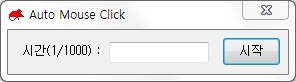
 AutoClickMouse.exe
public partial class MainForm : Form
{
    [DllImport("user32.dll")]
    static extern void keybd_event(byte vk, byte scan, int flags, ref int extrainfo);
    [DllImport("user32.dll")]
    static extern void mouse_event(uint dwFlags, uint dx, uint dy, uint dwData, int dwExtraInfo);

    private const uint MOUSEMOVE    = 0x0001;   // 마우스 이동
    private const uint ABSOLUTEMOVE = 0x8000;   // 전역 위치
    private const uint LBUTTONDOWN  = 0x0002;   // 왼쪽 마우스 버튼 눌림
    private const uint LBUTTONUP    = 0x0004;   // 왼쪽 마우스 버튼 떼어짐

    private bool m_bStart = false;

    private System.Timers.Timer m_ClickTimer;
    public MainForm()
    {
        InitializeComponent();

        m_ClickTimer = new System.Timers.Timer();
        m_ClickTimer.Elapsed += new System.Timers.ElapsedEventHandler(ClickTimeEvent);
    }

    private void OnClickStart(object sender, EventArgs e)
    {
        m_bStart = !m_bStart;
        m_ClickTimer.Enabled = m_bStart;

        if( !m_bStart )
        {
            btn_Start.Text = "시작";
            txt_Time.ReadOnly = false;
        }
        else
        {
            btn_Start.Text = "중지";
            txt_Time.ReadOnly = true;
            m_ClickTimer.Interval = Convert.ToUInt32(txt_Time.Text.ToString());
        }
    }

    private void ClickTimeEvent(object sender, System.Timers.ElapsedEventArgs e)
    {
        MouseClick(System.Windows.Forms.Cursor.Position);
    }

    private void MouseClick(Point pos)
    {
        mouse_event(LBUTTONDOWN, 0, 0, 0, 0);
        mouse_event(LBUTTONUP, 0, 0, 0, 0);
    }

    private void OnKeyPress(object sender, KeyPressEventArgs e)
    {
        if (e.KeyChar < 48 || e.KeyChar > 57)
        {
            MessageBox.Show("숫자만 입력 가능합니다.", "오류");
            txt_Time.Text = "";
            e.Handled = true;
        }
    }
}
출처: http://kindtis.tistory.com/169 [Game Programmer Life]


본 웹사이트는 광고를 포함하고 있습니다.
광고 클릭에서 발생하는 수익금은 모두 웹사이트 서버의 유지 및 관리, 그리고 기술 콘텐츠 향상을 위해 쓰여집니다.
광고 클릭에서 발생하는 수익금은 모두 웹사이트 서버의 유지 및 관리, 그리고 기술 콘텐츠 향상을 위해 쓰여집니다.
