
- 전체
- Native Apps
- WinJS App
- C# Apps
- XAML
- VB.net
- VisualC.net
- C++
- MFC
- visual studio mobile app dev
- Azure ms cloud service
- Asp.net
- 인공지능 (AI)
- wpf
- UWP
- MAUI
- asp.net
C# Apps Build Simple AI .NET Library - Part 1 - Basics First
2018.03.26 00:07
Build Simple AI .NET Library - Part 1 - Basics First

|
|
5.00 (19 votes) |


|
Series Introduction
My objective is to create a simple AI library that covers couple of advanced AI topics such as Genetic algorithms, ANN, Fuzzy logics and other evolutionary algorithms. The only challenge to complete this series would be having enough time working on code and articles.
Having the code itself might not be the main target however, understanding these algorithms is. wish it will be useful to someone someday.
Series will be published in couple of parts, am not sure how many yet. Anyways, each part will focus on single key topic trying to cover for good.
Please, feel free to comment and ask for any clarifications or hopefully suggest better approaches.
Article Introduction - Part 1 "Basics"
This is Part 1 of multi-parts series, have dedicated it to cover basic library called "CommonLib" that contains fundamental classes as:
- Graphics wrapper class called "Canvas"
- Math wrapper classes to handle "Vector" & "Matrix" operations and other math operations
- Random generator class "RandomFactory"
each of above classes shall be explained in details below
1- Graphics wrap class Canvas
Graphics shall be used to test AI libraries will build and hence, had to create one wrap class to contain all common graphics operations and make it easier than creating Graphics objects
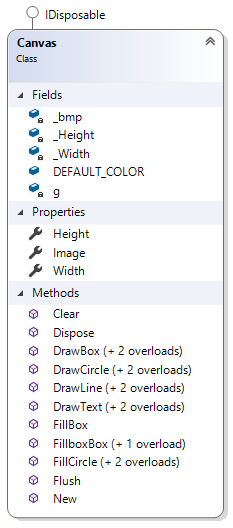
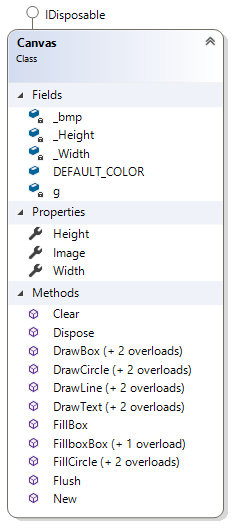
Canvas class wraps some graphics operations as DrawLine, DrawBox (Square), DrawCircle, DrawText & Clear
Mainly it contains one internal graphics object g and bitmap object bmp
Constructor
''' <summary>
''' Canvas constructor function
''' </summary>
''' <param name="_width">Drawing area - Width</param>
''' <param name="_height">Drawing area - Height</param>
Public Sub New(_width As Integer, _height As Integer)
    Me._Width = _width
    Me._Height = _height
    Me._bmp = New Bitmap(_width, _height)
    g = Graphics.FromImage(_bmp)
    g.SmoothingMode = SmoothingMode.HighQuality
End Sub
Width & Height are mandatory integers to create Canvas object which represents drawing area.
Here is an example of declaring canvas object and how to use
 Copy Code
Imports CommonLib.CommonLib

Public Class Form1
    ' Form-level Canvas object
    Private myCanvas As Canvas

    Private Sub Form1_Load(sender As Object, e As EventArgs) Handles MyBase.Load
        myCanvas = New Canvas(PictureBox1.Width, PictureBox1.Height)
        Draw()
    End Sub

    Private Sub Draw()
        With myCanvas
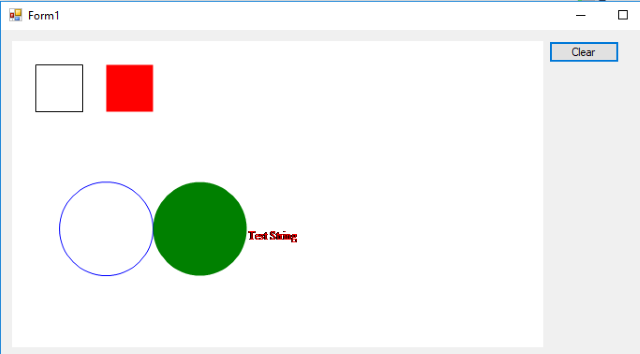
            .DrawBox(50, 25, 25, Color.Black)
            .FillBox(50, 100, 25, Color.Red)
            .DrawCircle(50, 100, 200, Color.Blue)
            .FillCircle(50, 200, 200, Color.Green)
            .DrawText("Test String", 250, 200, Color.Red)
        End With
        ' To draw canvas
        PictureBox1.Image = myCanvas.Image
        ' other code
    End Sub

    Private Sub Clear()
        myCanvas.Clear()
        PictureBox1.Image = myCanvas.Image
    End Sub
End Class
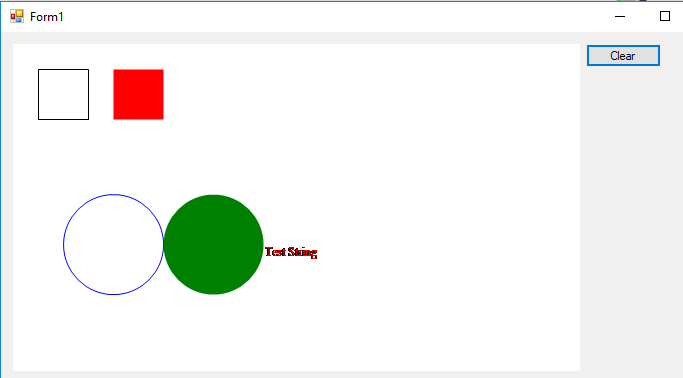
and here is the result of above code
2- Math Classes
MathFunctions
This class wraps some useful math functions
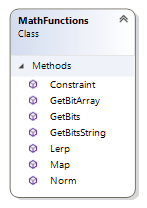
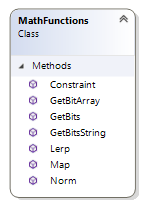
Constraint Function
''' <summary>
''' Constrains value between min and max values
'''   if less than min, return min
'''   more than max, return max
'''   otherwise return same value
''' </summary>
''' <param name="Value"></param>
''' <param name="min"></param>
''' <param name="max"></param>
''' <returns></returns>
Public Function Constraint(Value As Single, min As Single, max As Single) As Single
    If Value <= min Then
        Return min
    ElseIf Value >= max Then
        Return max
    End If
    Return Value
End Function
Map Function
''' <summary>
''' Re-maps a number from one range to another. In the example above,
''' </summary>
''' <param name="value"> the incoming value to be converted </param>
''' <param name="start1"> lower bound of the value's current range </param>
''' <param name="stop1"> upper bound of the value's current range </param>
''' <param name="start2"> lower bound of the value's target range </param>
''' <param name="stop2"> upper bound of the value's target range </param>
Public Shared Function Map(ByVal value As Single, ByVal start1 As Single, ByVal stop1 As Single, ByVal start2 As Single, ByVal stop2 As Single) As Single
    Dim Output As Single = start2 + (stop2 - start2) * ((value - start1) / (stop1 - start1))
    Dim errMessage As String = Nothing

    If Output <> Output Then
        errMessage = "NaN (not a number)"
        Throw New Exception(errMessage)
    ElseIf Output = Single.NegativeInfinity OrElse Output = Single.PositiveInfinity Then
        errMessage = "infinity"
        Throw New Exception(errMessage)
    End If
    Return Output
End Function
Norm Function
''' <summary>
''' Normalizes a number from another range into a value between 0 and 1.
''' Identical to map(value, low, high, 0, 1);
''' Numbers outside the range are not clamped to 0 and 1, because
''' out-of-range values are often intentional and useful.
''' </summary>
''' <param name="value"> the incoming value to be converted </param>
''' <param name="start"> lower bound of the value's current range </param>
''' <param name="stop"> upper bound of the value's current range </param>
Public Shared Function Norm(ByVal value As Single, ByVal start As Single, ByVal [stop] As Single) As Single
    Return (value - start) / ([stop] - start)
End Function
GetBitArray Function
''' <summary>
''' Generates 8 bit array of an integer, value from 0 to 255
''' </summary>
''' <param name="Value"></param>
''' <returns></returns>
Public Function GetBitArray(Value As Integer) As Integer()
    Dim Result(7) As Integer
    Dim sValue As String
    Dim cValue() As Char

    Value = Constraint(Value, 0, 255)
    sValue = Convert.ToString(Value, 2).PadLeft(8, "0"c)
    cValue = sValue.ToArray
    For i As Integer = 0 To cValue.Count - 1
        If cValue(i) = "1"c Then
            Result(i) = 1
        Else
            Result(i) = 0
        End If
    Next
    Return Result
End Function
Matrix Operations
Matrix operations are very important (especially for ANN later) and hence it worths to create separate class(s) to handle different cases of matrix functions. Namely, Vector and Matrix1D
Lots of resources are available to describe matrices and its functions and hence will not spend much time on that.
Just need to mention that, 2 special matrices are only considered so far in CommonLib; Matrix1D and Vector
Matrix1D
is single column-matrix


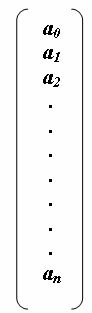
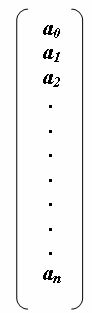
Later, this class will help simplifying neural network creation. This class implements IMatrix Interface
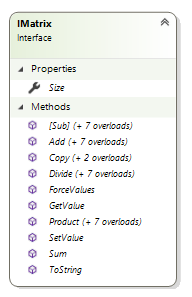
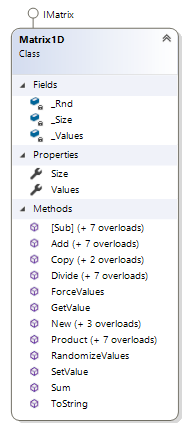
Size- Size or Capacity of Matrix - Simply Number of Stored Elements in Values ArrayProduct- Implement Matrix Product function between 2 metrics m1 and m2 or matrix and scalarAdd- Implement Matrix addition method between 2 metrics m1 and m2 or matrix and scalarSub- Implement Matrix subtraction method between 2 metrics m1 and m2 or matrix and scalarDivide- Implement Matrix divide method between 2 metrics m1 and m2 or matrix and scalarSum- Sum of all matrix elements a1+a2+a3+...........+anRandomizeValues- Randomize matrix elements between min and max valuesCopy- Copy contents of one matrix into object starting from given starting indexForceValues- Forces all elements of matrix to ForcedValueGetValue- Return index element of matrix Index starts with 0SetValue- Set value of matrix element at position Index 0 indexed positions
Vector
Vector is special matrix with 1 row and multiple columns (in our case, only 2 and 3 columns are considered not higher). This is one way to think about vectors, however the most efficient way is to consider a vector as "Magnitude plus Direction" object. This is very powerful object and yet so much simple; just by giving 2 numbers we may extract magnitude and direction.
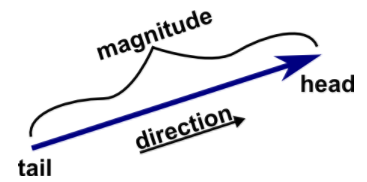
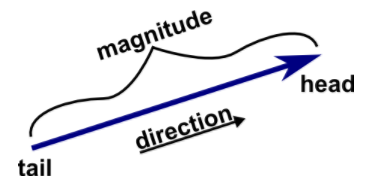
vectors play very important rule in math and physics and maybe will have separate article to cover vectors only. for now, you may visit this link to get more info about vectors and vectors operations
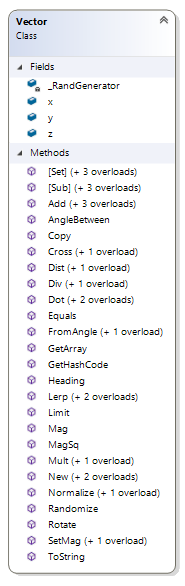
Note: only 2D and 3D vectors are considered in CommonLib, for higher dimensional vectors, matrix shall be used
many vector operations have been implemented in CommonLib such as:
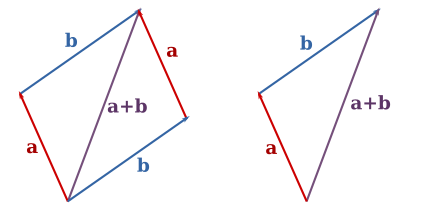
Randomize- Randomize X, Y and Z components of vector between 0 and 1Magnitude- Calculates the Euclidean magnitude (length) of the vector and returns the result = SQRT (X2+Y2+Z2)Add- Adds x, y, and z components to a vector, adds one vector to another, or adds two independent vectors together. here is graphical representation of vector addition from Wikipedia
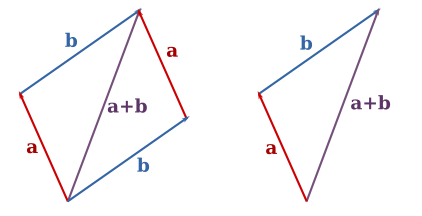
Sub- Perform vector subtraction with other vectors or scalar values
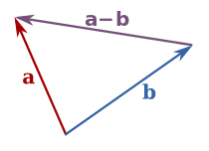
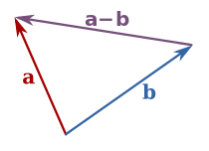
Mult- implement vector scalar multiplicationDiv- is scalar divide implementationDistance- Calculates the Euclidean distance between two vectors = SQRT (dX2+dY2+dZ2)Dot- implements vectors dot product. more at this linkCross- implements vectors cross product. here is the link explaining math behind itNormalize- Normalize the vector to length 1 (make it a unit vector)Limit- Limit the magnitude of this vector to the value passed as max parameterSetMag- Set the magnitude of this vector to the value passed as len parameterHeading- Calculate the angle of rotation for this vectorRotate- Rotate the vector by an angle, magnitude remains the sameAngleBetween- Calculates and returns the angle (in radians) between two vectors
3- RandomFactory
This class is very important for both initialization of different AI objects and for test purposes. It extends .NETRandom class and adds further methods
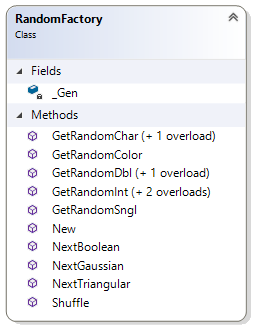
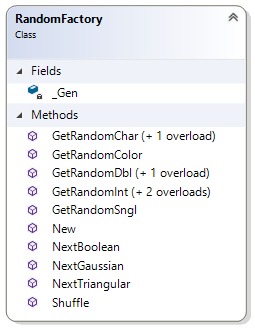
It can provide different random functions in addition to numbers (integer, Single and Double), as Random Color, Random Character, Random Boolean.
In addition, it has an implementation for Gaussian random function using Box-Muller transform
''' <summary>
'''   Generates normally distributed numbers using Box-Muller transform by generating 2 random doubles
'''   Gaussian noise is statistical noise having a probability density function (PDF) equal to that of the normal distribution,
'''   which is also known as the Gaussian distribution.
'''   In other words, the values that the noise can take on are Gaussian-distributed.
''' </summary>
''' <param name = "Mean">Mean of the distribution, default = 0</param>
''' <param name = "StdDeviation">Standard deviation, default = 1</param>
''' <returns></returns>
Public Function NextGaussian(Optional ByVal Mean As Double = 0, Optional ByVal StdDeviation As Double = 1) As Double
    Dim X1 = _Gen.NextDouble()
    Dim X2 = _Gen.NextDouble()
    Dim StdDistribution = Math.Sqrt(-2.0 * Math.Log(X1)) * Math.Sin(2.0 * Math.PI * X2)
    Dim GaussianRnd = Mean + StdDeviation * StdDistribution

    Return GaussianRnd
End Function
Also, it implements Triangle distribution random generation (you may check this wiki article)
''' <summary>
'''   Generates values from a triangular distribution
'''   Triangular distribution is a continuous probability distribution with:
'''       lower limit a
'''       upper limit b
'''       mode c
'''   where a less than b
'''   c is higher than or equal a but less than or equal b
''' </summary>
''' <param name = "min">Minimum</param>
''' <param name = "max">Maximum</param>
''' <param name = "mode">Mode (most frequent value)</param>
''' <returns></returns>
Public Function NextTriangular(ByVal min As Double, ByVal max As Double, ByVal mode As Double) As Double
    Dim u = _Gen.NextDouble()

    If (u < (mode - min) / (max - min)) Then
        Return min + Math.Sqrt(u * (max - min) * (mode - min))
    Else
        Return max - Math.Sqrt((1 - u) * (max - min) * (max - mode))
    End If
End Function
Shuffle method provide random shuffle implementation for a list by using the Fisher-Yates/Knuth algorithm
''' <summary>
'''   Shuffles a list in O(n) time by using the Fisher-Yates/Knuth algorithm
''' </summary>
''' <param name = "list"></param>
Public Sub Shuffle(ByVal list As IList)
    For i = 0 To list.Count - 1
        Dim j = _Gen.Next(0, i + 1)

        Dim temp = list(j)
        list(j) = list(i)
        list(i) = temp
    Next i
End Sub
To get efficient result of RandomFactory class, a global or form level object shall be created and used through out the code
What is Next
Next article will be about Genetic Algorithms (might be fuzzy controller!) depends on which code shall be ready first
To Do List
- Add 2D Matrix operations implementation, 1D matrix is good for now however extend library to include 2D shall add more efficiency or practicality. wish to complete this task before starting ANN library
History
CommonLib has been built to act as supporting class library for different projects hence it shall be kept as separate solution and only add references.
Version1 of this library is completed by August 2017, expecting further versions to follow.
[출처] https://www.codeproject.com/Articles/1205175/Build-Simple-AI-NET-Library-Part-Basics-First
광고 클릭에서 발생하는 수익금은 모두 웹사이트 서버의 유지 및 관리, 그리고 기술 콘텐츠 향상을 위해 쓰여집니다.
