
- 전체
- HTML
- Web Design (웹디자인)
- XE 응용 개발
- wordpress plugin dev
- Javascript & JavaScript Application
- MEAN Stack : full stack javascript
- angular js & ionic framework
- bootstrap
- WebGL, Three.js and Babylon.js
- restful api design
- mobile web
- node.js 응용
- Cloud Service 응용
- 웹 어셈블리 개발 [WASM, WebAssembly]
- 마이크로서비스, MSA (microservice architecture)
- WebGL / WebGPU
- next.js 개발
- micro frontend (마이크로프론트앤드)
- 전자상거래/쇼핑몰
- 서버 클라우드 (aws, azure, google)
JavaScript How to Create an addChild() Function in JavaScript
2020.03.09 14:21
How to Create an addChild() Function in JavaScript
Adding nodes to the DOM with JavaScript can be a lot of work. It involves several steps, including:


- Creating a new element node.
- Appending the element node as a child of another element.
- Creating a new text node.
- Appending the text node to the new element node.
- Adding one or more attributes with the
setAttribute()method of the new element.
The following explains how to create and use a function that will make the process of adding nodes to the DOM easier.
- Create a new file named addChild.js, containing the following function:
function addChild(doc, parent, child, childText, attributes) { if (typeof child == "string") { childNode = doc.createElement(child); } else { childNode = child; } if (typeof childText == "string") { childTextNode = doc.createTextNode(childText); childNode.appendChild(childTextNode); } if (attributes) { for (var att in attributes) { childNode.setAttribute(att,attributes[att]); } } parent.appendChild(childNode); return childNode; } - Create an HTML page and include the addChild.js file using a script element.
<!DOCTYPE HTML> <html> <head> <meta charset="UTF-8"> <script type="text/javascript" src="addChild.js"></script> <title>Add Child Demo</title> </head> <body> <h1>Add Child Demo</h1> </body> </html> - Write a script in the HTML document that passes the three parameters that the
addChild()function requires to it: the DOM document, parent-to-be node, and child-to-be.<!DOCTYPE HTML> <html> <head> <meta charset="UTF-8"> <script type="text/javascript" src="addChild.js"></script> <script type="text/javascript"> window.addEventListener("load", function () { var atts = { "style": "background:red;color:white;", "align": "center" }; addChild(document, document.getElementsByTagName("body")[0], "p", "Hello World!", atts); }); </script> <title>Add Child Demo</title> </head> <body> <h1>Add Child Demo</h1> </body> </html> - Save the HTML file and load it in a browser. The new node will be added to the web page, as shown below.
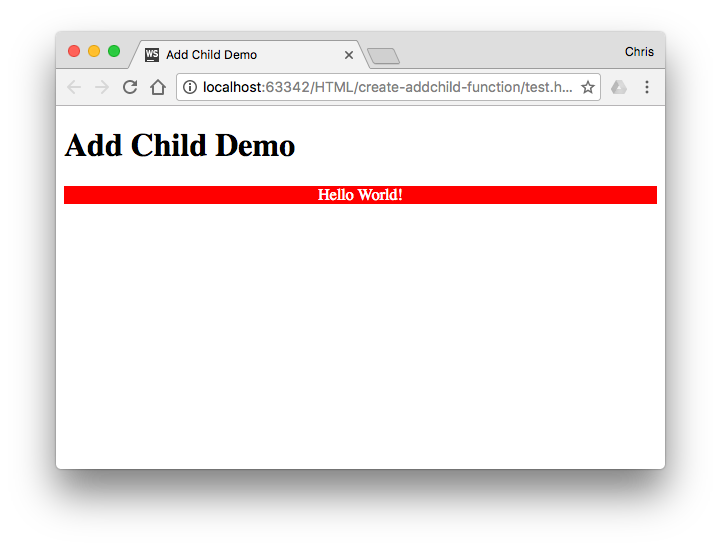 [출처] https://www.webucator.com/how-to/b.cfm
본 웹사이트는 광고를 포함하고 있습니다.
광고 클릭에서 발생하는 수익금은 모두 웹사이트 서버의 유지 및 관리, 그리고 기술 콘텐츠 향상을 위해 쓰여집니다.
광고 클릭에서 발생하는 수익금은 모두 웹사이트 서버의 유지 및 관리, 그리고 기술 콘텐츠 향상을 위해 쓰여집니다.
