
- 전체
- 게임 일반 (make game basics)
- 모바일 기획 및 디자인
- GameMaker Studio
- Unity3D
- Cocos2D
- 3D Engine OGRE
- 3D Engine irrlicht
- copperCube
- corona SDK
- Windows Basic Game
- BaaS (Mobile Backend)
- phnegap & cordova
- ionic & anguler
- parse (backend)
- firebase (backend)
- Game Backend Server / Opt
- web assembly
- Smart Makers
- pyGame & Ren'Py
- 머드(MUD) 게임 만들기
- Xamarin(자마린)
- flutter (플루터 앱 개발)
- construct 2 / 3
- pocketbase
- RPG Maker 시리즈
- godot engine
- playmaker(unity)
- react native
[GameMaker Studio] Neural Network in Game Maker Studio – part 1
After studying the basic concepts, it’s our time to create our own neural network. We will be using Game Maker Studio to make a neural net for target tracking.
The task is to make the V-shaped arrows learn whether to turn left or right depending on its direction (degrees) to the yellow square. Simple, right?
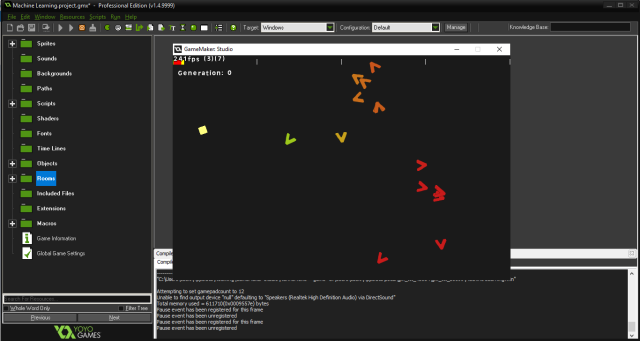
Before you continue reading, please do take in mind that I am not an ML expert. This tutorial is my personal approach to machine learning. This guide aims to help you to get started in creating your own ML algorithm in game maker studio faster.
You can also download the project on github by pressing the button below:
Without further ado, let’s jump into creating our neural network.
The first thing we have to do is to set up our neural network! To make it simple, the neural network we will create will have one hidden layer with one input and output nodes, and the training method that we will be using will be genetic algorithm.
It’s now time to create our neural net. First thing’s first, create a new project. Create a new script and we’ll call it scr_nn_create, we are going to set up our neural network using arrays like so:


///scr_nn_create()

il = 1; //How many input nodes
hl = 4; //How many hidden layer neuron
ol = 1; //How many output layer neuron

//Input Layer
    for(var i=0; i<il; i++){
        inputs[i] = 0;
    }

//Hidden Layer
    for(var i=0; i<hl; i++){
        neurons[i] = 0;
        for(var j=0; j<il; j++){
            weights[i, j] = 0;
        }
    }

//Output Layer
    for(var i=0; i<ol; i++){
        outputs[i] = 0;
        for(var j=0; j<hl; j++){
            output_weights[i, j] = 0;
        }
    }
Where:
- inputs – the input value that we are going to feed our neural network.
- neurons – holds the computed value of a neuron
- weights – the weight of a neuron in the hidden layer. These are the knobs that will be modified later on through training process to produce our desired results.
- outputs – output values of the neural network
- output_weights – the weight of a neuron in the output layer
We’ll create another script, we’ll call it scr_nn_initialize. This script will set a random value for each weights.
///scr_nn_initialize()

//Weights for hidden layer
    for(var i=0; i<hl; i++){
        for(var j=0; j<il; j++){
            weights[i, j] = random_range(-1.0, 1.0);
        }
    }

//Weights for output
    for(var i=0; i<ol; i++){
        for(var j=0; j<hl; j++){
            output_weights[i, j] = random_range(-1.0, 1.0);
        }
    }
The main structure for the neural net is complete!

But wait! We are not done yet. We still have a lot to do. Now that we have successfully set up our neural network. We will now create objects that will serve as the body for the brain. See you on the next post!
[출처] https://highleapstudios.wordpress.com/2019/09/24/neural-network-in-game-maker-studio-1/
광고 클릭에서 발생하는 수익금은 모두 웹사이트 서버의 유지 및 관리, 그리고 기술 콘텐츠 향상을 위해 쓰여집니다.
