
- 전체
- 보안뉴스
- 제로데이취약점
- 해킹프로그래밍
- 웹해킹
- 해킹기법
- 정보보호
- 정보보안기사 - 국가기술자격
- 악성코드분석_리버싱
- 시큐어코딩_개발보안진단원
- CISSP
- CISA
- 모의해킹_penetration-test
- deepweb / tor network
- Kali Linux
정보보호 [정보보호] 와이어샤크(Wireshark) 사용법 #6 [Meta 데이터 추출]
2023.07.30 19:10
[정보보호] 와이어샤크(Wireshark) 사용법 #6 [Meta 데이터 추출]
1. 패킷 세부 정보를 파일로 저장하기
Wireshark 앱 UI에서 확인할 수 있는 패킷 정보들을 로그 또는 csv, json 양식으로 추출하고자 한다면 아래와 같이 File >> Export Packet Dissections 항목을 이용하시면 됩니다.
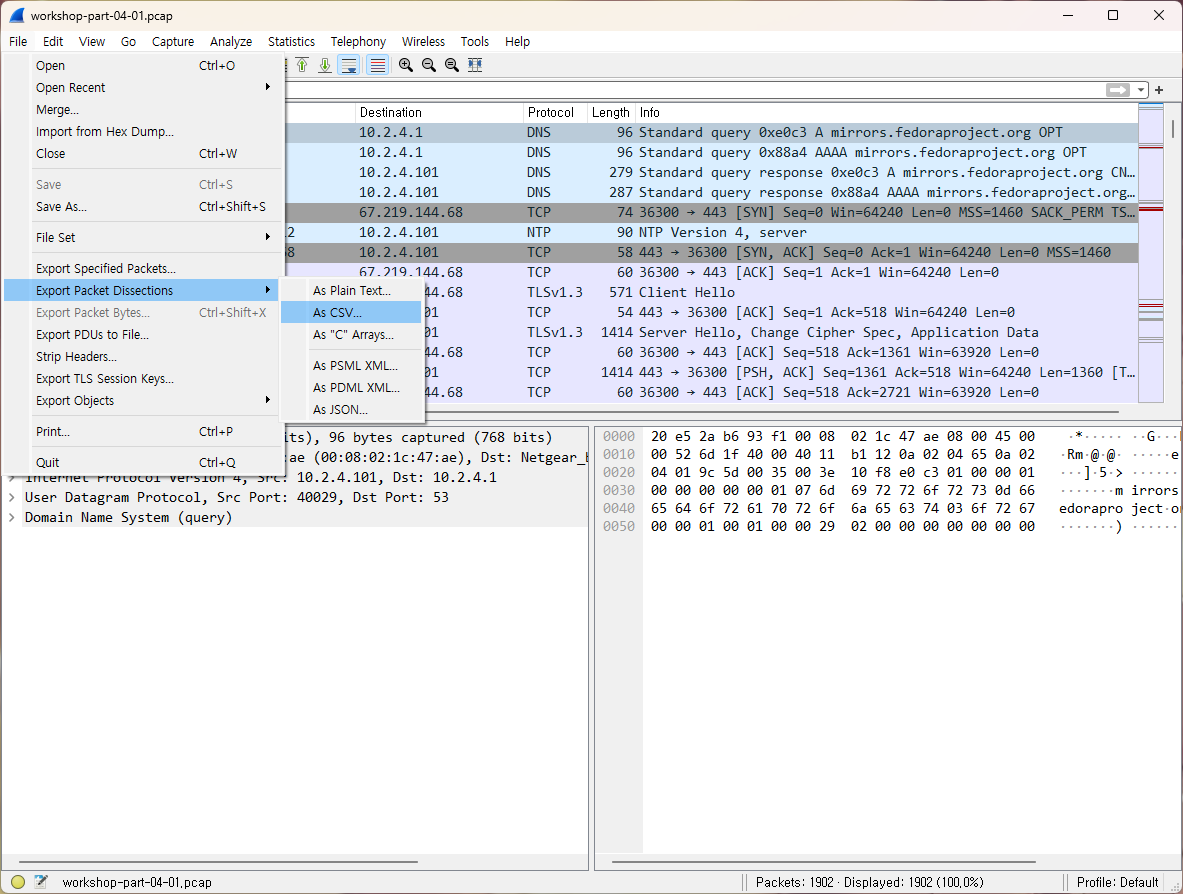
As Plain Text...
각 Column 값과 프로토콜 정보들이 txt 파일에 저장됩니다.
No.     Time           Source                Destination           Protocol Length Info
      1 0.000000       10.2.4.101            10.2.4.1              DNS      96     Standard query 0xe0c3 A mirrors.fedoraproject.org OPT

Frame 1: 96 bytes on wire (768 bits), 96 bytes captured (768 bits)
Ethernet II, Src: HewlettP_1c:47:ae (00:08:02:1c:47:ae), Dst: Netgear_b6:93:f1 (20:e5:2a:b6:93:f1)
Internet Protocol Version 4, Src: 10.2.4.101, Dst: 10.2.4.1
User Datagram Protocol, Src Port: 40029, Dst Port: 53
Domain Name System (query)
As Csv...
Column에 표시되는 정보들만 csv 형태로 뽑아냅니다.
"No.","Time","Source","Destination","Protocol","Length","Info"
"1","0.000000","10.2.4.101","10.2.4.1","DNS","96","Standard query 0xe0c3 A mirrors.fedoraproject.org OPT"
"2","0.000135","10.2.4.101","10.2.4.1","DNS","96","Standard query 0x88a4 AAAA mirrors.fedoraproject.org OPT"
"3","0.217144","10.2.4.1","10.2.4.101","DNS","279","Standard query response 0xe0c3 A mirrors.fedoraproject.org CNAME wildcard.fedoraproject.org A 38.145.60.21 A 140.211.169.206 A 152.19.134.142 A 8.43.85.67 A 8.43.85.73 A 140.211.169.196 A 152.19.134.198 A 38.145.60.20 A 209.132.190.2 A 67.219.144.68 OPT"
"4","0.217176","10.2.4.1","10.2.4.101","DNS","287","Standard query response 0x88a4 AAAA mirrors.fedoraproject.org CNAME wildcard.fedoraproject.org AAAA 2604:1580:fe00:0:dead:beef:cafe:fed1 AAAA 2620:52:3:1:dead:beef:cafe:fed7 AAAA 2620:52:3:1:dead:beef:cafe:fed6 AAAA 2605:bc80:3010:600:dead:beef:cafe:feda AAAA 2605:bc80:3010:600:dead:beef:cafe:fed9 AAAA 2610:28:3090:3001:dead:beef:cafe:fed3 OPT"
"5","0.218461","10.2.4.101","67.219.144.68","TCP","74","36300  >  443 [SYN] Seq=0 Win=64240 Len=0 MSS=1460 SACK_PERM TSval=804336147 TSecr=0 WS=128"
As json...
패킷의 매우 디테일한 필드 정보들 모두 Json 파일 안에 담긴 채로 저장됩니다.


[
  {
    "_index": "packets-2021-02-05",
    "_type": "doc",
    "_score": null,
    "_source": {
      "layers": {
        "frame": {
          "frame.encap_type": "1",
          "frame.time": "Feb  5, 2021 08:44:54.815974000 대한민국 표준시",
          "frame.offset_shift": "0.000000000",
          "frame.time_epoch": "1612482294.815974000",
          "frame.time_delta": "0.000000000",
          "frame.time_delta_displayed": "0.000000000",
          "frame.time_relative": "0.000000000",
          "frame.number": "1",
          "frame.len": "96",
          "frame.cap_len": "96",
          "frame.marked": "0",
          "frame.ignored": "0",
          "frame.protocols": "eth:ethertype:ip:udp:dns",
          "frame.coloring_rule.name": "UDP",
          "frame.coloring_rule.string": "udp"
        },
        "eth": {
          "eth.dst": "20:e5:2a:b6:93:f1",
          "eth.dst_tree": {
            "eth.dst_resolved": "Netgear_b6:93:f1",
            "eth.dst.oui": "2155818",
            "eth.dst.oui_resolved": "Netgear",
            "eth.addr": "20:e5:2a:b6:93:f1",
            "eth.addr_resolved": "Netgear_b6:93:f1",
            "eth.addr.oui": "2155818",
            "eth.addr.oui_resolved": "Netgear",
            "eth.dst.lg": "0",
            "eth.lg": "0",
            "eth.dst.ig": "0",
            "eth.ig": "0"
          },
          "eth.src": "00:08:02:1c:47:ae",
          "eth.src_tree": {
            "eth.src_resolved": "HewlettP_1c:47:ae",
            "eth.src.oui": "2050",
            "eth.src.oui_resolved": "Hewlett Packard",
            "eth.addr": "00:08:02:1c:47:ae",
            "eth.addr_resolved": "HewlettP_1c:47:ae",
            "eth.addr.oui": "2050",
            "eth.addr.oui_resolved": "Hewlett Packard",
            "eth.src.lg": "0",
            "eth.lg": "0",
            "eth.src.ig": "0",
            "eth.ig": "0"
          },
          "eth.type": "0x0800"
        },
        "ip": {
          "ip.version": "4",
          "ip.hdr_len": "20",
          "ip.dsfield": "0x00",
          "ip.dsfield_tree": {
            "ip.dsfield.dscp": "0",
            "ip.dsfield.ecn": "0"
          },
          "ip.len": "82",
          "ip.id": "0x6d1f",
          "ip.flags": "0x02",
          "ip.flags_tree": {
            "ip.flags.rb": "0",
            "ip.flags.df": "1",
            "ip.flags.mf": "0"
          },
          "ip.frag_offset": "0",
          "ip.ttl": "64",
          "ip.proto": "17",
          "ip.checksum": "0xb112",
          "ip.checksum.status": "2",
          "ip.src": "10.2.4.101",
          "ip.addr": "10.2.4.101",
          "ip.src_host": "10.2.4.101",
          "ip.host": "10.2.4.101",
          "ip.dst": "10.2.4.1",
          "ip.addr": "10.2.4.1",
          "ip.dst_host": "10.2.4.1",
          "ip.host": "10.2.4.1"
        },
        "udp": {
          "udp.srcport": "40029",
          "udp.dstport": "53",
          "udp.port": "40029",
          "udp.port": "53",
          "udp.length": "62",
          "udp.checksum": "0x10f8",
          "udp.checksum.status": "2",
          "udp.stream": "0",
          "Timestamps": {
            "udp.time_relative": "0.000000000",
            "udp.time_delta": "0.000000000"
          },
          "udp.payload": "e0:c3:01:00:00:01:00:00:00:00:00:01:07:6d:69:72:72:6f:72:73:0d:66:65:64:6f:72:61:70:72:6f:6a:65:63:74:03:6f:72:67:00:00:01:00:01:00:00:29:02:00:00:00:00:00:00:00"
        },
        "dns": {
          "dns.id": "0xe0c3",
          "dns.flags": "0x0100",
          "dns.flags_tree": {
            "dns.flags.response": "0",
            "dns.flags.opcode": "0",
            "dns.flags.truncated": "0",
            "dns.flags.recdesired": "1",
            "dns.flags.z": "0",
            "dns.flags.checkdisable": "0"
          },
          "dns.count.queries": "1",
          "dns.count.answers": "0",
          "dns.count.auth_rr": "0",
          "dns.count.add_rr": "1",
          "Queries": {
            "mirrors.fedoraproject.org: type A, class IN": {
              "dns.qry.name": "mirrors.fedoraproject.org",
              "dns.qry.name.len": "25",
              "dns.count.labels": "3",
              "dns.qry.type": "1",
              "dns.qry.class": "0x0001"
            }
          },
          "Additional records": {
            "<Root>: type OPT": {
              "dns.resp.name": "<Root>",
              "dns.resp.type": "41",
              "dns.rr.udp_payload_size": "512",
              "dns.resp.ext_rcode": "0x00",
              "dns.resp.edns0_version": "0",
              "dns.resp.z": "0x0000",
              "dns.resp.z_tree": {
                "dns.resp.z.do": "0",
                "dns.resp.z.reserved": "0x0000"
              },
              "dns.resp.len": "0"
            }
          }
        }
      }
    }
  }
]
2. 이미지, Html와 같은 데이터 오브젝트 추출하기
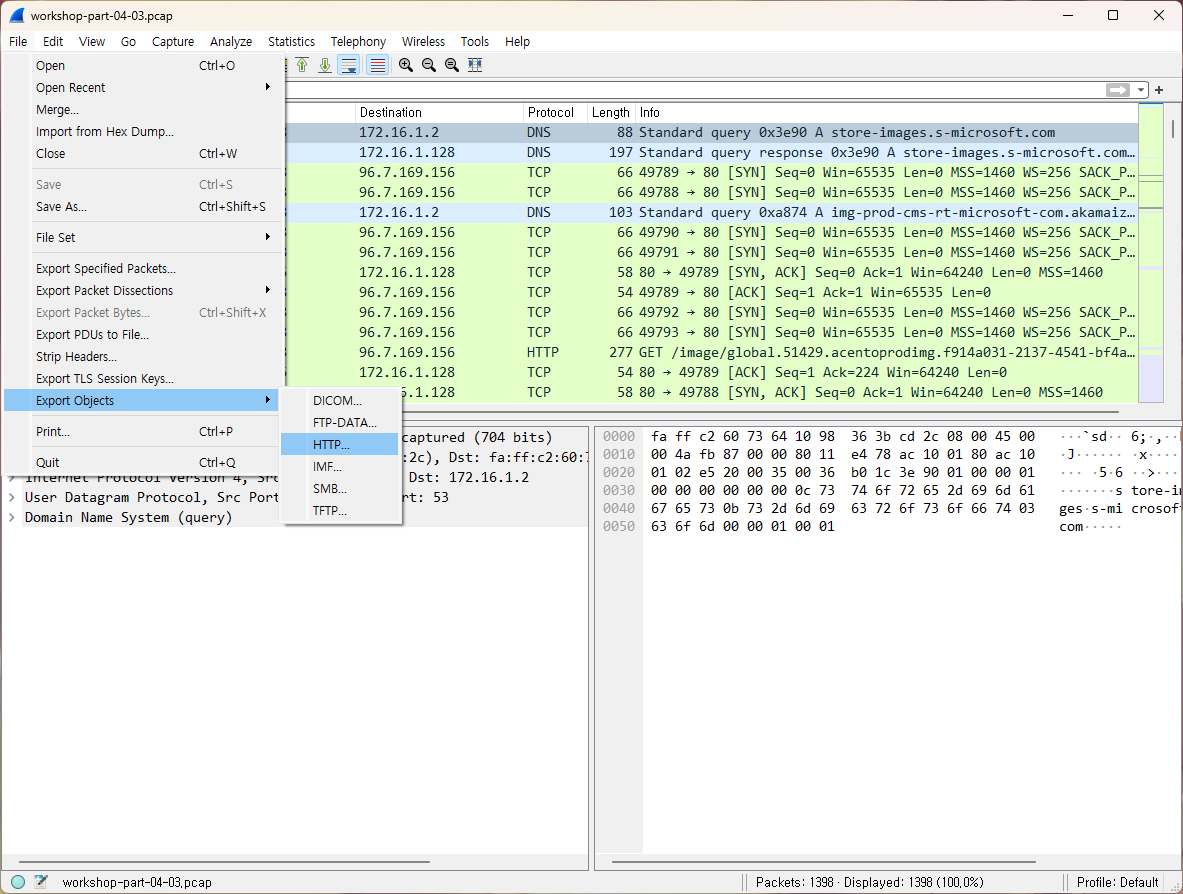
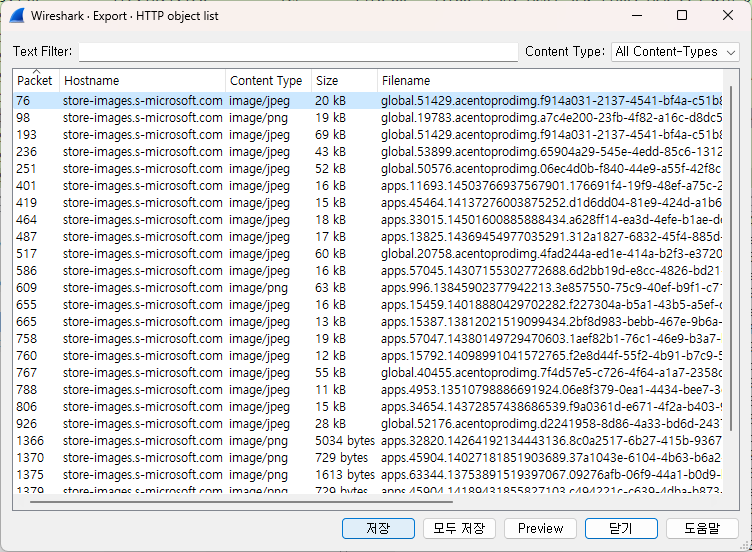
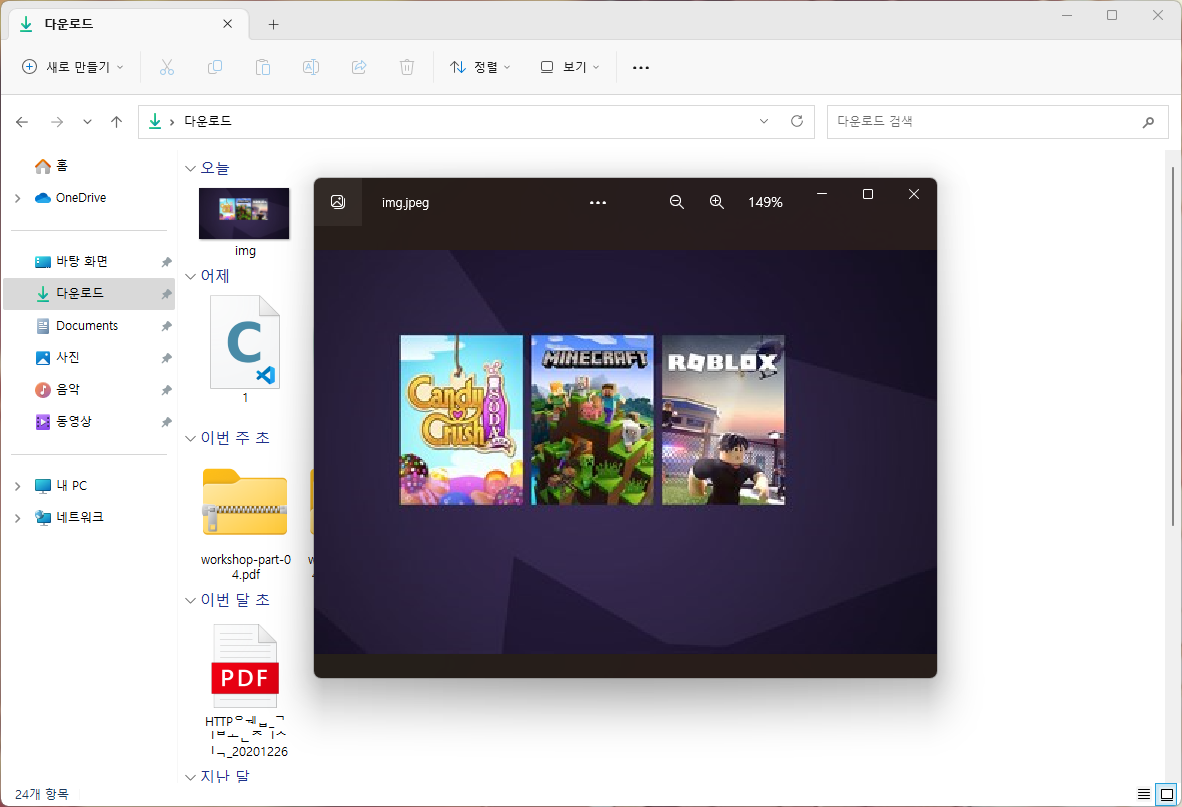
File >> Export Objects 탭을 통해 HTTP, FTP 채널로 오고간 다양한 데이터 오브젝트를 조회해보고, 또 따로 저장도 가능합니다.
[출처] https://citizen.tistory.com/39
본 웹사이트는 광고를 포함하고 있습니다.
광고 클릭에서 발생하는 수익금은 모두 웹사이트 서버의 유지 및 관리, 그리고 기술 콘텐츠 향상을 위해 쓰여집니다.
광고 클릭에서 발생하는 수익금은 모두 웹사이트 서버의 유지 및 관리, 그리고 기술 콘텐츠 향상을 위해 쓰여집니다.
