
[php] Low Code Web Content Server: Making Marks on the Digital Shore. An Anecdotal View. : 로우 코드 웹 콘텐츠 서버: 디지털 해안에 흔적을 남기다. 일화적인 견해.
2024.02.18 10:45
[php] Low Code Web Content Server: Making Marks on the Digital Shore. An Anecdotal View. : 로우 코드 웹 콘텐츠 서버: 디지털 해안에 흔적을 남기다. 일화적인 견해.
Low Code Web Content Server: Making Marks on the Digital Shore. An Anecdotal View.

 2.6K
2.6K 26
26 1
1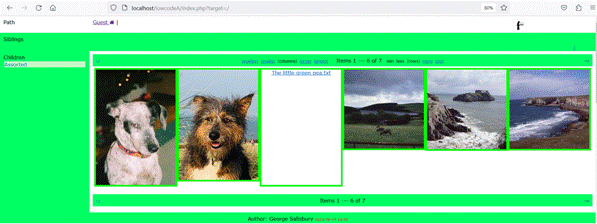
Introduction
In 2003, I obtained a domain name and a hosting service. Initially, I used a commercial HTML editor with a bit of WYSIWYG, but around 2015, I decided to try a content management system. Both were enjoyable journeys, but this year, I felt that it was time to move on and try something else.
Most of the code that I have written in my life started off as a private project, for fun. Some of the code has been used in my professional career, but even so, it was fun. This article is about a web PHP server-side application that I wrote, initially for fun, to fulfill my (narcissistical?) wish to publish, at least on my LAN if not on the Internet, some of the digital resources that I have generated/accumulated, and to do that with a low degree of web programming effort.
Much Ado About Nothing: Effort and Cost
I know that I am well into the last quarter of my life. As William Shakespeare put it, my life has been Much ado about nothing. Along the way, I would like to think that even if I did no good, I hopefully did no significant harm. It is hard to evaluate the effects of the marks that we make in life since the marks are mainly on one-another, and we do not know what other people think, or how our marks affect them.
William Shakespeare certainly left marks. Robert Hooke 1635-1703 left marks too, even if Sir Isaac Newton appears to have tried to erase them! In 1667, Hooke is supposed to have linked two cup/can shaped objects with a taunt string and made a primitive speech transmission system. Since most of my working life was spent in telecommunications, Robert Hooke means something to me, for his point-to-point telephone and also for his description of a visual telegraphy system. (Ok, I have a graduate qualification in physics, and a post-graduate qualification in telecommunications. So I appreciate Robert Hooke from both a physics perspective and a telecommunications perspective. The same appreciation goes for Joseph Henry 1897-1878. More on these two later.)
However for most of us, once the people whom we have marked have themselves moved on, we fade away. I carry with me fond memories/marks of my mother's uncle who lived with us from when I was about 18 months old to 14 years old. Uncle Bill took me under his wing, and I admit, there is a fair bit of Uncle Bill in me!
I could try to immortalise the marks that Uncle Bill made on me by writing a diary or a book about him, but who would publish it, and who would read it. The effort and cost is out of proportion! It would be different if I had the imagination and literary skills of William Shakespeare, but I do not. Mea culpa Uncle Bill, I have failed your memory.
But the Internet is offering/threatening to make some of our marks outlive us. I have just today done an Internet search on my name coupled with the name of a company that I used to work for. I found images of myself and links to some of my professional publications in a few blogs, even in a PhD thesis. One of my professional publications made it to the front cover of a highly respected business magazine, and resulted in an invite to the legal and regulatory department of my employer's parent company to explain myself. Strangely, that article is probably the most referenced (and yes, I stand by the analysis and conclusions). The Internet's marks are pretty much indelible and are definitely out of our individual control.
The Internet can also be used by us to make our own marks. We can create our own blog, write our life story, or just keep a journal/diary, all online if we want. Providing that the effort and cost are acceptable, then why not do it.
I suppose you could say that this article is about a way to make the effort and cost of making our own digital marks acceptable.
This article is about a PHP server-side web application that I wrote. The application allows a HTML client to navigate through the files in a server-side folder tree of assorted digital content. The guiding design goal was to have a single application that allows the addition/modification/deletion of digital content in the server-side folder tree without requiring changes to the application.
All That Glitters is Not Gold: The Marks I Want to Keep
In November 1975, I hobbled into the kitchen of the flat that I was sharing with 4 other students. I had to hobble because my lower left leg was in plaster after an embarrassing motorcycle accident. It was a Saturday and it was Richard's turn to do the cooking. As I entered the kitchen, Richard was about to tip frozen peas into a saucepan of boiling salted water. As the peas fell into the water, the water got frothy and boiled turbulently, I felt somehow motivated!
I propelled myself back to my bedroom and wrote the following poem (one almost as embarrassing as the motorcycle accident).
The little green pea.

The little green pea he went to sea
He swims and floats, sees lots of boats
He travels near, he travels far
Not for him a shiny car
A life at sea is such a joy
A nod and wink from every buoy
To sea, to see
The little pea.
(I did say that I was no Shakespeare!)
Regrettably (from other peoples' viewpoint), but only embarrassingly (from my viewpoint), I have a collection of self penned content that ranges from poetry to programs, and presentations to pictures...
At secondary school, I wrote a few stories and poems. Whilst at university, I wrote a few more poems, odes and doggerel. In the early 1980s, I tried writing songs. I have squirrelled away some of the original scraps of paper on which I wrote these works of art ;-). In my ~42 year career in telecommunications, I have created (and presented) a lot of technical training material and presentations for management and conferences.
It hurts my soul to simply throw away some of this content. So I thought it would be a nice retirement project to archive/publish some of this content.
Archiving is not necessarily difficult. Scan all the analogue documents/paper, and copy everything to some secure file storage system. The issue with archiving is the meta-data one needs, what/who is in which document/image, and where is it archived and with what name! I address indirectly some of the meta-data issues in a CodeProject article "Perceptual Hash based Image Comparison: Coded in "plain old C". An Anecdotal View".
But publishing is not quite so straight forward. I cannot face the effort needed for a published book (nor do I believe that anyone would buy it if I did), so I decided on publishing via my own web site which would allow me the freedom to incrementally add/change/delete content. Since I want some of the content to be available to some other people (e.g., family) who are physically remote, then the Internet seems like the publishing medium of choice. With a little bit of effort, I could even make some content only for one of my sisters, and say other content only for some of my cousins. And some content could be open to anyone.
But, and for me, this is a big but, I do not want to write lots of web code/HTML to handle the content. Ideally, there should be no web coding effort to incrementally add/change/delete content.
There is a no code solution which I shall describe a few lines later in this article, but it does not quite do what I want.
So I decided to polish up my PHP skills and write a server-side web application to serve my content to whoever the users might be. The resulting application:
- is provided as commented source for downloading and consists of a single PHP file of about 1800 lines.
- does not require an active component on the client-side, just a web browser.
- can be viewed in use on my web site at: RipeTech/guest
No Code Solution
I have installed a MAMP system on my Microsoft Windows 10 laptop, this gives me a web host accessible (locally) via the URL localhost. Physically, this URL leads to the file system location C:\MAMP\htdocs. I have placed in the physical location some image files and a text file (The little green pea!). If I view this physical location with the default file explorer (i.e., not using HTML) in list mode, I see:

There is a URI / HTML equivalent to this, which is obtained by issuing the URL localhost on my web browser. This command gave me:

Just as the physical location can have folders and sub-folders which you can navigate through using the file explorer, so too can you navigate through the structure using the URL and a web browser.
But but but, I do not want a text only listing of a folder's contents. I want to see the content (via a web browser) in a mode similar to the icon mode of a file explorer, e.g.:

Sorry I did not mean to advertise what my default text editor is!
Low Code Solution
An early motivation for this application was to make some images available to my family who are spread out in England and Wales. I soon realised that emulating the file explorer icon mode had a big drawback. The more images in a given folder, the longer the page took to download, and in some cases, I wanted to have hundreds of images on a page. This means that I needed a way to view only a sub-set of the images on a given page at a time, and somehow move up/down within a given folder.
I am now going to change the physical structure of the files that I used in the No code section. Why? Discussed a bit lower down!
- Add the PHP application file.
- Add a sub-folder Assorted holding about 30 images.
- Then move all of this into a sub-folder lowcode (name is not important).
So the folder's contents in the icon mode of a file explorer is:

And when viewed in a web browser using the URL http://localhost/lowcode/, we get:

It is not clearly visible in the above screenshot, but there are clickable fields with which you can modify the number of displayed elements per row and the number of rows per displayed page, and of course, select the previous/next set of files in the current page.
By creating the sub-folder lowcode (name is not important), it becomes possible to:
- create parallel folder/content trees with their own copy of the PHP application file
- apply .htaccess based users/passwords and thus limit who sees what!
This article is not meant to be a User guide, nor even a description of the capabilities of the application. I shall spare you from more details.
Instead, this article and the application is offered as get-you-going if, like me, you want to publish content with a low effort to incrementally add/change/delete content.
If you want more, then the application can be viewed in use on my web site at RipeTech/guest.
Points of Interest
I wanted the application (server-side) to be stateless. The server-side application should have no memory of any previous client request.
But sometimes, there are values that need to be (sort of) persisted.
Example: On my web site, where this application is used, there are 35 images under the title Assorted that can be reached via the URL https://ripetech.com/guest/index.php?target=/Images/Assorted/ (Images/Assorted).
And when viewed in a web browser using the URL https://ripetech.com/guest/index.php?target=/Images/Assorted/, we get:

The default is to display one row of 6 content files per page.
We can then use some HTML clickable fields, highlighted above in red and in blue, to alter the number of content files (in this case: images) per row (red), and the number of rows per page (blue). So here is the result of upping the number of rows to 2.

The URL that the client side invoked when the number of rows was upped to 2 is https://ripetech.com/guest/index.php?target=/Images/Assorted/&first=1&rows=2
All the information that the server-side application needs is in the invoking URL. The server-side application receives the invocation and then encodes relevant information into the HTML actions to be taken when various client side HTML events are triggered. When the user triggers an HTML event, the HTML action returns relevant information as a parameter in the URL.
This approach seems ok, but I have lots of presentations that I would like to publish. And the approach seems somehow unsatisfactory, too rigid and limiting.
So I wrote a script (in my own BASIC like interpreter, but it could have been done in say VBA) to extract each page in a given presentation and save the page to an image (I use JPGs). The script creates a top level folder for the presentation, and places each image in its own subfolder. The script also inserts into each subfolder a mini PHP/HTML file named autopagebody.html. The file is in the downloadable zip. Basically, the script checks how many user files are in a sub-folder, and if it is only one and if it is a jpg file, then it causes the image to be rendered at the default full size.
These are the comments taken from autopagebody.html, it helps explain some use cases. This file has shown itself to be very useful, and can act as a template to customise content handling.
<!--
  2023-08-15

  This file, if used,  MUST  be named   autopagebody.html
  It will be executed by a PHP server side application that was written
  to provide a "low code" way to add/modify/delete content on a web site.

  The "low code" PHP server side code  MUST  be named   index.php

  When the "low code"  index.php runs it checks for the presence of a content file
  named  "autopagebody.html".
  If found, it executes the "autopagebody.html" file, this file!

  This file is written in PHP to enable it to gain access to values held in the
  "low code" index.php.

  The idea was to provide special handling to bypass the  default "low code"
  index.php of content  IF  the target content folder meets certain requirements.


  1) if target content folder has only 1  jpg file (warning case sensitive),
     then display the image as large as possible AND inhibit the "low code" index.php
     default content rendering

  2) if target content folder has only 1  mp3 file (warning case sensitive),
     then offer that mp3 file for playing in a field outside the normal
     content file display area. So you could for example provide a single jpg
     and a mp3 that accompanies the image.

  3) if target content folder has only 1  txt file (warning case sensitive),
     then display the text of the file in an outside the normal content file display area.


  Why?
  I wanted 1) & 2) together to show a presentation as a set of static images,
  each slide optionally with an accompanying soundtrack.
  whilst 3) lets me provide a textual accompaniment for people with hearing issues
  (er, me!)

  The line(s)     $displayContent = 0 ;    tells "low code"  index.php
  whether the default content rendering is to be
  continued with.  Your decision!

-->
<?php
 $myLocalFiles = glob($cwdTarget . "*.jpg");
 if ( count($myLocalFiles)   == 1 ) {
 	$srcFile = $pathHere . basename ( $myLocalFiles[0] );
 	$srcStyle = 'style="width: 100%; height: auto;"' ;
 	echo "<img  src=$srcFile $srcStyle>"  ;
 	$displayContent = 0 ;
   }
 $myLocalFiles = glob($cwdTarget . "*.mp3");
 if ( count($myLocalFiles)   == 1 ) {
 	$srcFile = '"' . $pathHere . basename ( $myLocalFiles[0] ) . '"' ;
 	$srcStyle = 'style="float: right;"' ;
 	$srcError = 'Your browser does not support the audio element.' ;
 	echo "<div $srcStyle> <audio controls autoplay>
 	<source src=$srcFile  type=\"audio/mpeg\">$srcError</audio></div>" ;
 	//  $displayContent = 0 ;
 }
 $myLocalFiles = glob($cwdTarget . "*.txt");
 if ( count($myLocalFiles)   == 1 ) {
 	$srcFile =  $cwdTarget . basename ( $myLocalFiles[0] )  ;
 	$Content = file_get_contents($srcFile);
 	$order   = array("\r\n", "\n", "\r");
 	$replace = '<br />';
 	$Content = str_replace($order, $replace, $Content);
 	$Content = str_replace("  ", "  ", $Content);
 	echo "<div style='font-size:125%;color: rgb(0,0,255)'><p>$Content</p></div>";
  }
 ?>
The next section of this article shows a use of autopagebody.html.
As Threatened, a Little More on Hooke and Henry
On my web site, where this application is used, there are 38 images/slides in the presentation under the title B_Idosyncratic_history in the area Telecommunications where the second slide is about Robert Hooke (actually, slide 3 as well) that can be reached via the URL https://ripetech.com/guest/index.php?target=/Telecommunications/B_Idosyncratic_history/p002_Hooke_and_optics/ (RobertHooke).

Just for fun, here is the link to a slide on Joseph Henry: JosephHenry.

Compatibility with Content Management Systems
My web presence (ripetech.com) uses the WordPress content management system. I have no connection with the WordPress company except that I am a contented user of the free plan WordPress CMS and blogging software. I want my WordPress web presence to be fully usable, but still allow me to create a sub-domain (ripetech.com/guest) under which I can place my own server-side web application. No changes to my WordPress configuration were necessary to support HTML access to the target sub-domain ripetech.com/guest.
Using a FTP type browser, I went to my server's top-level and found a path htdocs/clickandbuilds/RipeTechBlog/, that is where I created a subfolder guest, and in htdocs/clickandbuilds/RipeTechBlog/guest/ I placed a copy of the PHP server-side application (~1800 lines) with the name index.php. The PHP file requires customisation in the switch case at about line 370. My web presence uses case 5!
The Bottom Line
Hopefully, the two examples: of images, and of presentation slides (ok, technically they have been converted to images), show how one could publish (treasured?) digital content using just 2 web programming files:
- index.php: the larger server-side PHP file (~1800 lines), typically needed once per server.
- autopagebody.html: the smaller PHP file that is optional, but if used, it can provide special handling for a content file.
The Prologue
I have mentioned telecommunications quite often in this article. For about 20 years, my telecommunications career focused on real-time programming. Sometimes, on small embedded systems, often on large systems (up to ~4000 ix86 processors per telephone exchange!) with an exchange-wide real-time OS supporting: multi-processors, multi-processing, priority driven interruptable processing, distributed replicated relational database, load-sharing, hot-standby, fault-tolerance...
The relationship between telecommunications and processing/programming goes back a long long way. Consider the following:
- What has the world's first programmable electronic computer got to do with Tommy Flowers?
- Where did "C" come from?
- Where did UNIX come from?
- A server resolves a request within say X time units. Requests arrive at the server randomly. What is the name of the traffic theory to determine average waiting times for a request to be resolved? In what industry was that theory developed? Then, who has reused the term as the name of a general-purpose, concurrent, functional high-level programming language?
My thanks for your time. May you make good marks!
William George Barber 1896-1978, aka "Uncle Bill", I do not forget. ♡
License
This article, along with any associated source code and files, is licensed under The Code Project Open License (CPOL)

 Germany
로우 코드 웹 콘텐츠 서버: 디지털 해안에 흔적을 남기다. 일화적인 견해.
소개
2003년에 도메인 이름과 호스팅 서비스를 얻었습니다. 처음에는 약간의 WYSIWYG가 포함된 상용 HTML 편집기를 사용했지만 2015년경 콘텐츠 관리 시스템을 사용해 보기로 결정했습니다. 둘 다 즐거운 여행이었지만, 올해는 이제 다른 일을 시도해야 할 때라고 느꼈습니다.


제가 살면서 작성한 대부분의 코드는 재미를 위해 개인 프로젝트로 시작되었습니다. 코드 중 일부는 내 직업 경력에 사용되었지만 그럼에도 불구하고 재미있었습니다. 이 기사는 내가 생성한 디지털 리소스 중 일부를 인터넷이 아니더라도 적어도 내 LAN에 게시하려는 나의(자기애적?) 소망을 충족시키기 위해 처음에는 재미로 작성한 웹 PHP 서버측 애플리케이션에 관한 것입니다. /축적되며 낮은 수준의 웹 프로그래밍 노력 으로 이를 수행할 수 있습니다 .
아무것도 아닌 것에 대한 많은 고민: 노력과 비용
나는 내 인생의 마지막 분기에 와 있다는 것을 알고 있습니다. 윌리엄 셰익스피어가 말했듯이 내 삶은 아무것도 아닌 일로 떠들썩 했다 . 그 과정에서 내가 좋은 일을 하지 못하더라도 큰 해를 끼치지는 않았으면 좋겠다고 생각하고 싶습니다. 우리가 인생에서 만드는 흔적의 효과를 평가하는 것은 어렵습니다. 왜냐하면 그 흔적은 주로 서로에게 대한 것이기 때문이고, 우리는 다른 사람들이 어떻게 생각하는지, 우리의 흔적이 그들에게 어떤 영향을 미치는지 알지 못합니다.
윌리엄 셰익스피어는 확실히 흔적을 남겼습니다. Robert Hooke 1635-1703도 흔적을 남겼습니다. 아이작 뉴턴 경이 그것을 지우려고 시도한 것처럼 보이지만 말입니다! 1667년에 Hooke는 두 개의 컵/캔 모양의 물체를 조롱 문자열로 연결하고 원시적인 음성 전송 시스템을 만든 것으로 추정됩니다. 내 직업 생활의 대부분을 통신 분야에서 보냈기 때문에 Robert Hooke는 지점 간 전화 와 영상 전신 시스템에 대한 설명으로 인해 나에게 의미가 있습니다 . (알겠습니다. 저는 물리학 학사 학위와 통신 석사 학위를 보유하고 있습니다. 따라서 저는 물리학과 통신 관점 모두에서 Robert Hooke에게 감사드립니다. Joseph Henry 1897-1878에게도 동일한 감사가 있습니다. 이 두 가지에 대해 자세히 알아보기 나중에.)
그러나 우리 대부분의 경우, 우리가 표시 한 사람들이 스스로 이동 하면 우리는 사라집니다. 나는 생후 18개월부터 14세까지 우리와 함께 살았던 어머니의 삼촌에 대한 좋은 추억/자취를 가지고 있습니다. Bill 삼촌은 나를 그의 보살핌 아래로 데려갔고, 나는 인정합니다. 내 안에 Bill 삼촌이 꽤 많이 있다는 것을 인정합니다!
빌 삼촌에 관한 일기나 책을 써서 빌 삼촌이 나에게 남긴 흔적을 영원히 간직하려고 노력할 수도 있지만, 그것을 누가 출판하고 누가 읽을 것인지 말이죠. 노력 과 비용 이 비례하지 않습니다! 나에게 윌리엄 셰익스피어의 상상력과 문학적 기량이 있었다면 달랐겠지만, 나는 그렇지 않았다. 빌 삼촌 , 제가 당신의 기억력을 잃었습니다.
그러나 인터넷은 우리 상표 중 일부가 우리보다 오래 지속되도록 하겠다고 제안하거나 위협하고 있습니다 . 오늘 방금 인터넷에서 내 이름과 내가 다니던 회사 이름을 검색해 보았습니다. 나는 몇몇 블로그, 심지어 박사 학위 논문에서도 내 자신의 이미지와 내 전문 출판물에 대한 링크를 찾았습니다. 제가 쓴 전문 출판물 중 하나가 매우 존경받는 비즈니스 잡지의 표지에 실렸고, 그 결과 제 고용주 모회사의 법률 및 규제 부서에 초대되어 제 자신에 대해 설명하게 되었습니다. 이상하게도 그 기사가 아마도 가장 많이 참조된 기사일 것입니다. (그렇습니다. 저는 분석과 결론을 지지합니다). 인터넷의 흔적은 거의 지워지지 않으며 확실히 우리의 개인적 통제 범위를 벗어납니다.
우리는 인터넷 을 사용하여 자신만의 표시를 만들 수도 있습니다. 원한다면 우리 자신의 블로그를 만들거나 인생 이야기를 쓰거나 일기나 일기를 쓸 수도 있습니다. 이 모든 것을 온라인에서 할 수 있습니다. 노력과 비용이 수용 가능하다면 그렇게 하지 않으시겠습니까 ?
이 기사는 우리 자신의 디지털 마크를 수용 가능하게 만드는 노력과 비용을 만드는 방법에 관한 것이라고 말할 수 있을 것입니다 .
이 기사는 내가 작성한 PHP 서버측 웹 애플리케이션에 관한 것입니다. 이 응용 프로그램을 사용하면 HTML 클라이언트가 다양한 디지털 콘텐츠의 서버측 폴더 트리에 있는 파일을 탐색할 수 있습니다. 기본 설계 목표는 응용 프로그램을 변경할 필요 없이 서버측 폴더 트리에서 디지털 콘텐츠를 추가/수정/삭제할 수 있는 단일 응용 프로그램을 갖는 것이었습니다.
반짝이는 것은 모두 금이 아니다: 내가 지키고 싶은 흔적
1975년 11월, 나는 다른 학생 4명과 함께 쓰고 있던 아파트의 부엌으로 절뚝거리며 들어갔습니다. 나는 당혹스러운 오토바이 사고로 인해 왼쪽 다리 아래에 석고가 붙어 절뚝거리게 되었습니다. 토요일이었고 Richard가 요리를 할 차례였습니다. 내가 부엌에 들어갔을 때 Richard는 끓는 소금물이 담긴 냄비에 냉동 완두콩을 넣으려고 했습니다. 완두콩이 물에 떨어지면서 물에 거품이 생기고 세차게 끓어오르는 모습에 왠지 의욕이 생겼습니다!
나는 다시 침실로 돌아가 다음과 같은 시를 썼습니다(오토바이 사고만큼 당혹스러운 시였습니다).
The little green pea.

The little green pea he went to sea
He swims and floats, sees lots of boats
He travels near, he travels far
Not for him a shiny car
A life at sea is such a joy
A nod and wink from every buoy
To sea, to see
The little pea.
(나는 셰익스피어가 아니라고 말했어요!)
(다른 사람들의 관점에서 볼 때) 안타깝지만 (나의 관점에서 볼 때) 부끄럽게도 나는 시에서 프로그램, 프리젠테이션에서 그림에 이르기까지 자필 콘텐츠 모음을 보유하고 있습니다.
중학교 시절에는 몇 편의 이야기와 시를 썼습니다. 대학에 있는 동안 나는 몇 편의 시, 송시, 도게렐을 더 썼습니다. 1980년대 초반에는 작곡에 도전했어요. 나는 이 예술 작품을 썼던 원본 종이 조각 중 일부를 긁어 모았습니다 ;-). 저는 42년 동안 통신 분야에서 경력을 쌓으면서 경영진과 회의를 위한 많은 기술 교육 자료와 프레젠테이션을 제작(발표)했습니다.
이 콘텐츠 중 일부를 단순히 버리는 것은 내 영혼을 아프게 합니다. 그래서 저는 이 콘텐츠 중 일부를 보관/출판하는 것이 좋은 은퇴 프로젝트가 될 것이라고 생각했습니다.
아카이빙이 반드시 어려운 것은 아닙니다. 모든 아날로그 문서/종이를 스캔하고 모든 것을 안전한 파일 저장 시스템에 복사하십시오. 보관 관련 문제는 필요한 메타데이터, 어떤 문서/이미지에 무엇/누가 있는지, 어디에 보관되며 어떤 이름으로 보관되는지입니다! 나는 CodeProject 기사 "Perceptual Hash based Image Comparison: Coded in "plain old C". An Anecdotal View" 에서 일부 메타데이터 문제를 간접적으로 다루고 있습니다 .
그러나 출판은 그렇게 간단하지 않습니다. 나는 책을 출판하는 데 필요한 노력을 감당할 수 없기 때문에(내가 구매한다고 해도 누군가가 그것을 구입할 것이라고 믿지 않습니다), 콘텐츠를 점진적으로 추가/변경/삭제할 수 있는 내 웹사이트를 통해 출판하기로 결정했습니다. 나는 일부 콘텐츠를 물리적으로 멀리 떨어져 있는 다른 사람들(예: 가족)이 사용할 수 있기를 원하므로 인터넷이 출판 매체로 선택되는 것 같습니다. 조금만 노력하면 여동생 중 한 명만을 위한 콘텐츠도 만들 수 있고, 사촌 몇 명만을 위한 콘텐츠도 만들 수 있었습니다. 그리고 일부 콘텐츠는 누구에게나 공개될 수 있습니다.
하지만 나에게는 이것이 큰 일이지만 콘텐츠 를 처리하기 위해 많은 웹 코드/HTML을 작성하고 싶지 않습니다. 이상적으로는 콘텐츠를 점진적으로 추가/변경/삭제하기 위한 웹 코딩 노력이 없어야 합니다.
이 기사의 뒷부분에서 몇 줄 설명할 코드 솔루션은 없지만 원하는 대로 작동하지는 않습니다.
그래서 나는 PHP 기술을 연마하고 사용자가 누구든지 내 콘텐츠를 제공할 수 있는 서버측 웹 애플리케이션을 작성하기로 결정했습니다. 결과 애플리케이션은 다음과 같습니다.
- 다운로드를 위한 주석 처리된 소스로 제공되며 약 1800줄의 단일 PHP 파일로 구성됩니다.
- 클라이언트 측에 활성 구성 요소가 필요하지 않고 웹 브라우저만 필요합니다.
- 내 웹사이트 RipeTech/guest 에서 사용 중인 내용을 볼 수 있습니다.
코드 없음 솔루션
Microsoft Windows 10 노트북에 MAMP 시스템을 설치했는데 , 이는 URL localhost 를 통해 (로컬로) 액세스할 수 있는 웹 호스트를 제공합니다 . 물리적으로 이 URL은 파일 시스템 위치 C:\MAMP\htdocs 로 연결됩니다 . 저는 실제 위치에 일부 이미지 파일과 텍스트 파일(작은 녹색 완두콩!)을 배치했습니다. 목록 모드 에서 기본 파일 탐색기(예: HTML을 사용하지 않음)를 사용하여 이 실제 위치를 보면 다음과 같습니다.
이에 상응하는 URI/HTML이 있는데, 이는 내 웹 브라우저에서 URL localhost를 발급하여 얻습니다. 이 명령은 나에게 다음을 제공했습니다.
실제 위치에 파일 탐색기를 사용하여 탐색할 수 있는 폴더와 하위 폴더가 있을 수 있는 것처럼 URL과 웹 브라우저를 사용하여 구조를 탐색할 수도 있습니다.
그러나 그러나 나는 폴더 내용을 텍스트로만 나열하는 것을 원하지 않습니다 . 파일 탐색기의 아이콘 모드 와 유사한 모드에서 웹 브라우저를 통해 콘텐츠를 보고 싶습니다 . 예:
죄송합니다. 내 기본 텍스트 편집기가 무엇인지 광고하려는 의도는 아니었습니다!
로우코드 솔루션
이 응용 프로그램을 사용하게 된 초기 동기는 영국과 웨일즈에 흩어져 있는 우리 가족이 일부 이미지를 사용할 수 있도록 하는 것이었습니다. 나는 곧 파일 탐색기 아이콘 모드를 에뮬레이션하는 데 큰 단점이 있다는 것을 깨달았습니다. 특정 폴더에 이미지가 많을수록 페이지를 다운로드하는 데 시간이 더 걸리고 어떤 경우에는 페이지에 수백 개의 이미지를 담고 싶었습니다. 즉, 한 번에 특정 페이지에 있는 이미지의 하위 집합만 보고 특정 폴더 내에서 위/아래로 이동할 수 있는 방법이 필요했습니다.
이제 코드 없음 섹션 에서 사용한 파일의 물리적 구조를 변경하겠습니다 . 왜? 조금 더 아래에서 논의했습니다!
- PHP 애플리케이션 파일을 추가합니다.
- 약 30개의 이미지를 보관하는 하위 폴더 Assorted를 추가합니다 .
- 그런 다음 이 모든 항목을 하위 폴더 lowcode 로 이동합니다 (이름은 중요하지 않음).
따라서 파일 탐색기의 아이콘 모드 에 있는 폴더 내용은 다음 과 같습니다.
그리고 URL http://localhost/lowcode/ 를 사용하여 웹 브라우저에서 보면 다음과 같은 결과를 얻습니다.
위 스크린샷에는 명확하게 표시되지 않지만 행당 표시되는 요소 수와 표시된 페이지 당 행 수를 수정할 수 있는 클릭 가능한 필드가 있으며 물론 이전/다음 파일 세트를 선택할 수 있습니다. 현재 페이지 .
하위 폴더 lowcode (이름은 중요하지 않음)를 생성하면 다음이 가능해집니다.
- PHP 애플리케이션 파일의 자체 복사본을 사용하여 병렬 폴더/컨텐츠 트리 생성
- .htaccess 기반 사용자/비밀번호를 적용하여 누가 무엇을 볼 수 있는지 제한하세요!
이 문서는 사용자 가이드나 응용 프로그램 기능에 대한 설명이 아닙니다. 자세한 내용은 생략하겠습니다.
대신, 이 기사와 응용 프로그램은 나처럼 점진적으로 콘텐츠를 추가/변경/삭제하는 데 적은 노력으로 콘텐츠를 게시하려는 경우 시작하기 위해 제공됩니다.
더 많은 내용을 원하시면 내 웹 사이트 RipeTech/guest 에서 사용 중인 응용 프로그램을 볼 수 있습니다 .
가볼만한 곳
나는 애플리케이션(서버 측)이 상태 비저장이 되기를 원했습니다 . 서버 측 애플리케이션에는 이전 클라이언트 요청에 대한 메모리가 없어야 합니다.
그러나 때로는 (일종의) 지속되어야 하는 값이 있습니다.
예: 이 애플리케이션이 사용되는 내 웹 사이트에는 URL https://ripetech.com/guest/index.php?target=/Images/Assorted/ 를 통해 접근할 수 있는 Assorted 라는 제목 아래에 35개의 이미지가 있습니다 ( 이미지/모듬 ).
그리고 URL https://ripetech.com/guest/index.php?target=/Images/Assorted/ 를 사용하여 웹 브라우저에서 보면 다음과 같은 결과를 얻습니다.
기본값은 페이지당 6개의 콘텐츠 파일이 한 행에 표시되는 것입니다.
그런 다음 위에 빨간색과 파란색으로 강조 표시된 일부 HTML 클릭 가능 필드를 사용하여 행(빨간색)당 콘텐츠 파일(이 경우 이미지) 수와 페이지당 행 수(파란색)를 변경할 수 있습니다. 행 수를 2로 늘린 결과는 다음과 같습니다.
행 수가 2로 늘어났을 때 클라이언트 측에서 호출한 URL은 https://ripetech.com/guest/index.php?target=/Images/Assorted/&first=1&rows=2 입니다.
서버측 애플리케이션에 필요한 모든 정보는 호출 URL에 있습니다. 서버 측 애플리케이션은 호출을 수신한 다음 다양한 클라이언트 측 HTML 이벤트가 트리거될 때 수행될 HTML 작업에 관련 정보를 인코딩합니다. 사용자가 HTML 이벤트를 트리거하면 HTML 작업은 관련 정보를 URL의 매개변수로 반환합니다.
이 접근 방식은 괜찮아 보이지만 게시하고 싶은 프레젠테이션이 많이 있습니다. 그리고 그 접근 방식은 왠지 불만족스럽고, 너무 경직되고 제한적인 것 같습니다.
그래서 나는 주어진 프리젠테이션의 각 페이지를 추출하고 페이지를 이미지에 저장하기 위한 스크립트(내 자신의 BASIC 같은 인터프리터로 작성했지만 VBA로 수행할 수도 있음)를 작성했습니다(저는 JPG를 사용합니다). 스크립트는 프레젠테이션을 위한 최상위 폴더를 생성하고 각 이미지를 자체 하위 폴더에 배치합니다. 또한 스크립트는 autopagebody.html 이라는 미니 PHP/HTML 파일을 각 하위 폴더에 삽입합니다 . 파일은 다운로드 가능한 zip 파일로 되어 있습니다. 기본적으로 스크립트는 하위 폴더에 사용자 파일이 몇 개 있는지 확인하고, 파일이 하나이고 jpg 파일인 경우 이미지를 기본 전체 크기로 렌더링합니다.
이것은 autopagebody.html 에서 가져온 주석으로 , 일부 사용 사례를 설명하는 데 도움이 됩니다. 이 파일은 매우 유용한 것으로 나타났으며 콘텐츠 처리를 사용자 정의하는 템플릿 역할을 할 수 있습니다.
<!--
  2023-08-15

  This file, if used,  MUST  be named   autopagebody.html
  It will be executed by a PHP server side application that was written
  to provide a "low code" way to add/modify/delete content on a web site.

  The "low code" PHP server side code  MUST  be named   index.php

  When the "low code"  index.php runs it checks for the presence of a content file
  named  "autopagebody.html".
  If found, it executes the "autopagebody.html" file, this file!

  This file is written in PHP to enable it to gain access to values held in the
  "low code" index.php.

  The idea was to provide special handling to bypass the  default "low code"
  index.php of content  IF  the target content folder meets certain requirements.


  1) if target content folder has only 1  jpg file (warning case sensitive),
     then display the image as large as possible AND inhibit the "low code" index.php
     default content rendering

  2) if target content folder has only 1  mp3 file (warning case sensitive),
     then offer that mp3 file for playing in a field outside the normal
     content file display area. So you could for example provide a single jpg
     and a mp3 that accompanies the image.

  3) if target content folder has only 1  txt file (warning case sensitive),
     then display the text of the file in an outside the normal content file display area.


  Why?
  I wanted 1) & 2) together to show a presentation as a set of static images,
  each slide optionally with an accompanying soundtrack.
  whilst 3) lets me provide a textual accompaniment for people with hearing issues
  (er, me!)

  The line(s)     $displayContent = 0 ;    tells "low code"  index.php
  whether the default content rendering is to be
  continued with.  Your decision!

-->
<?php
 $myLocalFiles = glob($cwdTarget . "*.jpg");
 if ( count($myLocalFiles)   == 1 ) {
 	$srcFile = $pathHere . basename ( $myLocalFiles[0] );
 	$srcStyle = 'style="width: 100%; height: auto;"' ;
 	echo "<img  src=$srcFile $srcStyle>"  ;
 	$displayContent = 0 ;
   }
 $myLocalFiles = glob($cwdTarget . "*.mp3");
 if ( count($myLocalFiles)   == 1 ) {
 	$srcFile = '"' . $pathHere . basename ( $myLocalFiles[0] ) . '"' ;
 	$srcStyle = 'style="float: right;"' ;
 	$srcError = 'Your browser does not support the audio element.' ;
 	echo "<div $srcStyle> <audio controls autoplay>
 	<source src=$srcFile  type=\"audio/mpeg\">$srcError</audio></div>" ;
 	//  $displayContent = 0 ;
 }
 $myLocalFiles = glob($cwdTarget . "*.txt");
 if ( count($myLocalFiles)   == 1 ) {
 	$srcFile =  $cwdTarget . basename ( $myLocalFiles[0] )  ;
 	$Content = file_get_contents($srcFile);
 	$order   = array("\r\n", "\n", "\r");
 	$replace = '<br />';
 	$Content = str_replace($order, $replace, $Content);
 	$Content = str_replace("  ", "  ", $Content);
 	echo "<div style='font-size:125%;color: rgb(0,0,255)'><p>$Content</p></div>";
  }
 ?>
이 기사의 다음 섹션에서는 autopagebody.html 의 사용법을 보여줍니다 .
위협을 받으면 Hooke와 Henry에 대해 조금 더 자세히 알아보세요.
이 응용 프로그램이 사용되는 내 웹 사이트에는 통신 영역의 B_Idosyncratic_history 제목 아래 프레젠테이션에 38개의 이미지/슬라이드가 있습니다. 두 번째 슬라이드는 Robert Hooke에 관한 것입니다(실제로는 슬라이드 3도 마찬가지입니다). URL https://ripetech.com/guest/index.php?target=/Telecommunications/B_Idosyncratic_history/p002_Hooke_and_optics/(RobertHooke ) . _
재미삼아 다음은 Joseph Henry에 대한 슬라이드 링크입니다. JosephHenry .
콘텐츠 관리 시스템과의 호환성
내 웹 사이트( ripetech.com ) 는 WordPress 콘텐츠 관리 시스템을 사용합니다. 나는 무료 요금제 WordPress CMS 및 블로그 소프트웨어의 만족스러운 사용자라는 점을 제외하고는 WordPress 회사 와 아무런 관련이 없습니다 . 내 WordPress 웹 사이트를 완전히 사용할 수 있기를 원 하지만 여전히 자체 서버 측 웹 애플리케이션을 배치할 수 있는 하위 도메인( riptech.com/guest )을 만들 수 있습니다. 대상 하위 도메인 riptech.com/guest 에 대한 HTML 액세스를 지원하기 위해 WordPress 구성을 변경할 필요가 없었 습니다 .
FTP 유형 브라우저를 사용하여 서버의 최상위 수준으로 이동하여 htdocs/clickandbuilds/RipeTechBlog/ 경로를 찾았습니다 . 여기에 하위 폴더 guest를 생성 하고 htdocs/clickandbuilds/RipeTechBlog/guest/ 에 이름이 index.php 인 PHP 서버측 애플리케이션(~1800줄) . PHP 파일은 약 370번째 줄에서 스위치 케이스의 사용자 정의가 필요합니다. 내 웹 존재 사용 사례 5!
결론
바라건대, 이미지와 프리젠테이션 슬라이드(기술적으로는 이미지로 변환됨)의 두 가지 예가 단 2개의 웹 프로그래밍 파일을 사용하여 디지털 콘텐츠를 게시(보장?)할 수 있는 방법을 보여주기를 바랍니다.
- index.php : 더 큰 서버 측 PHP 파일(~1800줄), 일반적으로 서버당 한 번 필요합니다.
- autopagebody.html : 선택사항인 더 작은 PHP 파일이지만 사용하는 경우 콘텐츠 파일에 대한 특수 처리를 제공할 수 있습니다.
프롤로그
나는 이 글에서 통신에 대해 자주 언급했습니다. 약 20년 동안 저의 통신 경력은 실시간 프로그래밍에 중점을 두었습니다. 때로는 소규모 임베디드 시스템에서, 종종 대규모 시스템(전화 교환기당 최대 4000개의 ix86 프로세서!)에서 다음을 지원하는 교환 전체 실시간 OS를 사용합니다: 다중 프로세서, 다중 처리, 우선 순위 기반 중단 가능 처리, 분산 복제 관계형 데이터베이스, 로드 공유, 핫 스탠바이, 내결함성...
통신과 처리/프로그래밍의 관계는 아주 오래전으로 거슬러 올라갑니다. 다음을 고려하세요:
- 세계 최초의 프로그래밍 가능한 전자 컴퓨터가 Tommy Flowers와 어떤 관련이 있습니까?
- "C"는 어디서 왔나요?
- 유닉스는 어디에서 왔는가?
- 서버는 X 시간 단위 내에 요청을 해결합니다. 요청은 무작위로 서버에 도착합니다. 요청이 해결될 때까지의 평균 대기 시간을 결정하는 교통 이론의 이름은 무엇입니까? 그 이론은 어떤 산업에서 개발되었나요? 그렇다면 이 용어를 범용, 동시, 기능적 고급 프로그래밍 언어의 이름으로 재사용한 사람은 누구일까요?
시간을 내주셔서 감사합니다. 좋은 성적을 낼 수 있기를 !
William George Barber(1896-1978), 일명 "빌 삼촌"을 저는 잊지 않습니다. ♡
특허
이 기사는 관련 소스 코드 및 파일과 함께 The Code Project Open License(CPOL) 에 따라 라이센스가 부여됩니다.
광고 클릭에서 발생하는 수익금은 모두 웹사이트 서버의 유지 및 관리, 그리고 기술 콘텐츠 향상을 위해 쓰여집니다.
