
JSP CRUD Example jsp 기본예제
2018.07.28 15:06
JSP CRUD Example jsp 기본예제
JSP CRUD Example
We can easily create CRUD Example in JSP. Here, we are using DAO files for database and JSTL for traversing records.
Download jstl.jar and mysql-connector.jar
Download jstl1.2.jar file
Download mysql-connector.jar
jspcrudapp.zip
Download SQL File to Import in MySQL
Download Project
CRUD Example
Directory Structure in Eclipse
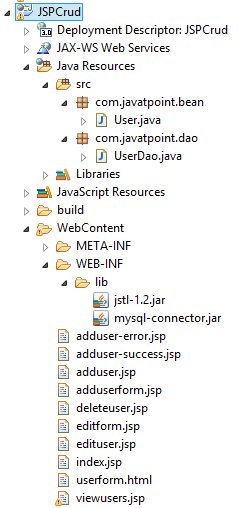
index.jsp
- <!DOCTYPE html>
- <html>
- <head>
- <meta http-equiv="Content-Type" content="text/html; charset=ISO-8859-1">
- <title>JSP CRUD Example</title>
- </head>
- <body>
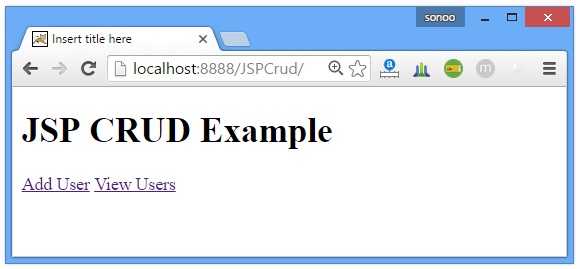
- <h1>JSP CRUD Example</h1>
- <a href="adduserform.jsp">Add User</a>
- <a href="viewusers.jsp">View Users</a>
- </body>
- </html>
adduserform.jsp
- <!DOCTYPE html>
- <html>
- <head>
- <meta http-equiv="Content-Type" content="text/html; charset=ISO-8859-1">
- <title>Add User Form</title>
- </head>
- <body>
- <jsp:include page="userform.html"></jsp:include>
- </body>
- </html>
userform.html
- <a href="viewusers.jsp">View All Records</a><br/>
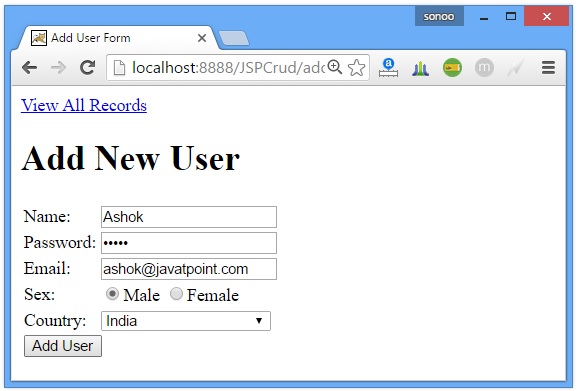
- <h1>Add New User</h1>
- <form action="adduser.jsp" method="post">
- <table>
- <tr><td>Name:</td><td><input type="text" name="name"/></td></tr>
- <tr><td>Password:</td><td>
- <input type="password" name="password"/></td></tr>
- <tr><td>Email:</td><td><input type="email" name="email"/></td></tr>
- <tr><td>Sex:</td><td>
- <input type="radio" name="sex" value="male"/>Male
- <input type="radio" name="sex" value="female"/>Female </td></tr>
- <tr><td>Country:</td><td>
- <select name="country" style="width:155px">
- <option>India</option>
- <option>Pakistan</option>
- <option>Afghanistan</option>
- <option>Berma</option>
- <option>Other</option>
- </select>
- </td></tr>
- <tr><td colspan="2"><input type="submit" value="Add User"/></td></tr>
- </table>
- </form>
adduser.jsp
- <%@page import="com.javatpoint.dao.UserDao"%>
- <jsp:useBean id="u" class="com.javatpoint.bean.User"></jsp:useBean>
- <jsp:setProperty property="*" name="u"/>
- <%
- int i=UserDao.save(u);
- if(i>0){
- response.sendRedirect("adduser-success.jsp");
- }else{
- response.sendRedirect("adduser-error.jsp");
- }
- %>
User.java
- package com.javatpoint.bean;
- public class User {
- private int id;
- private String name,password,email,sex,country;
- //generate getters and setters
- }
UserDao.java


- package com.javatpoint.dao;
- import java.sql.*;
- import java.util.ArrayList;
- import java.util.List;
- import com.javatpoint.bean.User;
- public class UserDao {
- public static Connection getConnection(){
- Connection con=null;
- try{
- Class.forName("com.mysql.jdbc.Driver");
- con=DriverManager.getConnection("jdbc:mysql://localhost:3306/test","","");
- }catch(Exception e){System.out.println(e);}
- return con;
- }
- public static int save(User u){
- int status=0;
- try{
- Connection con=getConnection();
- PreparedStatement ps=con.prepareStatement(
- "insert into register(name,password,email,sex,country) values(?,?,?,?,?)");
- ps.setString(1,u.getName());
- ps.setString(2,u.getPassword());
- ps.setString(3,u.getEmail());
- ps.setString(4,u.getSex());
- ps.setString(5,u.getCountry());
- status=ps.executeUpdate();
- }catch(Exception e){System.out.println(e);}
- return status;
- }
- public static int update(User u){
- int status=0;
- try{
- Connection con=getConnection();
- PreparedStatement ps=con.prepareStatement(
- "update register set name=?,password=?,email=?,sex=?,country=? where id=?");
- ps.setString(1,u.getName());
- ps.setString(2,u.getPassword());
- ps.setString(3,u.getEmail());
- ps.setString(4,u.getSex());
- ps.setString(5,u.getCountry());
- ps.setInt(6,u.getId());
- status=ps.executeUpdate();
- }catch(Exception e){System.out.println(e);}
- return status;
- }
- public static int delete(User u){
- int status=0;
- try{
- Connection con=getConnection();
- PreparedStatement ps=con.prepareStatement("delete from register where id=?");
- ps.setInt(1,u.getId());
- status=ps.executeUpdate();
- }catch(Exception e){System.out.println(e);}
- return status;
- }
- public static List<User> getAllRecords(){
- List<User> list=new ArrayList<User>();
- try{
- Connection con=getConnection();
- PreparedStatement ps=con.prepareStatement("select * from register");
- ResultSet rs=ps.executeQuery();
- while(rs.next()){
- User u=new User();
- u.setId(rs.getInt("id"));
- u.setName(rs.getString("name"));
- u.setPassword(rs.getString("password"));
- u.setEmail(rs.getString("email"));
- u.setSex(rs.getString("sex"));
- u.setCountry(rs.getString("country"));
- list.add(u);
- }
- }catch(Exception e){System.out.println(e);}
- return list;
- }
- public static User getRecordById(int id){
- User u=null;
- try{
- Connection con=getConnection();
- PreparedStatement ps=con.prepareStatement("select * from register where id=?");
- ps.setInt(1,id);
- ResultSet rs=ps.executeQuery();
- while(rs.next()){
- u=new User();
- u.setId(rs.getInt("id"));
- u.setName(rs.getString("name"));
- u.setPassword(rs.getString("password"));
- u.setEmail(rs.getString("email"));
- u.setSex(rs.getString("sex"));
- u.setCountry(rs.getString("country"));
- }
- }catch(Exception e){System.out.println(e);}
- return u;
- }
- }
adduser-success.jsp
- <!DOCTYPE html>
- <html>
- <head>
- <meta http-equiv="Content-Type" content="text/html; charset=ISO-8859-1">
- <title>Add User Success</title>
- </head>
- <body>
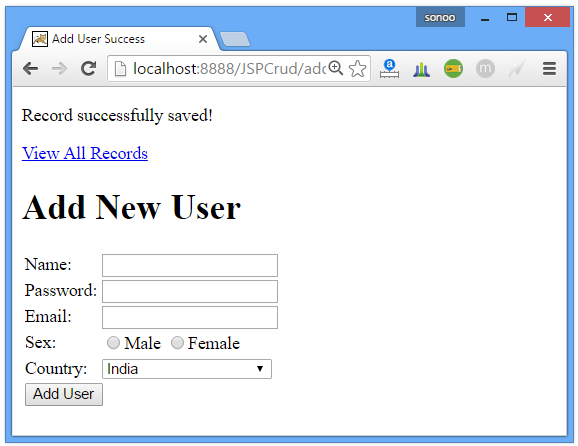
- <p>Record successfully saved!</p>
- <jsp:include page="userform.html"></jsp:include>
- </body>
- </html>
adduser-error.jsp
- <!DOCTYPE html>
- <html>
- <head>
- <meta http-equiv="Content-Type" content="text/html; charset=ISO-8859-1">
- <title>Add User Error</title>
- </head>
- <body>
- <p>Sorry, an error occurred!</p>
- <jsp:include page="userform.html"></jsp:include>
- </body>
- </html>
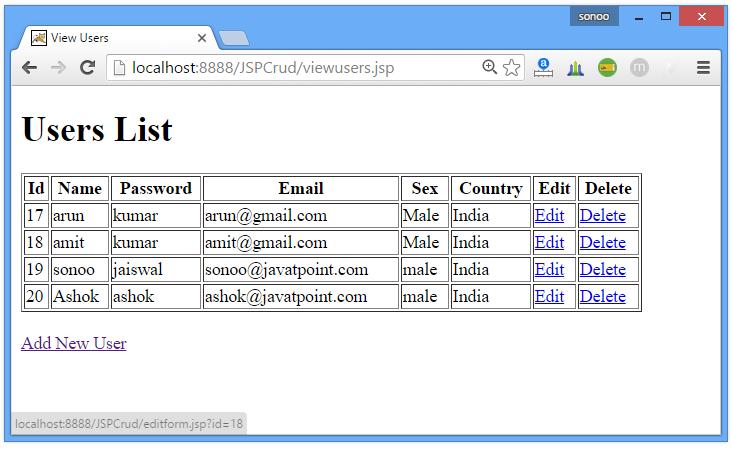
viewusers.jsp
- <!DOCTYPE html>
- <html>
- <head>
- <meta http-equiv="Content-Type" content="text/html; charset=ISO-8859-1">
- <title>View Users</title>
- </head>
- <body>
- <%@page import="com.javatpoint.dao.UserDao,com.javatpoint.bean.*,java.util.*"%>
- <%@ taglib uri="http://java.sun.com/jsp/jstl/core" prefix="c"%>
- <h1>Users List</h1>
- <%
- List<User> list=UserDao.getAllRecords();
- request.setAttribute("list",list);
- %>
- <table border="1" width="90%">
- <tr><th>Id</th><th>Name</th><th>Password</th><th>Email</th>
- <th>Sex</th><th>Country</th><th>Edit</th><th>Delete</th></tr>
- <c:forEach items="${list}" var="u">
- <tr><td>${u.getId()}</td><td>${u.getName()}</td><td>${u.getPassword()}</td>
- <td>${u.getEmail()}</td><td>${u.getSex()}</td><td>${u.getCountry()}</td>
- <td><a href="editform.jsp?id=${u.getId()}">Edit</a></td>
- <td><a href="deleteuser.jsp?id=${u.getId()}">Delete</a></td></tr>
- </c:forEach>
- </table>
- <br/><a href="adduserform.jsp">Add New User</a>
- </body>
- </html>
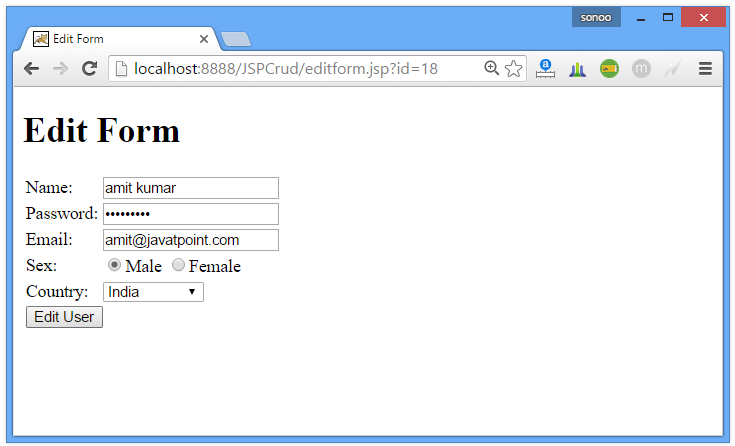
editform.jsp
- <!DOCTYPE html>
- <html>
- <head>
- <meta http-equiv="Content-Type" content="text/html; charset=ISO-8859-1">
- <title>Edit Form</title>
- </head>
- <body>
- <%@page import="com.javatpoint.dao.UserDao,com.javatpoint.bean.User"%>
- <%
- String id=request.getParameter("id");
- User u=UserDao.getRecordById(Integer.parseInt(id));
- %>
- <h1>Edit Form</h1>
- <form action="edituser.jsp" method="post">
- <input type="hidden" name="id" value="<%=u.getId() %>"/>
- <table>
- <tr><td>Name:</td><td>
- <input type="text" name="name" value="<%= u.getName()%>"/></td></tr>
- <tr><td>Password:</td><td>
- <input type="password" name="password" value="<%= u.getPassword()%>"/></td></tr>
- <tr><td>Email:</td><td>
- <input type="email" name="email" value="<%= u.getEmail()%>"/></td></tr>
- <tr><td>Sex:</td><td>
- <input type="radio" name="sex" value="male"/>Male
- <input type="radio" name="sex" value="female"/>Female </td></tr>
- <tr><td>Country:</td><td>
- <select name="country">
- <option>India</option>
- <option>Pakistan</option>
- <option>Afghanistan</option>
- <option>Berma</option>
- <option>Other</option>
- </select>
- </td></tr>
- <tr><td colspan="2"><input type="submit" value="Edit User"/></td></tr>
- </table>
- </form>
- </body>
- </html>
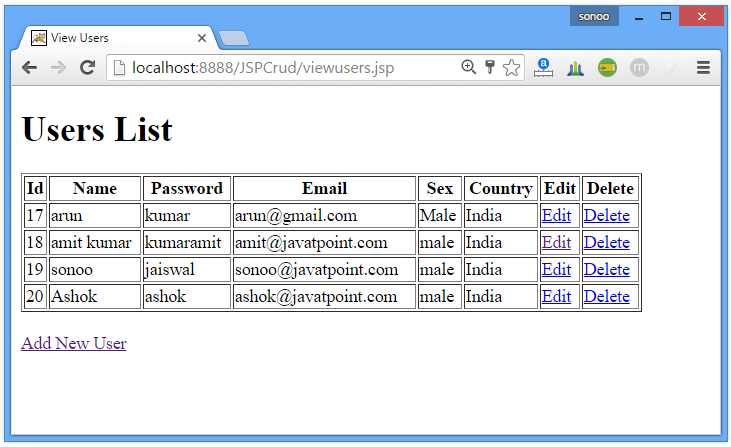
edituser.jsp
- <%@page import="com.javatpoint.dao.UserDao"%>
- <jsp:useBean id="u" class="com.javatpoint.bean.User"></jsp:useBean>
- <jsp:setProperty property="*" name="u"/>
- <%
- int i=UserDao.update(u);
- response.sendRedirect("viewusers.jsp");
- %>
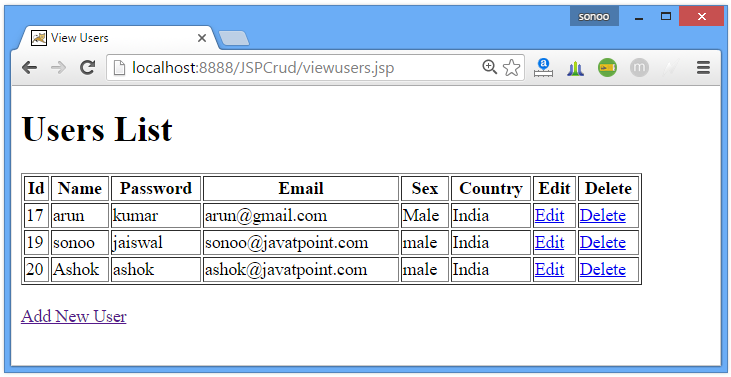
deleteuser.jsp
- <%@page import="com.javatpoint.dao.UserDao"%>
- <jsp:useBean id="u" class="com.javatpoint.bean.User"></jsp:useBean>
- <jsp:setProperty property="*" name="u"/>
- <%
- UserDao.delete(u);
- response.sendRedirect("viewusers.jsp");
- %>
Download Project
Output
본 웹사이트는 광고를 포함하고 있습니다.
광고 클릭에서 발생하는 수익금은 모두 웹사이트 서버의 유지 및 관리, 그리고 기술 콘텐츠 향상을 위해 쓰여집니다.
광고 클릭에서 발생하는 수익금은 모두 웹사이트 서버의 유지 및 관리, 그리고 기술 콘텐츠 향상을 위해 쓰여집니다.
