
- 전체
- 안드로이드 플랫폼
- 아두이노
- 라즈베리 파이
- 안드로이드 ADK
- Embedded HardWare
- Embedded FirmWare
- Embedded Platform
- Embedded SoftWare
- 임베디드 리눅스
- Hobby Electronics
- 임베디드기사 - 국가기술자격
- VHDL 디지털설계
- M2M_IoT_사물지능통신
- 아마추어 로봇
- EDA - Electronic CAD
- 로봇공학
- 국가기술자격 로봇 제작 개발 자격증
- IoT (임베디드 인터넷)
아두이노 [아두이노 arduino] Arduino – base64 encode and decode
2024.03.11 02:42
[아두이노 arduino] Arduino – base64 encode and decode
Arduino contains a library that helps with base64 encode and decode. You can download it from the Library Manager. Search for base64, and install the library by Densaugeo.
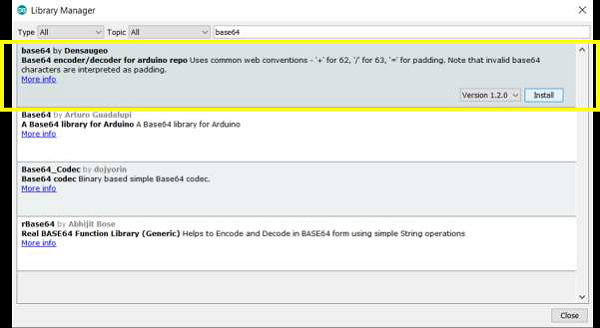
Now, open a new sketch and run the following sample code −
#include "base64.hpp"

unsigned char normal_text[20] = "Hello World";
unsigned char base64_text[20];
unsigned char decoded_text[20];

void setup() {
   // put your setup code here, to run once:
   Serial.begin(9600);
   Serial.println();

   int base64_length = encode_base64(normal_text,12,base64_text);
   Serial.print("Base64 Text: ");Serial.println((char *) base64_text);
   Serial.print("Base64 Length: ");Serial.println(base64_length);

   int decoded_length = decode_base64(base64_text,decoded_text);
   Serial.print("Decoded Text: ");Serial.println((char *)decoded_text);
   Serial.print("Decoded Length: ");Serial.println(decoded_length);
}

void loop() {
   // put your main code here, to run repeatedly:
}
Output
The Serial Monitor Output is shown below −
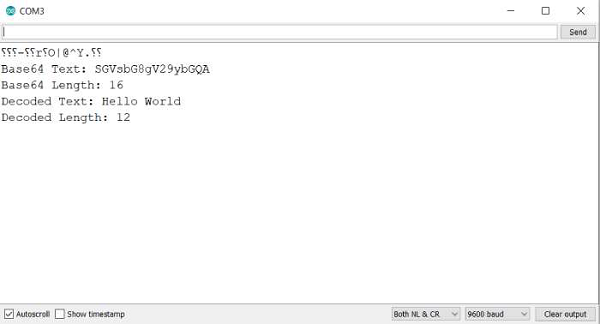
You can verify this output on websites like: https://base64.guru/converter/decode
As you can see, this library deals with unsigned character arrays. The base64_encode function takes three arguments −
-
The array to be converted
-
The number of elements in the array to be converted
-
The array in which to store the encoded values
It returns the length of the encoded array.
The base64_decode function takes in two arguments −
-
The array containing the encoded values
-
The array in which to store the decoded results
Since Serial.print() and its variations don't deal with unsigned char arrays, you need to cast it to a char array for printing.


[출처] https://www.tutorialspoint.com/arduino-base64-encode-and-decode
광고 클릭에서 발생하는 수익금은 모두 웹사이트 서버의 유지 및 관리, 그리고 기술 콘텐츠 향상을 위해 쓰여집니다.
