
Anonymous Web Scraping using Python and Tor

Requirements

Python

c01python-logo-master-v3-TM.png


socks module provides a standard socket-like interface for Python for tunneling connections through SOCKS proxies.
$ sudo pip install pysocks

Requests is an HTTP library, written in Python, that is wrapper over urllib*, and is very pythonic in use.
$ sudo pip install requests

c02requests-sidebar.png


Fedora

$ sudo yum install tor

Ubuntu

$ sudo apt-get install tor

c032000px-Tor-logo-2011-flat_svg.png

경축! 아무것도 안하여 에스천사게임즈가 새로운 모습으로 재오픈 하였습니다.
어린이용이며, 설치가 필요없는 브라우저 게임입니다.
https://s1004games.com


After doing all the required installations. To start the tor and let run in background run following command.
$ tor &

By default tor uses port# 9050 if not mentioned otherwise. You can check if the process is listening using command netstat.
$ netstat -tupln

look for process listening on port# 9050 c04untitled.png
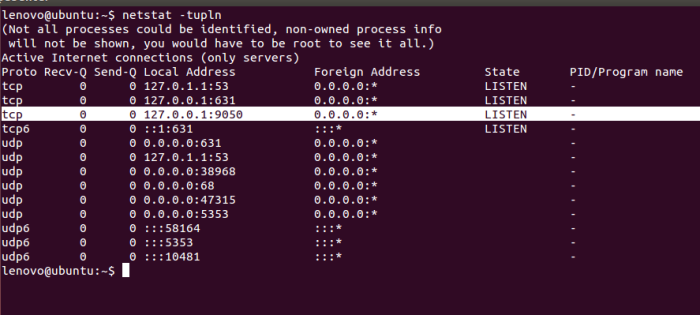
 

Now for the programming part do following open up the python interpreter and run commands as follows.
>>> import socks
>>> import socket
>>> socks.setdefaultproxy(proxy_type=socks.PROXY_TYPE_SOCKS5, addr="127.0.0.1", port=9050)

socks.setdefaultproxy sets a default proxy which all further socksocket objects will use, unless explicitly changed.
>>> socket.socket = socks.socksocket

socks.socksocket returns a socket object which is assigned to socket.socket which opens a socket. Now all connections made by the script will be done using this socket.

>>> import requests
>>> print requests.get("http://icanhazip.com").text
176.10.99.203

Try opening that url http://icanhazip.com from your browser as well. This website shows your public IP address. You will see different IP address in browser and in program output. Now you can change above script and write your webscraping or webcrawling program around it and make your python program run anonymously on the internet.


[출처] https://deshmukhsuraj.wordpress.com/2015/03/08/anonymous-web-scraping-using-python-and-tor/

본 웹사이트는 광고를 포함하고 있습니다.
광고 클릭에서 발생하는 수익금은 모두 웹사이트 서버의 유지 및 관리, 그리고 기술 콘텐츠 향상을 위해 쓰여집니다.
번호 제목 글쓴이 날짜 조회 수
15 [python 데이터분석] [jupyter] 주피터 노트북에 이미지 삽입 file 졸리운_곰 2025.09.06 526
14 [python 데이터분석] [Python] Streamlit 사용법 (python 데이터분석 웹 만들기) file 졸리운_곰 2024.12.22 462
13 [python 데이터분석] Anaconda : Error while loading conda entry point: conda-libmamba-solver (libarchive.so.19: cannot open shared object file: No such file or directory) 졸리운_곰 2024.12.14 520
12 [python 데이터분석] Anaconda | Conda update 반영 안됨(update 후에도 버전 변경 없음) file 졸리운_곰 2024.11.18 431
11 [python 데이터분석] Keeping Anaconda Up To Date 졸리운_곰 2024.05.30 552
10 [python 데이터 분석] 국내 경제 100대 통계지표 졸리운_곰 2024.02.18 672
9 [python 데이터 분석] Python 에서 R언어 패키지 호출 : Calling R From Python With rpy2 file 졸리운_곰 2024.01.28 676
8 [python 데이터 분석] 파이썬을 활용한 코스피, 달러 환율정보 수집부터 차트 시각화까지 file 졸리운_곰 2023.12.11 735
7 [Python 데이터분석][pandas] [Python pandas] DataFrame의 문자열 칼럼을 숫자형으로 바꾸기 : pd.to_numeric(), DataFrame.astype() file 졸리운_곰 2023.12.09 357
6 [Python 데이터분석] [Python 환경설정] VS code 설치 및 Anaconda와 연동하기 file 졸리운_곰 2023.03.17 527
5 [Python 데이터분석][python 데이터분석 프로덕션] [Python] Docker를 사용한 Dash 웹앱 생성 file 졸리운_곰 2021.12.10 403
4 [Python 데이터분석] [pandas] 공공데이터(csv) 활용시 한글 깨짐 현상 해결 file 졸리운_곰 2021.09.30 592
3 [Python 데이터분석] 공공데이터포털::공휴일 데이터 조회 (REST API) file 졸리운_곰 2021.09.30 358
2 [Python 데이터 분석] pandas의 to_csv()를 사용해서 csv 파일로 저장하기(save 하기) 졸리운_곰 2021.09.29 603
1 [Python 데이터 분석] 데이터 과학을 단순하게 만드는 3가지 Python 패키지 file 졸리운_곰 2021.09.24 513
대표 김성준 주소 : 경기 용인 분당수지 U타워 등록번호 : 142-07-27414
통신판매업 신고 : 제2012-용인수지-0185호 출판업 신고 : 수지구청 제 123호 개인정보보호최고책임자 : 김성준 sjkim70@stechstar.com
대표전화 : 010-4589-2193 [fax] 02-6280-1294 COPYRIGHT(C) stechstar.com ALL RIGHTS RESERVED