Unable to load textured Collada exported from blender using Three.js


up vote0down votefavorite

I am using Three.js, version 71. I'm using Blender, version 2.73.

I created a textured collada object (.dae file) using Blender, and now I want to load it into my three.js scene. So far, I can only load models that get exported from blender that have no textures on them.

Here is how I create the textured collada object:
In blender, I simply use the default cube. Using the settings on the right, I add a texture to the cube. Here is the texture I am putting onto the cube (NOTE: it is 2048 X 2048, so it's a power of 2): Texture for Collada (2048 X 2048)

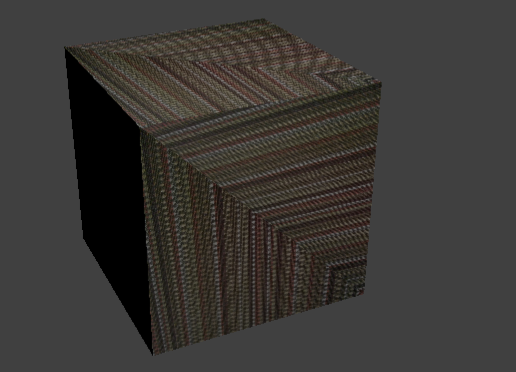
Here is an image of the cube in render mode to prove that the texture is on it: Textured Collada
Here are the export settings I used when I exported the cube as a collada from Blender: Collada Export Settings
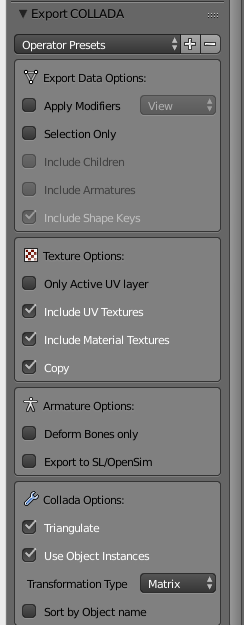
Here is some code I used to try to load the textured collada:

var loader = new THREE.ColladaLoader();
var localObject;
loader.options.convertUpAxis = true;
loader.load( './models/test_texture.dae', function ( collada ) {
  localObject = collada.scene;
  localObject.scale.x = localObject.scale.y = localObject.scale.z = 32;
  localObject.updateMatrix();
  game.scene.add(localObject);
} );

Here is the error I got:

[.WebGLRenderingContext]GL ERROR :GL_INVALID_OPERATION : glDrawElements: attempt to access out of range vertices in attribute 2

I then googled that error message and someone said the I need to compute tangents. Here are my attempts at that and the errors I got:

var loader = new THREE.ColladaLoader();
var localObject;
loader.options.convertUpAxis = true;
loader.load( './models/test_texture.dae', function ( collada ) {
  localObject = collada.scene;
  localObject.scale.x = localObject.scale.y = localObject.scale.z = 32;
  localObject.updateMatrix();

  for (var i = collada.scene.children.length - 1; i >= 0; i--) {
    var child = collada.scene.children[i];

    // child.children[0] will give us the THREE.Mesh of the collada
    if ( child.colladaId == "Cube" ) {

      // ATTEMPT 1: Just tried computing tangets based on answer from neoRiley here: http://stackoverflow.com/questions/21200386/webgl-gl-error-gl-invalid-operation-gldrawelements-attempt-to-access-out-of
      // child.children[0].geometry.computeTangents();

      // ATTEMPT 2: Got this suggestion from Popov here: http://stackoverflow.com/questions/15717468/three-lod-and-normalmap-shader-fail
      // child.children[0].geometry[ 0 ][ 0 ].computeTangents();
      // child.children[0].geometry[ 1 ][ 0 ].computeTangents();

      // ATTEMPT 3: Tried setting some update flags based on answer from Sayris here: http://stackoverflow.com/questions/13988615/webglrenderingcontext-error-loading-texture-maps
      // child.children[0].geometry.buffersNeedUpdate = true;
      // child.children[0].geometry.uvsNeedUpdate = true;
      // child.children[0].material.needsUpdate = true;
      // child.children[0].geometry.computeTangents();
    }
  };
  game.scene.add(localObject);
} );

ATTEMPT 1 ERROR:

경축! 아무것도 안하여 에스천사게임즈가 새로운 모습으로 재오픈 하였습니다.
어린이용이며, 설치가 필요없는 브라우저 게임입니다.
https://s1004games.com

Uncaught TypeError: Cannot read property '0' of undefined
// Stack trace
three.js:9935 handleTriangle
three.js:9974 THREE.Geometry.computeTangents
myCode.js:116 (anonymous function)
ColladaLoader.js:204 parse
ColladaLoader.js:84 request.onreadystatechange

ATTEMPT 2 ERROR:

Uncaught TypeError: Cannot read property '0' of undefined

This came from own code. I didn't think geometry of THREE.Mesh is two dimensional, but I tried it anyway.

ATTEMPT 3 ERROR: (same as ATTEMPT 1 ERROR)

Uncaught TypeError: Cannot read property '0' of undefined
// Stack trace
three.js:9935 handleTriangle
three.js:9974 THREE.Geometry.computeTangents
myCode.js:116 (anonymous function)
ColladaLoader.js:204 parse
ColladaLoader.js:84 request.onreadystatechange

A


0down voteaccepted

I decided to use the JSON loader instead because I couldn't get the collada one to work. The first thing I did was install the JSON exporter addon into Blender. I got the addon from the .zip file from my three.js download. It's in three.js-r71/utils/exporters/blender/addons and it's called io_three. You just need to copy that folder and paste it in your Blender installation directory in Blender Foundation/Blender/2.73/scripts/addons.

You then have to enable it in Blender. To do that:

  1. Click to File->User Preferences...
  2. Click Add-ons
  3. Type three in the search field
  4. All the way to the right, click the check box to enable it
  5. At the bottom left, click Save User Settings so you don't need to do this again. You'll know it's working if you see Three.js (.json) when you click File->Export.

I followed most of the instructions from this site to help me create and export a model: http://graphic-sim.com/B_basic_export.html

Here are the steps I used to create and export the model (I tweaked them a little bit from the site)

  1. Start up Blender.
  2. Look at the Properties editor (on the right).
  3. Press the World context button. In the World panel click Ambient Color and change it from black to middle gray.
  4. Press the Material context button. On the Diffuse panel change Intensity to 1.0. Do the same on the Specular panel. In the Shading panel put a check in the Shadeless box.
  5. Press the Textures context button. Near the top in the Type drop down box, select Image or Movie. In the Image panel, browse to your image (make sure the image's dimensions are in a power of 2).
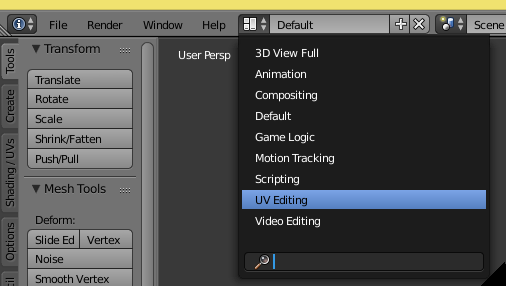
  6. Choose the UV Editing screen layout (drop-down box to right of help menu at top). UV Editing menu
  7. With mouse cursor in 3D editor, go into edit mode (Tab key).
  8. Unwrap (Press the U key). Choose Smart UV Project. Click Ok to accept defaults.
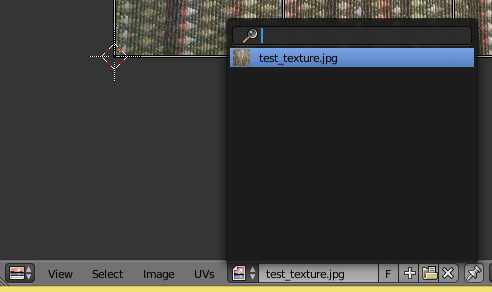
  9. In the UV Editing screen, select your image using the menu at the bottom left (see screenshot)Selecting Image in UV layout
  10. Select Image->Save As Image. This image will need to be next to your JSON file that you will export.
  11. Click File->Export->Three.js (.json).
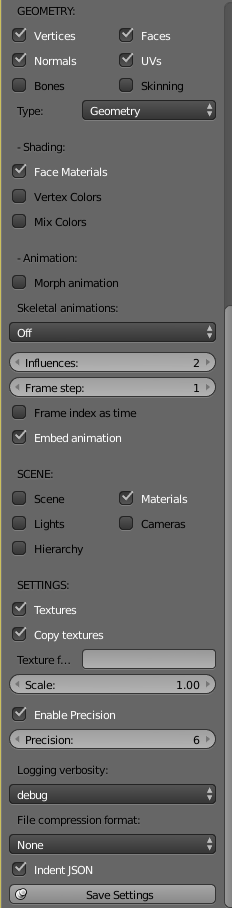
  12. To the left, select a few more export options (see screenshot for the ones i used, which I found by trial and error). I think I only added Face MaterialsMaterials, and Textures. You can then also click Save Settings to save these settings. JSON Export Settings
  13. Put your JSON file and your image file that you saved earlier in your project folder.
  14. Use the following code to load it:

    var object;
    var loader = new THREE.JSONLoader();          
    loader.load( "./models/test_texture.json", function(geometry, materials) {
      object = new THREE.Mesh(geometry, materials[0]);
      object.scale.set(32, 32, 32);
      game.scene.add(object);
    });


[출처] https://stackoverflow.com/questions/29318057/unable-to-load-textured-collada-exported-from-blender-using-three-js

본 웹사이트는 광고를 포함하고 있습니다.
광고 클릭에서 발생하는 수익금은 모두 웹사이트 서버의 유지 및 관리, 그리고 기술 콘텐츠 향상을 위해 쓰여집니다.
번호 제목 글쓴이 날짜 조회 수
598 기계 학습을 최대한 활용할 수 있는 11가지 오픈소스 도구 file 졸리운_곰 2017.08.22 90
597 프로그래밍 언어별 딥러닝 라이브러리 정리 file 졸리운_곰 2017.08.22 107
596 What are the differences between glu, glew, glut, qt, sdl, openGL and webGL? 졸리운_곰 2017.08.19 127
» Unable to load textured Collada exported from blender using Three.js file 졸리운_곰 2017.08.15 563
594 웹 데이터 수집의 기술 서적 부록 소스 file 졸리운_곰 2017.08.15 104
593 blender 2.78 매뉴얼 manual 블랜더 file 졸리운_곰 2017.08.13 117
592 Cg (programming language) : 3d graphics shader programming 졸리운_곰 2017.08.10 117
591 wikipedia 사이트를 크롤링 할 수고를 덜어주는 wikipedia dump 사이트 졸리운_곰 2017.08.05 113
590 python and java libraries to parse wikipedia dump dataset 졸리운_곰 2017.08.05 253
589 한글 빅 데이터 분석용 : 한글 자연어 처리용 자료 사이트 졸리운_곰 2017.08.01 122
588 한국어 빅데이터 분석용 : 한국어 학습 단어 일람 (단어장) file 졸리운_곰 2017.08.01 124
587 Collada Dae file : Schema validation 졸리운_곰 2017.08.01 121
586 ow to import entire Wikipedia into your own MySQL database. Steps for creating MySQL database out of Wikipedia XML dump… file 졸리운_곰 2017.07.22 276
585 [반응형 웹] 과 [적응형 웹]을 넘어 경험을 디자인하다 file 졸리운_곰 2017.07.15 122
584 [적응형 웹 전성시대] : 스마트한 UI, 만족스런 UX 위한 웹? file 졸리운_곰 2017.07.15 92
583 [반응형 웹의 진실] 트렌드 따라가다 내실 놓친다 file 졸리운_곰 2017.07.15 97
582 스카이레이크 윈도우7 부팅 USB 만들기(기가바이트 편) file 졸리운_곰 2017.07.09 392
581 노트북 외장그래픽 사용하는법 (내장그래픽 끄기) file 졸리운_곰 2017.07.08 2262
580 dnSpy : .net 어셈블리 (바이너리) 디버깅, 소스 코딩 file 졸리운_곰 2017.07.01 1357
579 Collada란 무엇인가 졸리운_곰 2017.07.01 428
대표 김성준 주소 : 경기 용인 분당수지 U타워 등록번호 : 142-07-27414
통신판매업 신고 : 제2012-용인수지-0185호 출판업 신고 : 수지구청 제 123호 개인정보보호최고책임자 : 김성준 sjkim70@stechstar.com
대표전화 : 010-4589-2193 [fax] 02-6280-1294 COPYRIGHT(C) stechstar.com ALL RIGHTS RESERVED