
- 전체
- Sample DB
- database modeling
- [표준 SQL] Standard SQL
- G-SQL
- 10-Min
- ORACLE
- MS SQLserver
- MySQL
- SQLite
- postgreSQL
- 데이터아키텍처전문가 - 국가공인자격
- 데이터 분석 전문가 [ADP]
- [국가공인] SQL 개발자/전문가
- NoSQL
- hadoop
- hadoop eco system
- big data (빅데이터)
- stat(통계) R 언어
- XML DB & XQuery
- spark
- DataBase Tool
- 데이터분석 & 데이터사이언스
- Engineer Quality Management
- [기계학습] machine learning
- 데이터 수집 및 전처리
- 국가기술자격 빅데이터분석기사
- 암호화폐 (비트코인, cryptocurrency, bitcoin)
big data (빅데이터) Flume NG version 설치 및 로그 수집
2016.05.29 12:09
Flume NG version 설치 및 로그 수집
Flume NG 설치 및 로그 수집 하기 입니다.
각각 아래와 같이 구성하였습니다.
0번 HDFS <--- 저장소
1번 agent01 <--- 로그의 데이터가 모아져 HDFS에 저장함.
2번 agent02 <--- 로그 수집
3번 agent03 <--- 로그 수집
먼저 Flume NG 를 다운로드 합니다.
apache 홈페이지에서 다운로드 하시거나 wget 명령어로 다운로드 합니다.
wget http://archive.apache.org/dist/flume/1.3.1/apache-flume-1.3.1-bin.tar.gz 를 입력합니다.
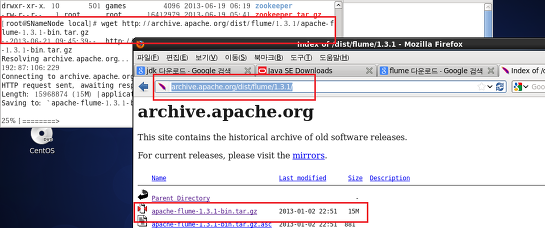
다운로드한 파일을 압축해제 후 원하는 경로에 위치 시킵니다.
tar xvfzp apache-flume-1.3.1-bin.tar.gz <-- 압축해제
mv flume-1.3.1 /usr/local/flume <-- 원하는 경로로 이동
그다음 리눅스 환경변수를 설정합니다. (로그 수집 할 노드 모두)
vi /etc/profile <-- 입력하여 환경변수를 설정합니다.
export FLUME_HOME=/usr/local/flume <-- 추가합니다.
PATH 지정해주기 <-- 추가합니다.
source /etc/profile <-- 환경변수를 입력하였으면 적용 시킵니다.
그다음 flume폴더를 압축하여 각 노드에 배포를 합니다.
tar cvfpz flume디렉토리 <- 압축
- scp –rp flume.tar.gz DataNode02:/usr/local <-배포
- scp –rp flume.tar.gz DataNode03:/usr/local
배포된 flume압축파일을 압축해제 후 원하는 경로에 위치 합니다.
tar xvfzp flume.tar.gz
mv flume /usr/local/flum
그다음 flume디렉토리 안에 conf디렉토리 안에 있는 flume-conf.properties.template
파일을 flume.conf 파일로 복사 합니다.
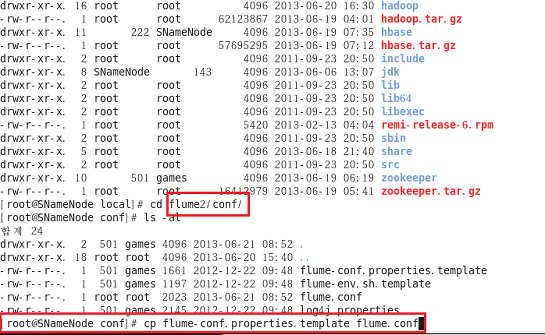
복사한 flume.conf 파일을 vi 편집기를 이용하여 환경설정을 합니다.
로그데이터가 모아질 1번 노드와 로그를 수집 할 노드의 환경설정은 조금 다릅니다.


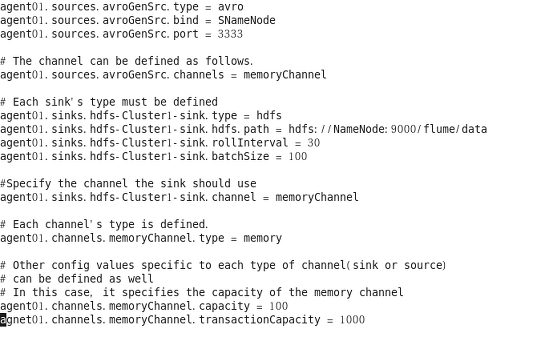
1번 노드의 flume.conf 파일 내용
agent01.sources = avroGenSrc
agent01.channels = memoryChannel
agent01.sinks = hdfs-Cluster1-sink
# For each one of the sources, the type is defined
agent01.sources.avroGenSrc.type = avro
agent01.sources.avroGenSrc.bind = SNameNode
agent01.sources.avroGenSrc.port = 3333
# The channel can be defined as follows.
agent01.sources.avroGenSrc.channels = memoryChannel
# Each sink's type must be defined
agent01.sinks.hdfs-Cluster1-sink.type = hdfs
agent01.sinks.hdfs-Cluster1-sink.hdfs.path = hdfs://NameNode:9000/flume/data
agent01.sinks.hdfs-Cluster1-sink.rollInterval = 30
agent01.sinks.hdfs-Cluster1-sink.sink.batchSize = 100
#Specify the channel the sink should use
agent01.sinks.hdfs-Cluster1-sink.channel = memoryChannel
# Each channel's type is defined.
agent01.channels.memoryChannel.type = memory
# Other config values specific to each type of channel(sink or source)
# can be defined as well
# In this case, it specifies the capacity of the memory channel
agent01.channels.memoryChannel.capacity = 100000
agent01.channels.memoryChannel.transactionCapacity = 10000
2,3번 노드의 flume.conf 파일 내용(2,3번 agent의 내용은 같으며 agent의 이름만 다르게 주시면 됩니다.)
agent02.sources = execGenSrc
agent02.channels = memoryChannel
agent02.sinks = avroSink
# For each one of the sources, the type is defined
agent02.sources.execGenSrc.type = exec
agent02.sources.execGenSrc.command = tail -F /home/aaaaa/hadoop/logs/logsample.log <--- 수집할 로그 파일 경로
agent02.sources.execGenSrc.batchSize = 10
# The channel can be defined as follows.
agent02.sources.execGenSrc.channels = memoryChannel
# Each sink's type must be defined
agent02.sinks.avroSink.type = avro
agent02.sinks.avroSink.hostname = 로그데이터가 모아질 호스트 네임 & 주소
agent02.sinks.avroSink.port = 3333
agent02.sinks.avroSink.batch-size = 10
#Specify the channel the sink should use
agent02.sinks.avroSink.channel = memoryChannel
# Each channel's type is defined.
agent02.channels.memoryChannel.type = memory
# Other config values specific to each type of channel(sink or source)
# can be defined as well
# In this case, it specifies the capacity of the memory channel
agent02.channels.memoryChannel.capacity = 100000
agent02.channels.memoryChannel.transactionCapacity = 10000
-------------------------------------------------------------------------------------
환경 설정이 마무리 되었다면 각각의 노드에서 agent를 실행합니다.
- flume-ng agent --conf-file ./conf/flume.conf --name agent01 <-- 1번 노드
- flume-ng agent --conf-file ./conf/flume.conf --name agent02 <-- 2번 노드
- flume-ng agent --conf-file ./conf/flume.conf --name agent03 <-- 3번 노드
각각 실행 하고 정상적으로 올라 왔다면 아래와 같이 구성 된 것입니다.

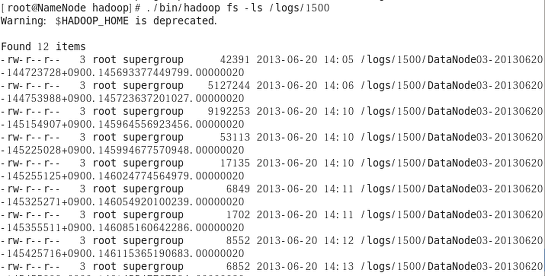
바로 HDFS를 확인하여 보면 로그가 수집이 되는 것을 확인 할 수있습니다.
./bin/hadoop fs -ls /logs/1500
광고 클릭에서 발생하는 수익금은 모두 웹사이트 서버의 유지 및 관리, 그리고 기술 콘텐츠 향상을 위해 쓰여집니다.
