
- 전체
- Sample DB
- database modeling
- [표준 SQL] Standard SQL
- G-SQL
- 10-Min
- ORACLE
- MS SQLserver
- MySQL
- SQLite
- postgreSQL
- 데이터아키텍처전문가 - 국가공인자격
- 데이터 분석 전문가 [ADP]
- [국가공인] SQL 개발자/전문가
- NoSQL
- hadoop
- hadoop eco system
- big data (빅데이터)
- stat(통계) R 언어
- XML DB & XQuery
- spark
- DataBase Tool
- 데이터분석 & 데이터사이언스
- Engineer Quality Management
- [기계학습] machine learning
- 데이터 수집 및 전처리
- 국가기술자격 빅데이터분석기사
- 암호화폐 (비트코인, cryptocurrency, bitcoin)
spark [spark] Apache Livy: A REST Interface for Apache Spark
2021.03.12 23:30
[spark] Apache Livy: A REST Interface for Apache Spark
What Is Livy ?

Apache Livy is a service that enables easy interaction with a Spark cluster over a REST interface. It enables easy submission of Spark jobs or snippets of Spark code, synchronous or asynchronous result retrieval, as well as Spark Context management, all via a simple REST interface or an RPC client library. Apache Livy also simplifies the interaction between Spark and application servers, thus enabling the use of Spark for interactive web/mobile applications.
Apache Spark is a powerful framework for data processing and analysis. It provides two modes for data exploration:
- Interactive: provided by spark-shell, pySpark, and SparkR REPLs
- Batch: using spark-submit to submit a Spark application to cluster without interaction in the middle of run-time
While these two modes look different on the surface, deep down they are actually unified. When the user executes a shell command to launch a client to submit Spark application, after the Spark application is launched, this client could either keep serving as REPL (interactive mode) or exit silently (batch mode).
Regardless of the mode the user chooses to launch Spark application, the user has two choices. The user can either log into a cluster gateway machine and launch applications, or launch from a local machine. Both choices have several flaws:
- Centralize the resource overheads and possibilities of failure to gateway machines.
- Difficult to introduce sophisticated access control mechanism, and to integrate into existing security services like Knox, Ranger.
- Unnecessarily exposing deployment details to the users.
In order to overcome the current shortcomings of executing Spark applications from remote machine, Livy — a REST based Spark interface can be used to run statements, jobs, and applications.
Features of Livy:
- Long running Spark Contexts that can be used for multiple Spark jobs, by multiple clients
- Share cached RDDs or DataSets across multiple jobs and clients
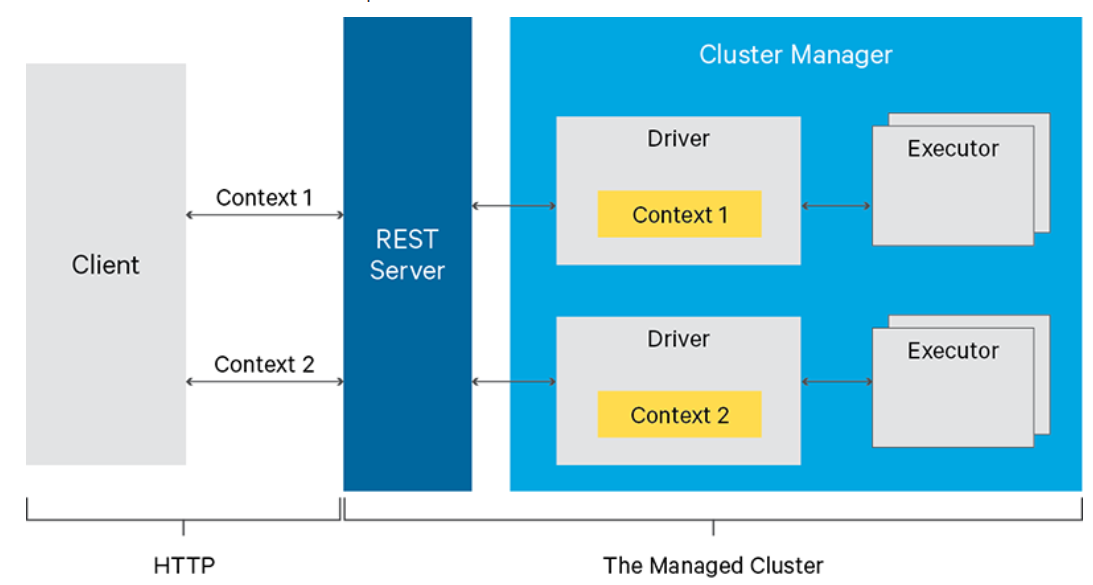
- Multiple Spark Contexts can be managed simultaneously, and the Spark Contexts run on the cluster (YARN/Mesos) instead of the Livy Server, for good fault tolerance and concurrency
- Jobs can be submitted as precompiled jars, snippets of code or via java/scala client API
- Ensure security via secure authenticated communication
The following image, taken from the official website, shows what happens when submitting Spark jobs/code through the Livy REST APIs:

Livy offers three modes to run Spark jobs:
- Using programmatic API
- Running interactive statements through REST API
- Submitting batch applications with REST API
Let’s learn how to start a Livy server and programmatically execute remote Spark Jobs in Java.
The prerequisites to start a Livy server are the following:
- The
JAVA_HOMEenv variable set to a JDK/JRE 8 installation. - A running Spark cluster.
Building Livy
Livy is built using Apache Maven. To check out and build Livy, run:
git clone https://github.com/apache/incubator-livy.git
cd livy
mvn clean package -DskipTsets
Running Livy Server
In order to run Livy with local sessions, first export these variables:
export SPARK_HOME=/usr/lib/spark
export HADOOP_CONF_DIR=/etc/hadoop/conf
Then start the server with:
./bin/livy-server
Verify that the server is running by connecting to its web UI, which uses port 8998 by default http://<livy_host>:8998/ui

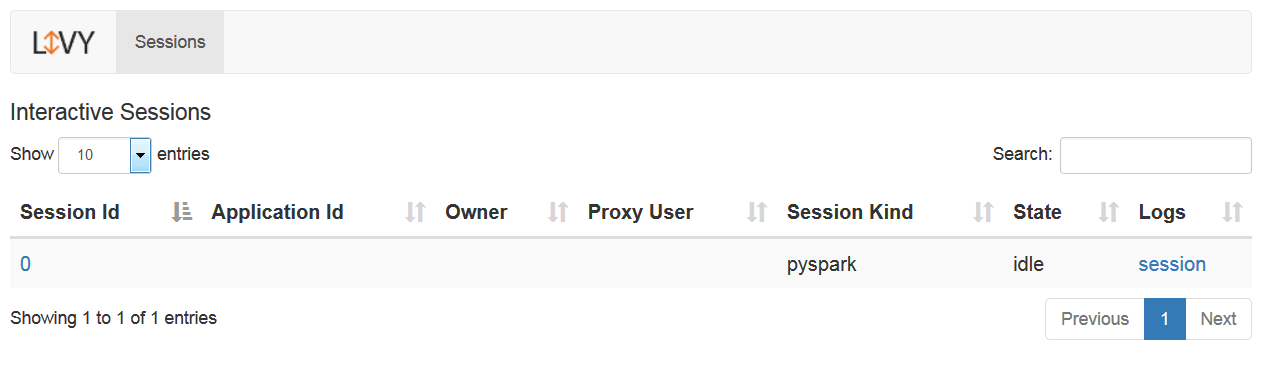
Livy uses the Spark configuration under SPARK_HOME by default. You can override the Spark configuration by setting the SPARK_CONF_DIR environment variable before starting Livy.
It is strongly recommended to configure Spark to submit applications in YARN cluster mode. That makes sure that user sessions have their resources properly accounted for in the YARN cluster, and that the host running the Livy server doesn’t become overloaded when multiple user sessions are running.


Livy Server Configuration
Livy uses a few configuration files under configuration the directory, which by default is the conf directory under the Livy installation. An alternative configuration directory can be provided by setting the LIVY_CONF_DIR environment variable when starting Livy.
The configuration files used by Livy are:
livy.conf: contains the server configuration.spark-blacklist.conf: list Spark configuration options that users are not allowed to override. These options will be restricted to either their default values, or the values set in the Spark configuration used by Livy.log4j.properties: configuration for Livy logging.
Using the Programmatic API
Livy provides a programmatic Java/Scala and Python API that allows applications to run code inside Spark without having to maintain a local Spark context. Here shows how to use the Java API.
Add the Livy client dependency to your application’s POM:
<!-- https://mvnrepository.com/artifact/org.apache.livy/livy-client-http -->
<dependency>
    <groupId>org.apache.livy</groupId>
    <artifactId>livy-client-http</artifactId>
    <version>0.5.0-incubating</version>
</dependency>
To be able to compile code that uses Spark APIs, also add the correspondent Spark dependencies.
To run Spark jobs within your applications, extend org.apache.livy.Job and implement the functionality you need. Here's an example job that calculates an approximate value for Pi:
import java.util.*;

import org.apache.spark.api.java.*;
import org.apache.spark.api.java.function.*;

import org.apache.livy.*;

public class PiJob implements Job<Double>, Function<Integer, Integer>,
  Function2<Integer, Integer, Integer> {

  private final int samples;

  public PiJob(int samples) {
    this.samples = samples;
  }

  @Override
  public Double call(JobContext ctx) throws Exception {
    List<Integer> sampleList = new ArrayList<Integer>();
    for (int i = 0; i < samples; i++) {
      sampleList.add(i + 1);
    }

    return 4.0d * ctx.sc().parallelize(sampleList).map(this).reduce(this) / samples;
  }

  @Override
  public Integer call(Integer v1) {
    double x = Math.random();
    double y = Math.random();
    return (x*x + y*y < 1) ? 1 : 0;
  }

  @Override
  public Integer call(Integer v1, Integer v2) {
    return v1 + v2;
  }

}
To submit this code using Livy, create a LivyClient instance and upload your application code to the Spark context. Here’s an example of code that submits the above job and prints the computed value:
import org.apache.livy.*
import org.apache.log4j.Logger;public static void main(String[] args) throws URISyntaxException,IOException{URI uri = new URI(livyUrl);
Map<String,String> config = new HashMap<>();        config.put("spark.app.name","livy-poc");        config.put("livy.client.http.connection.timeout", "180s");        config.put("spark.driver.memory", "1g");LivyClient client = new LivyClientBuilder(false).setURI(uri).setAll(config).build();

try {
  System.info.printf("Uploading %s to the Spark context...\n", piJar);
  .addJar(new URI(jarPath)).get();
  System.out.printf("Running PiJob with %d samples...\n", samples);
  double pi = client.submit(new PiJob(samples)).get();
  System.out.println("Pi is roughly: " + pi);
} finally {
  client.stop(true);
}}
Conclusion
With HDP 2.6, Livy has become more stable and feature-ready. The combination of Zeppelin + Livy + Spark has improved a great deal, not only in terms of the feature it supports but also for stability and scalability. Compared to the traditional ways of running Spark jobs, Livy offers a more scalable, secure and integrated way to run Spark. I highly recommend you to take a try.
References
https://livy.incubator.apache.org/
https://github.com/apache/incubator-livy
[출처] https://dassum.medium.com/apache-livy-a-rest-interface-for-apache-spark-f435540e26a9
광고 클릭에서 발생하는 수익금은 모두 웹사이트 서버의 유지 및 관리, 그리고 기술 콘텐츠 향상을 위해 쓰여집니다.
