
- 전체
- android studio
- Android SDK
- Android NDK
- Android ADK
- Android Etc. Lib.
- Android dalvik VM
- Android 보안
- PhoneGap
- AOSP 개발
- MIT App Inventor 2
- kivy (python)
- ionic framework
- Kotlin (코틀린)
- React Native
Using the WebViewer Control in App Inventor
앱인터에서 웹뷰 컨트롤 사용
Using the WebViewer Control in App Inventor
Would it be neat if you could display pages from the web in your Android app? Well, you can! And it is very easy to do in App Inventor. In the Designer, drop a WebViewer control on to your app’s screen design area. The WebViewer control is located at the bottom of the user interface section of the Palette:  After dropping the control on to your user interface, select the control and set the Properties. In particular, set a default or initial web URL to display on the screen. Here, I have set the default URL to http://appinventor.pevest.com. Be sure to include the leading http://
 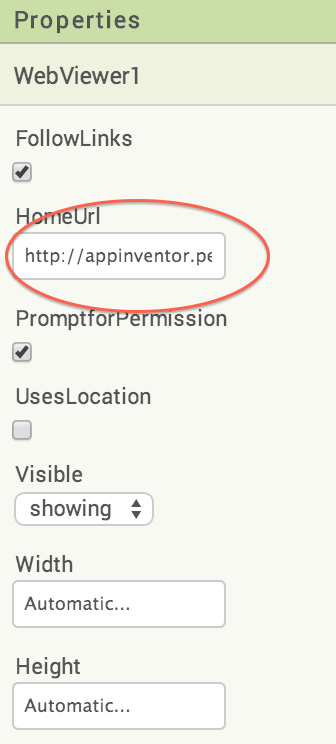 When your app runs, the WebViewer will automatically load the page at the HomeURL. You can change this page, programmatically. Here, for example, in response to a button press, the URL is changed to my 3D blog.
  Once this runs, the new page is read in to the viewer. Just like this!
 After dropping the control on to your user interface, select the control and set the Properties. In particular, set a default or initial web URL to display on the screen. Here, I have set the default URL to http://appinventor.pevest.com. Be sure to include the leading http://
  When your app runs, the WebViewer will automatically load the page at the HomeURL. You can change this page, programmatically. Here, for example, in response to a button press, the URL is changed to my 3D blog.
  Once this runs, the new page is read in to the viewer. Just like this!


본 웹사이트는 광고를 포함하고 있습니다.
광고 클릭에서 발생하는 수익금은 모두 웹사이트 서버의 유지 및 관리, 그리고 기술 콘텐츠 향상을 위해 쓰여집니다.
광고 클릭에서 발생하는 수익금은 모두 웹사이트 서버의 유지 및 관리, 그리고 기술 콘텐츠 향상을 위해 쓰여집니다.
