스프링 web MVC와 앵귤러의 통합
AngularJS is a JavaScript framework, extends HTML and very strong for Single Page Applications. In the tutorial AngularJs SpringBoot, JavaSampleApproach will guide you how to integrate Angularjs with Spring Boot.
Related articles:
– How to integrate Http Angularjs with Spring MVC | Spring Boot
– How to integrate Angular 4 with SpringBoot Web App and SpringToolSuite
I. Technologies for Angularjs SpringBoot
– Java 1.8
– Angularjs 1.6.0
– Maven 3.3.9
– Spring Tool Suite – Version 3.8.1.RELEASE
II. Overview
Create a simple Spring Boot application, with an index.html page , that includes a simple button for getting a current time by Angularjs script.
1. Project Structure
Here is structure of Angular-SpringBoot project

2. Step to do
– Create SpringBoot project
– Create a simple WebController
– Create a index.html page
– Create a angularjs controller
– Run and check result
III. Practice
1. Create SpringBoot project
– Open Spring Tool Suite, on main menu, choose File->New->Spring Starter Project, add project info, then press Next for needed dependencies:
For Template Engines, choose Thymeleaf
For Web MVC, choose Web->Web

Then press Finish, Spring Boot project will be created successfully.
Open pom.xml file, check dependencies:
|
|
<dependency>
<groupId>org.springframework.boot</groupId>
<artifactId>spring-boot-starter-thymeleaf</artifactId>
</dependency>
<dependency>
<groupId>org.springframework.boot</groupId>
<artifactId>spring-boot-starter-web</artifactId>
</dependency>
|
2. Create a simple WebController
Create a Simple WebController with 1 requestmapping:
1
2
3
4
5
6
7
8
9
10
11
12
13
|
package com.javasampleapproach.angularjs.controller;
import org.springframework.stereotype.Controller;
import org.springframework.web.bind.annotation.RequestMapping;
import org.springframework.web.bind.annotation.RequestMethod;
@Controller
public class WebController {
@RequestMapping(value="/",method = RequestMethod.GET)
public String homepage(){
return "index";
}
}
|
3. Create an index.html page
Create an index.html file with Angularjs configuration:
|
|
<script src="http://ajax.googleapis.com/ajax/libs/angularjs/.../angular.min.js"></script>
<script src="/js/controller.js"></script>
|
Index.html file defines a button that is handle click events by an angularjs controller in js/controller.js file.
1
2
3
4
5
6
7
8
9
10
11
12
13
14
15
16
17
18
|
<!DOCTYPE HTML>
<html>
<head>
<title>Spring Boot - Angularjs Example</title>
<meta charset="utf-8" />
<meta name="viewport" content="width=device-width, initial-scale=1" />
<script src="http://ajax.googleapis.com/ajax/libs/angularjs/.../angular.min.js"></script>
<script src="/js/controller.js"></script>
</head>
<body>
<div ng-app="app" ng-controller="controller">
<button id="btn-id" ng-click="clickfunction()">Press for Time</button>
<p ng-bind="welcome"></p>
</div>
</body>
</html>
4. Create an Angularjs controller javascript file
controller.js file defines an angularjs controller for handling press events of a button in index.html file.
|
|
var app = angular.module('app', []);
app.controller('controller', function($scope, $filter) {
$scope.clickfunction = function(){
var time = $filter('date')(new Date(),'yyyy-MM-dd HH:mm:ss Z');
$scope.welcome = "Time = " + time;
}
});
|
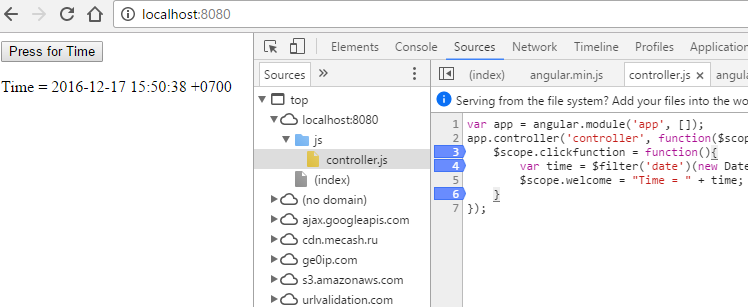
5. Run and check result
Builde SpringBoot project: mvn clean install. Then run with commandline: mvn spring-boot:run
Result:
IV. Sourcecode
SpringBootAngularJs
By JavaSampleApproach | December 17, 2016.
Last updated on June 4, 2017.
|
[출처] http://javasampleapproach.com/spring-framework/spring-boot/configure-angularjs-springboot


