
윈도우10에서 배드섹터복구하는 3가지 방법 :
Bad Sector Repair in Windows 10 (3 Ways Included)
Scenario
I have upgraded to Windows 10 and during creating an image of the hard drive to back up, Windows 10 reported that the back up had failed, the reason was bad sectors. Can someone tell me how to repair bad sector in Windows 10? The drive I am checking is the main system drive C:.
What to do when a hard disk has bad sector problem in Windows 10/8/7?
A bad sector is a sector on a computer's disk drive or flash memory that is either inaccessible or un-writeable due to physical damage to the disk surface or failed flash memory transistors. When you have a bad sector on the hard disk, the data on the bad sector may be lost. Therefore, you need to do a bad sector repair in Windows 10 hard drive. You can use disk utility software such as CHKDSK, SCANDISK, Windows built-in bad sector repair tool or best bad sector repair software to detect or repair bad sector.
Bad sector repair in Windows 10 using Windows built-in tool
Step 1. Open This PC, right-click on System drive and choose Properties.
Step 2. Go to Tools, and then click Check. Click on Check under Error-checking.
Step 3. Review the scan result, then click Scan and repair drive.
Step 4. Choose when to repair the file system. Wait for Windows 10/8 scan and repair the hard drive bad sectors.
Run Chkdsk /f in Windows 10 for bad sector
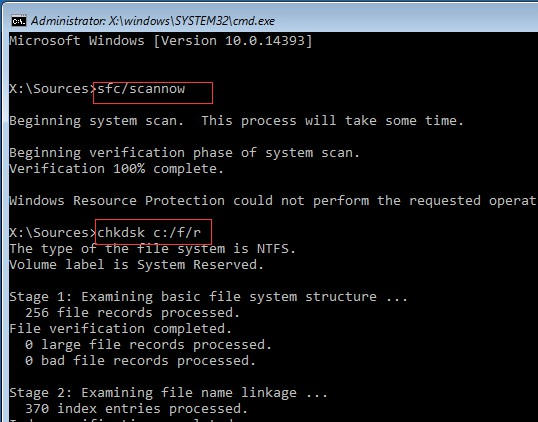
System File Checker is a utility in Windows that allows users to scan for corruptions in Windows system files and restore corrupted files. This tool can also scan every sector on a disk volume looking for the bad sector. Let’s see how to remove bad sector from hard disk using CMD.
To use this tool, open the command prompt and type the following commands in Command Prompt and press Enter after each of them:
-
sfc /scannow
-
chkdsk c: /f /r
-
bootrec /fixmbr
-
bootrec /fixboot
-
bootrec /scanos
-
bootrec /rebuildbcd


Bad sector repair in Windows 10 using AOMEI Partition Assistant
AOMEI Partition Assistant is a professional disk manager. The Check Partition feature can directly help you check the bad sectors from the hard disk in Windows 10/8/7 with several clicks. To check bad sector with AOMEI Partition Assistant, you can follow the steps below:
Step 1. Download AOMEI Partition Assistant and launch the software. At the main interface, right-click the partition that you want to check and select Advanced, then select Check Partition.

Step 2. Select the way of checking errors to perform. As you can see from the following screenshot, there are three choices, simply choose the last one “Check whether there is bad sector on the partition” . And click OK to go to next step.

Step 3. Click Start button to check.
To check a disk, you can right-click the disk and select Surface Test.
After finding out the bad sector, you can subdivide the bad sector into an independent unallocated space. In that case, it will not affect the data on the good sector, and the Operating System will know not to attempt to store data in this bad sector.
AOMEI Partition Assistant is also a disk copying software. When you find there are too many bad sectors, you may consider replacing the disk with a good one. You can use Copy Disk Quickly method to copy the data on the disk to a new disk, it will not copy the bad sector to the new disk.
[출처] https://www.disk-partition.com/windows-10/bad-sector-repair-windows-10.html
광고 클릭에서 발생하는 수익금은 모두 웹사이트 서버의 유지 및 관리, 그리고 기술 콘텐츠 향상을 위해 쓰여집니다.
