Parse JSON using Python and store in MySQL

 
JSON is one the most widely used data format. If you are trying to gather some data using any API then most probably you are going to deal with JSON. Lets see how to parse JSON and get specific parameter values.
 
Python has a library called "json" which will helps us to deal with the json data. Also we can use the "pprint" which is "data pretty printer" to display formatted output. Generally we will have three main steps for this kind of task,
  • Read the JSON data
  • Store values in python variables
  • Store the data in some database

Lets try to write a simple program based on these three steps,

# Import library to deal with json 
import json

# Import library which can print parsed data 
from pprint import pprint

# Open the json file
testFile = open("test.json")

# Load json data in python variable
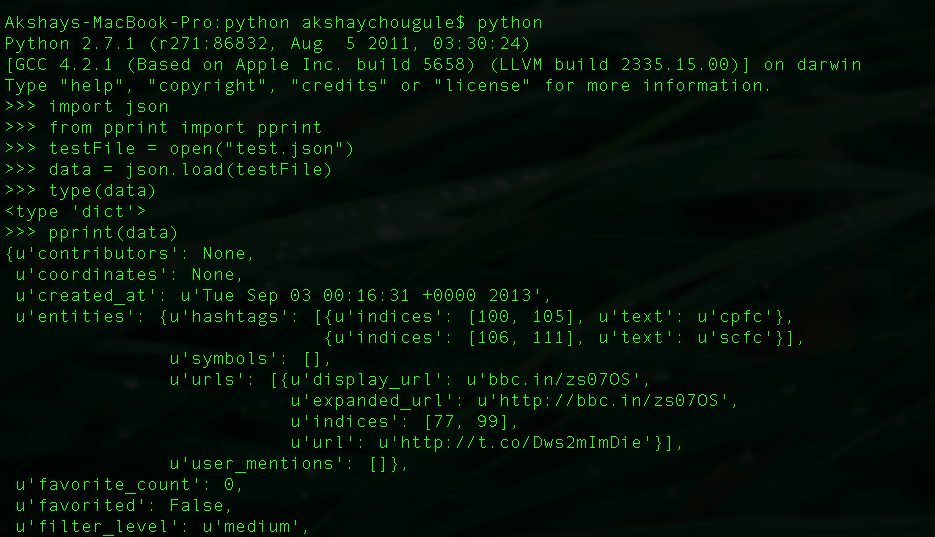
data = json.load(testFile)

# You can check the type of python data variable, it should be dictionary
type(data)

# Print the formatted output
pprint(data)
01.Screen Shot 2013-10-02 at 11_44_19 PM.png


경축! 아무것도 안하여 에스천사게임즈가 새로운 모습으로 재오픈 하였습니다.
어린이용이며, 설치가 필요없는 브라우저 게임입니다.
https://s1004games.com


# Now we can access any element (value) using corresponding key as follow,
# Print value of id_str
data["id_str"]

# Store few values in python variable
id_str = data["id_str"]
created_at = data["created_at"]
filter_level = data["filter_level"]

# Store nested values
userData = data["user"]
uid = userData["id"]
followers_count = userData["followers_count"]

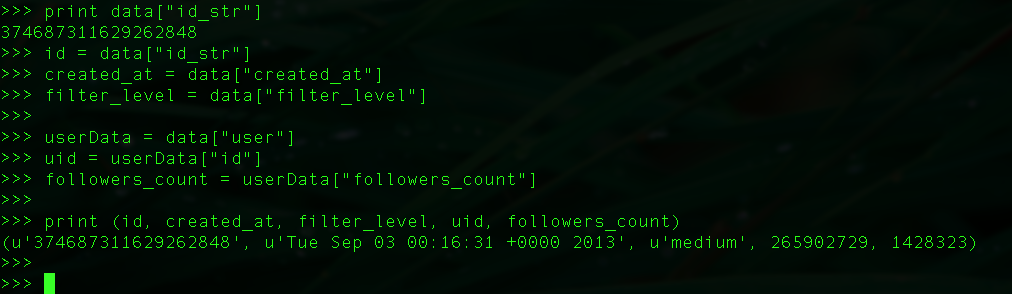
# Print the values to make sure we are getting the right data
print (id, created_at, filter_level, uid, followers_count)
 
 
02.Screen Shot 2013-10-02 at 11_40_41 PM.png


Now storing independent python variable values in to database is easy task. You can refer this post for the same.


Note: The json data object used here is collected from twitter API.


[출처] http://datavu.blogspot.kr/2013/10/parse-json-using-python-and-store-in.html


본 웹사이트는 광고를 포함하고 있습니다.
광고 클릭에서 발생하는 수익금은 모두 웹사이트 서버의 유지 및 관리, 그리고 기술 콘텐츠 향상을 위해 쓰여집니다.
번호 제목 글쓴이 날짜 조회 수
57 SQLAlchemy 시작하기 – Part 2 졸리운_곰 2016.06.11 539
56 SQLAlchemy 시작하기 – Part 1 졸리운_곰 2016.06.11 401
55 TensorFlow의 기본 사용법 졸리운_곰 2016.06.11 725
54 텐서플로우 시작하기 file 졸리운_곰 2016.06.11 774
53 Introduction to Python for Econometrics_Statistics and Data Analysis.pdf file 졸리운_곰 2016.06.07 2529
52 Numerical.Methods.in.Engineering.with.Python.2nd.Edition.Jaan.Kiusalaas.2010.pdf file 졸리운_곰 2016.06.07 2499
51 NumMethodPython.pdf file 졸리운_곰 2016.06.07 2419
50 Python-for-Computational-Science-and-Engineering.pdf file 졸리운_곰 2016.06.07 2316
49 PythonWeb AppApp DevelopmentHTMLMySQLCSSJavaScript file 졸리운_곰 2016.06.07 808
48 Building websites in Python with Flask 졸리운_곰 2016.06.07 445
47 A minimal Flask-RESTful API looks like this 졸리운_곰 2016.06.07 520
46 Azure에서 Flask를 사용하여 웹앱 만들기 졸리운_곰 2016.06.07 702
45 Designing a RESTful API with Python and Flask 졸리운_곰 2016.06.07 485
44 Anonymous Web Scraping using Python and Tor file 졸리운_곰 2016.05.04 1284
43 Using TOR with Python file 졸리운_곰 2016.05.04 1911
42 Crawling anonymously with Tor in Python 졸리운_곰 2016.05.04 542
41 scrapy : 크롤링 해보기 file 졸리운_곰 2016.04.21 719
40 Python으로 xml 데이터를 mysql 데이터베이스 화 file 졸리운_곰 2016.03.13 780
39 Python으로 공공데이터 오픈 API 활용하기 졸리운_곰 2016.01.14 1225
» Parse JSON using Python and store in MySQL file 졸리운_곰 2016.01.09 456
대표 김성준 주소 : 경기 용인 분당수지 U타워 등록번호 : 142-07-27414
통신판매업 신고 : 제2012-용인수지-0185호 출판업 신고 : 수지구청 제 123호 개인정보보호최고책임자 : 김성준 sjkim70@stechstar.com
대표전화 : 010-4589-2193 [fax] 02-6280-1294 COPYRIGHT(C) stechstar.com ALL RIGHTS RESERVED