In the examples of Huong Dan Java on JPA, I often use MySQL as an example because it is free and easy to use, mainly because I’m familiar with it: D. I think some of you, especially the students, often use MSSQL Server. So, I write this tutorial to guide you all how to connect MSSQL Server in JPA.
First, I will create a Maven project as an example:
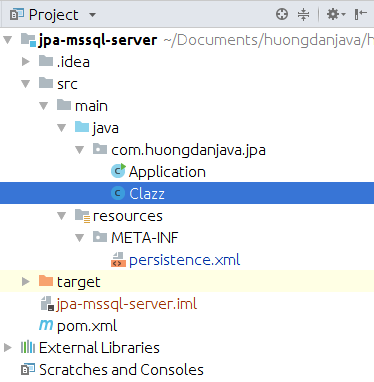
Since I’m going to use JPA with Hibernate’s implementation, I’ll add Hibernate dependencies like this:
|
|
<dependency>
<groupId>org.hibernate</groupId>
<artifactId>hibernate-core</artifactId>
<version>5.3.0.Final</version>
</dependency>
<dependency>
<groupId>org.hibernate</groupId>
<artifactId>hibernate-entitymanager</artifactId>
<version>5.3.0.Final</version>
</dependency>
|
Project Lombok:
|
|
<dependency>
<groupId>org.projectlombok</groupId>
<artifactId>lombok</artifactId>
<version>1.16.20</version>
<scope>provided</scope>
</dependency>
|
To use JPA with MSSQL Server, we need to add the JDBC Driver dependency for MSSQL Server as mssql-jdbc. You can find the latest version of mssql-jdbc from Microsoft on the Remote Maven Repository at https://mvnrepository.com/artifact/com.microsoft.sqlserver/mssql-jdbc. This JDBC Driver is available in many versions for different versions of Java, please select the correct version of Java that you are using.
Here, I am using Java 8 so I will add the dependency of mssql-jdbc as follows:
|
|
<dependency>
<groupId>com.microsoft.sqlserver</groupId>
<artifactId>mssql-jdbc</artifactId>
<version>6.4.0.jre8</version>
</dependency>
|
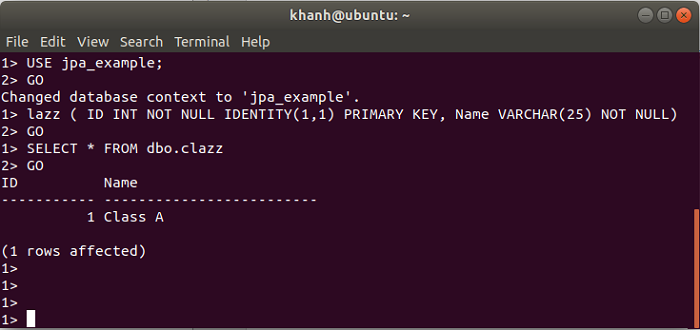
In this example, I will define a simple table that contains class information:
|
|
CREATE TABLE dbo.clazz (
ID INT NOT NULL IDENTITY(1,1) PRIMARY KEY,
Name VARCHAR(25) NOT NULL
)
|
Entity of this table:
1
2
3
4
5
6
7
8
9
10
11
12
13
14
15
16
17
18
19
20
21
22
23
24
25
|
package com.huongdanjava.jpa;
import javax.persistence.Column;
import javax.persistence.Entity;
import javax.persistence.GeneratedValue;
import javax.persistence.GenerationType;
import javax.persistence.Id;
import javax.persistence.Table;
import lombok.Getter;
import lombok.Setter;
@Entity
@Table
@Getter
@Setter
public class Clazz {
@Id
@GeneratedValue(strategy = GenerationType.IDENTITY)
private Long id;
@Column
private String name;
}
|
The most important part is the configuration file for JPA’s persistence.xml configuration file. The contents of this file will be configured as follows:
1
2
3
4
5
6
7
8
9
10
11
12
13
14
15
16
17
18
19
|
<persistence version="2.1"
xmlns="http://xmlns.jcp.org/xml/ns/persistence" xmlns:xsi="http://www.w3.org/2001/XMLSchema-instance"
xsi:schemaLocation="http://xmlns.jcp.org/xml/ns/persistence http://xmlns.jcp.org/xml/ns/persistence_2_1.xsd">
<persistence-unit name="jpaexample" transaction-type="RESOURCE_LOCAL">
<class>com.huongdanjava.jpa.Clazz</class>
<exclude-unlisted-classes>true</exclude-unlisted-classes>
<properties>
<property name="javax.persistence.jdbc.driver" value="com.microsoft.sqlserver.jdbc.SQLServerDriver" />
<property name="javax.persistence.jdbc.url" value="jdbc:sqlserver://localhost:1433;databaseName=jpa_example" />
<property name="javax.persistence.jdbc.user" value="sa" />
<property name="javax.persistence.jdbc.password" value="abczxy1T" />
<property name="hibernate.format_sql" value="true" />
<property name="hibernate.use_sql_comments" value="true" />
</properties>
</persistence-unit>
</persistence>
|
Here, the MSSQL class driver will be com.microsoft.sqlserver.jdbc.SQLServerDriver and the url to connect to the database will look like jdbc:sqlserver://<ip>:<port>;databaseName=<database_name>. Inside:
- ip is the address of MSSQL Server
- The port is the port that MSSQL Server runs on this server. The default port of MSSQL is 1443. If you change the port then correct it.
- database_name is the name of the database that we need to work on.
OK, everything needs to be done, now try running a small example:
1
2
3
4
5
6
7
8
9
10
11
12
13
14
15
16
17
18
19
20
21
22
23
|
package com.huongdanjava.jpa;
import javax.persistence.EntityManager;
import javax.persistence.EntityManagerFactory;
import javax.persistence.EntityTransaction;
import javax.persistence.Persistence;
public class Application {
public static void main(String[] args) {
EntityManagerFactory emf = Persistence.createEntityManagerFactory("jpaexample");
EntityManager em = emf.createEntityManager();
EntityTransaction transaction = em.getTransaction();
transaction.begin();
Clazz clazz = new Clazz();
clazz.setName("Class A");
em.persist(clazz);
transaction.commit();
}
}
|
Result: